

Best Xibosignage.com Alternatives for 2026: Top 10 Picks
- sbgerus
- 19 hours ago
- 8 min read

For most commercial deployments, Signstream is the strongest alternative to Xibo — it runs on unlimited screens at no extra per-device charge, requires no technical expertise to manage, and includes an ad exchange marketplace that actually generates revenue from your screens. If you need a drop-in replacement without the per-device licensing trap that catches many Xibo users at scale, Signstream is where to start.
Three reasons it leads this list:
Migration-friendly: Cloud-based with mobile and browser control, so you’re not rebuilding infrastructure from scratch.
No per-screen meter: Unlimited screen deployment on a single subscription, unlike most per-screen SaaS alternatives.
Managed support with monetization: Built-in analytics, scheduling, and an ad exchange that multi-location businesses and franchises can use to offset costs.
Other strong categories exist depending on your situation: cloud SaaS platforms built for multi-site retail chains, live-data-driven platforms for dynamic content, and education-focused tools with emergency messaging. The right pick depends on your scale, IT capacity, and whether you need to monetize your screens.
Table of Contents
How do these Xibo alternatives compare on features and pricing?
Category | Best For | Pricing Shape | Cloud / Self-Hosted | Player OS / Hardware | Key Features | Integrations & APIs | Support / Onboarding |
Signstream ⭐ | Gyms, restaurants, franchises, multi-location retail | Subscription, unlimited screens | Cloud | Smart TVs, Android, browser | Scheduling, templates, analytics, ad exchange, dynamic QR codes | Ad marketplace, API access | Managed support, migration assistance |
Multi-location cloud SaaS | Multi-site retail and hospitality | ~$7–$10/screen/month; free 1-screen tier | Cloud | Raspberry Pi, Android, Fire TV, Tizen | Scheduling, proof-of-play, templates | REST API, Slack, Google Workspace | Self-serve + paid support |
Live-data platform | Dynamic menus, social walls, dashboards | ~$10/screen/month; free tier | Cloud | Android, Chrome OS, Fire TV | Live data feeds, interactivity, templates | Google Sheets, social, weather APIs | Self-serve docs + chat |
Education / emergency | K–12, universities | Free tier; paid plans available | Cloud | Raspberry Pi, Android, Chrome OS | Emergency alerts, templates, scheduling | Google Classroom, alert systems | Community + email support |
Workplace comms | Enterprise offices | Enterprise pricing | Cloud + hybrid | Windows, Android, Tizen | Room booking, internal comms, signage | Microsoft 365, Teams, SharePoint | Dedicated CSM, SLA |
Governance-first SaaS | Brand-governed multi-site | ~$20/screen/month | Cloud | Android, Chrome OS, Tizen, webOS | Approval workflows, app store, proof-of-play | 80+ app integrations, REST API | Onboarding + enterprise SLA |
Budget SaaS | Single-location SMBs | Free tier; low-cost paid plans | Cloud | Android, Chrome OS, Raspberry Pi | Basic scheduling, templates | Limited third-party integrations | Community + email |
Managed deployments | Organizations without in-house IT | Custom / project-based | Cloud | Varies by project | Full-service content management | Custom per project | White-glove, dedicated manager |
White-label / reseller | Integrators, agencies | Varies; reseller margin available | Cloud | Android, Chrome OS | Scheduling, templates, branding controls | API access, white-label portal | Reseller support tier |
The per-screen meter trap: Many platforms advertise a low per-screen rate but charge separately for player licenses on Android, Samsung Tizen, and LG webOS devices. Xibo’s own model illustrates this clearly: the CMS is free to download, but commercial players for Android, Tizen, and webOS are licensed per device. At 20+ screens, those fees add up fast. Signstream’s unlimited-screen model sidesteps this entirely.
According to Gartner Peer Insights, governance, multi-site management, and support availability are the three dimensions that most consistently decide buyer preference, not raw feature counts.
How do you migrate from Xibo to a new platform?
Check AGPL licensing obligations. If your team has made modifications to Xibo’s open-source CMS code, AGPL licensing requires those modifications to be made available under the same license. Confirm your obligations before decommissioning.
Common pitfalls: Player licenses on Android and webOS devices don’t transfer to a new platform. Asset naming conventions in Xibo (especially for dynamic playlists) often break when imported into a different CMS. Broken data feeds are the most common post-migration complaint, so test every live integration in staging before going live.
What to ask vendors: Does the platform offer a data import tool or professional migration service? What’s the SLA for migration support? Will they provide onsite assistance for large deployments?
Pro Tip: Run both systems in parallel for 48–72 hours after cutover. Keep Xibo live on a small subset of screens until you’ve confirmed the new platform is stable, proof-of-play is logging correctly, and all feeds are pulling live data.
How do you choose the right Xibo alternative for your organization?
Start with your constraints, not the feature list. Most buyers who regret their choice picked a platform that looked great in a demo but didn’t fit their IT capacity or scale.
Evaluation checklist:
How many screens do you manage today, and how many in 18 months? Per-screen pricing compounds fast.
Does your team have dedicated IT support, or does the platform need to be self-managing?
What hardware are you already running? Replacing devices adds cost that doesn’t appear in software pricing.
Do you need live data integrations (menus, dashboards, social feeds)?
Is content governance (approval workflows, brand controls) a compliance requirement?
Do you want to monetize your screens through advertising or cross-promotion?
What’s your budget timeline: low upfront with recurring fees, or higher upfront with lower ongoing costs?
Questions to ask during a vendor trial:
How does the player behave offline? Does it cache content and resume automatically?
What API access is available, and is it included in the base plan?
How granular is proof-of-play reporting, and can it be exported?
What’s the support response time SLA, and does it vary by plan tier?
Are there per-device fees beyond the subscription?
Red flags to watch for:
No free trial or proof-of-concept period.
Pricing that requires a sales call to get a number.
Per-device clauses buried in the terms of service.
Proof-of-play telemetry that only shows “played” without timestamps or duration.
Three example decision paths:
A single-location café with one screen and no IT staff should look at budget SaaS options with a free tier and a simple drag-and-drop interface. A 40-location retail chain needs centralized scheduling, proof-of-play, and an SLA-backed support tier. A school district prioritizing emergency alerts and compliance should focus on education-specific platforms with alert system integrations and role-based publishing controls. For any business that wants to earn revenue from its screens, Signstream’s ad exchange is a differentiator none of the pure-signage platforms match.
Why Signstream is the recommended alternative to Xibo
Signstream addresses the two biggest frustrations Xibo users bring to migration conversations: the per-device licensing cost at scale, and the IT overhead of managing a self-hosted CMS. The platform is fully cloud-based, managed from any browser or mobile device, and deploys to unlimited screens on a single subscription.
Feature alignment with the comparison dimensions:
Ad exchange marketplace: Cross-promote with other local businesses and monetize your screens as a revenue channel.
Signstream clients in fitness and hospitality have reported an increase in class attendance after deploying the platform, driven by real-time promotions on gym and club screens. For a restaurant or retail franchise, the ad exchange adds a monetization layer that turns a cost center into a revenue line.
The migration path from Xibo is straightforward: export your assets, point your existing smart TVs or Android devices at Signstream’s app, and you’re live. No server to maintain, no AGPL obligations to manage, no per-device license renewals.
Key Takeaways
The strongest Xibo alternative for most commercial businesses is Signstream, which combines unlimited screen deployment, ad exchange monetization, and zero IT overhead in a single cloud subscription.
Point | Details |
Per-screen fees compound fast | Self-hosted and per-screen SaaS models both generate device-level costs that grow with your screen count. |
Cloud SaaS reduces IT overhead | Centralized cloud platforms handle updates, patching, and backups, freeing your team from server maintenance. |
Migration needs a parallel window | Run both systems for 48–72 hours post-cutover to confirm feeds, proof-of-play, and player stability. |
Match platform to use case | Schools need alert integrations; enterprises need governance; franchises need ad exchange and unlimited screens. |
Signstream recommended pick | Unlimited screens, ad exchange monetization, and managed support make Signstream the top pick for commercial deployments. |
The case for Signstream, and when another route makes more sense
The conventional wisdom in digital signage evaluations is to build a feature matrix, score each vendor, and pick the highest total. That approach consistently leads buyers to over-engineered platforms they’ll never fully use, or to per-screen SaaS contracts that look affordable at five screens and painful at fifty.
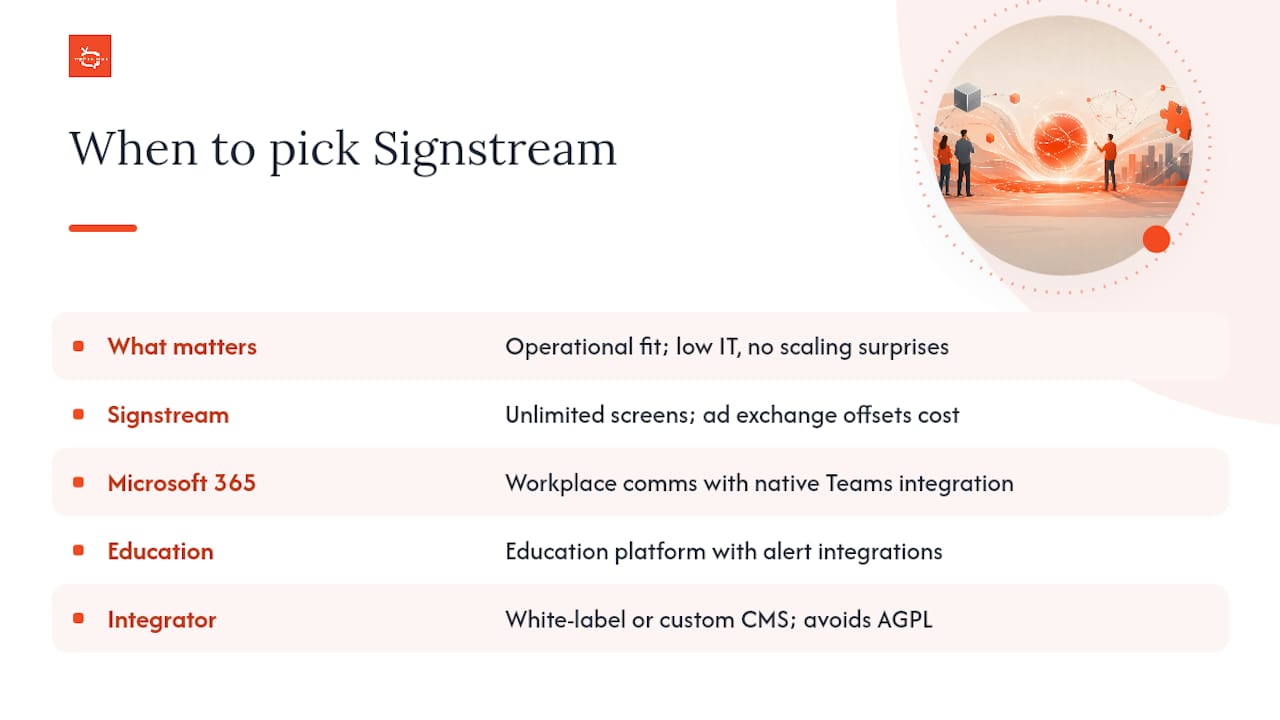
What actually matters is the operational fit. A platform your team will actually use, that doesn’t require a dedicated IT resource to keep running, and that doesn’t generate surprise invoices when you add a new location. That’s why Signstream leads this list for most commercial buyers: the unlimited-screen model removes the scaling penalty, and the ad exchange turns signage from a pure cost into something that can pay for itself.
That said, there are situations where a different category fits better. If your organization runs a large enterprise with Microsoft 365 deeply embedded in daily operations, a workplace communications platform with native Teams integration will serve you better than a pure signage tool. If you’re a school district with emergency alert compliance requirements, an education-specific platform with purpose-built alert integrations is the right call. And if you’re an integrator building a reseller business, a white-label platform or a custom CMS removes the AGPL constraints that come with building on open-source signage software.
The GetApp comparison page for Xibo shows that the most common buyer queries are about pricing clarity and side-by-side feature comparisons. That tells you most buyers are trying to avoid a bad surprise, not find a perfect feature match. Start with the constraints, not the features, and the right platform becomes obvious faster than any scoring matrix will show you.
Signstream’s migration offer for businesses leaving Xibo
Switching from Xibo doesn’t have to mean weeks of downtime or a full hardware refresh. Signstream’s cloud platform deploys on the smart TVs and Android devices you already own, and the migration from a self-hosted CMS to a fully managed cloud setup typically takes days, not months.

The practical advantage over most alternatives: unlimited screens on one subscription means your cost stays flat whether you’re running five displays or five hundred. Add the ad exchange marketplace, and your screens can generate cross-promotional revenue from day one. For gyms, restaurants, retail chains, and franchise operators, that combination is hard to find elsewhere at this price point.
See how Signstream works and request a migration assessment, or explore interactive ad monetization to see how your screens can start earning. If you’re evaluating affordable digital signage solutions for a small team or a first deployment, Signstream’s free trial is the fastest way to confirm the fit before committing.
Sources and further reading
Pricing, licensing terms, and feature sets change regularly across all digital signage platforms. Verify current figures directly on each vendor’s website before making a purchasing decision.
I Evaluated 8 Best Digital Signage Software for 2026
Xibo Digital Signage Review 2026: Open-Source Powerhouse or IT Headache?
Xibo alternative: when free signage stops being free - Fingoweb
The great price surge of 2025 — SaaStr
Open-source software licenses 101: AGPL license — FOSSA
Best Digital Signage Reviews 2026 | Gartner Peer Insights
Xibo 2026 Pricing, Features, Reviews & Alternatives | GetApp
How Our Digital Signage Platform Works Remotely
Recommended