

Best SignStream Alternatives for Business Buyers

For most business buyers evaluating signstream.app alternatives, Signstream itself remains the strongest all-in-one pick — hardware-agnostic deployment, built-in ad-exchange monetization, and unlimited screen support at no extra per-screen charge. If you need to compare the field before deciding, the shortlist below covers the platforms that consistently surface in aggregator consensus from Capterra and Slashdot:
Signstream — best overall for ad monetization, hardware-agnostic scale, and operational simplicity
ScreenCloud — best for enterprise teams needing deep app integrations and a polished content studio
OptiSigns — best for low-cost rollouts on commodity Android hardware
Yodeck — best for small businesses wanting a free single-screen tier and Raspberry Pi deployment
Kitcast — best for Apple TV environments and quick onboarding
Xibo — best for organizations that need open-source CMS control and on-premises hosting
Skykit — best for enterprise-grade Chrome OS and managed device deployments
One quick note on search confusion: searches for “SignStream alternatives” sometimes return electronic signature tools like DocuSign or Adobe Acrobat Sign. Those products manage contract workflows, not display networks. Every platform in this list is a digital signage solution.
Table of Contents
How do the top alternatives compare at a glance?
The table below maps each platform across the dimensions that matter most to operations and IT buyers. Pricing reflects publicly available starting points; always confirm current rates on vendor sites.
Platform | Best for | Starting price / trial | Hardware compatibility | Monetization / ad support | Key integrations | Enterprise features | Support |
Ad monetization + unlimited screens | Subscription tiers; free trial available | Hardware-agnostic; Android, Smart TV apps, browser-based | Built-in ad-exchange marketplace; cross-promo network | APIs, analytics dashboard, QR codes | Multi-site, unlimited screens, custom channels, analytics | Onboarding support; knowledge base | |
Enterprise content management | Paid plans; free trial | Android, webOS, Tizen, Windows, Fire TV, Raspberry Pi | No native ad exchange | Slack, Google Workspace, 80+ app integrations | SSO, user roles, multi-location | 24/7 support; dedicated CSM on higher tiers | |
Budget-conscious rollouts | Low-cost monthly per screen; free trial | Android, webOS, Tizen, Windows, Fire TV, Raspberry Pi | Limited ad support | Google Workspace, Canva, social feeds | Multi-user, multi-location | Email and chat support | |
Small business / single-screen free tier | Free for one screen; paid per screen | Raspberry Pi (native), Android, Windows, webOS, Tizen | No native ad exchange | Google Slides, social feeds, weather | Multi-screen, user roles | Email support; community forum | |
Kitcast | Apple TV deployments | Paid monthly; free trial | Apple TV (primary), Android, Windows | No native ad exchange | Slack, Google Workspace | Multi-location, user roles | Chat and email support |
Xibo | Open-source / on-premises control | Free open-source; paid cloud plans | Windows, Android, webOS, Linux | No native ad exchange | REST API, custom integrations | SSO, multi-site, audit logs | Community + paid support tiers |
Skykit | Enterprise Chrome OS managed deployments | Enterprise pricing; demo available | Chrome OS, Android, Windows | Limited ad support | Google Workspace, SSO, APIs | Enterprise SSO, MDM, multi-site | Dedicated enterprise support |
Recommended pick: Signstream stands out because no other platform on this list combines hardware-agnostic deployment with a built-in ad-exchange monetization network — a combination that directly adds revenue potential to your screen network rather than treating screens as a cost center.
Stat callout: Signstream clients in fitness and hospitality have reported increased class attendance after deploying the platform’s real-time content and promotional tools.
Detailed profiles: Signstream and the top alternatives
Signstream
Signstream is a cloud-based digital signage platform built for businesses that want to manage display networks and monetize screen space simultaneously. You update content across unlimited screens from any device, in real time, without needing technical staff on-site.
Key differentiator: The built-in ad-exchange marketplace lets you cross-promote with other local businesses and earn revenue from your own screens — a feature most signage-only platforms simply do not offer.
Core features: Real-time content updates, unlimited screen deployment, custom channel management, dynamic QR codes, scheduling, template library, smart TV apps, analytics, and a full ad-exchange network.
Hardware: Hardware-agnostic. Works on Smart TVs, Android devices, and any browser-capable display. No proprietary player required.
Integrations: APIs, analytics dashboard, dynamic QR code tools, and ad-exchange connectors.
Pros:
Unlimited screens at no extra per-screen charge
Built-in ad monetization and cross-promotion marketplace
No technical expertise required for daily management
Real-time updates from mobile or desktop
Cons:
Newer platform; smaller third-party integration library than some enterprise incumbents
Ad-exchange value depends on local advertiser network density
Who it’s for: Gyms, fitness clubs, restaurants, retail chains, offices, franchises, and tourism networks that want screens to generate revenue, not just display content.
Real-world use case: A fitness club deploys Signstream across lobby and studio screens, schedules class promotions in real time, and earns additional revenue by selling ad slots to nearby sports nutrition retailers through the ad-exchange marketplace.

Pro Tip: Before your first demo, map out which screens you want to monetize versus which are purely operational. Signstream’s ad-exchange setup is faster when you arrive with that inventory list ready.
ScreenCloud
ScreenCloud is a well-established enterprise digital signage platform with a strong content app ecosystem and a polished management interface. It targets mid-size to large organizations that need centralized control across many locations.
Key differentiator: Over 80 native app integrations, including Slack, Google Workspace, and Microsoft Teams, make ScreenCloud the go-to for organizations that want to pull live data feeds directly into their displays.
Core features: Content scheduling, app integrations, multi-location management, user roles, SSO, and a content studio.
Hardware: Supports Android, webOS, Tizen, Windows, Fire TV, and Raspberry Pi. Hardware-agnostic in practice.
Pros:
Deep integration library
Strong enterprise governance (SSO, audit logs, user roles)
Polished onboarding and 24/7 support on higher tiers
Cons:
No native ad-exchange or monetization features
Per-screen pricing can add up at scale
Higher cost entry point for smaller organizations
Who it’s for: Enterprise IT teams and marketing departments managing multi-site deployments where content integrations and governance matter more than monetization.
Real-world use case: A regional hospital network uses ScreenCloud to pull live wayfinding data and HR announcements from its Google Workspace environment onto lobby and corridor displays across 12 facilities. For more on how ScreenCloud stacks up against other options, the ScreenCloud alternatives guide covers pricing and player compatibility in detail.
OptiSigns
OptiSigns competes primarily on price. It offers a low monthly per-screen cost and broad hardware support, making it a practical choice for businesses rolling out signage on a tight budget.
Key differentiator: Wide hardware compatibility at a low price point. OptiSigns runs on nearly every player OS, which means you can repurpose existing Android sticks or Fire TV devices rather than buying new hardware.
Core features: Content scheduling, templates, social media feeds, weather widgets, and basic multi-user management.
Hardware: Android, webOS, Tizen, Windows, Fire TV, Raspberry Pi.
Pros:
Low per-screen monthly cost
Broad hardware compatibility
Canva and Google Workspace integrations
Cons:
Limited enterprise governance features
No native ad-exchange or monetization
Support response times can vary on lower-tier plans
Who it’s for: Small to mid-size businesses prioritizing cost efficiency over advanced features. Retailers and quick-service restaurants running straightforward promotional content.
Real-world use case: A small retail chain with five locations uses OptiSigns on existing Amazon Fire TV sticks to display daily promotions and social media feeds, keeping hardware costs near zero. If you want to compare low-cost player options more broadly, the Amazon Signage Stick alternatives guide is a useful reference.
Yodeck
Yodeck built its reputation on a genuinely free single-screen tier and native Raspberry Pi support. For small businesses testing digital signage for the first time, the barrier to entry is about as low as it gets.
Key differentiator: Free forever for one screen, with Raspberry Pi players available at low cost. That combination makes Yodeck the most accessible entry point in the market for budget-constrained pilots.
Core features: Content scheduling, Google Slides integration, social feeds, weather, and remote management.
Hardware: Raspberry Pi (native), Android, Windows, webOS, Tizen.
Pros:
Free single-screen tier
Simple setup with Raspberry Pi
Good template library
Cons:
No ad-exchange or monetization features
Scales up in cost quickly beyond a handful of screens
Enterprise governance features are limited compared to ScreenCloud or Skykit
Who it’s for: Small businesses, nonprofits, and single-location operators testing digital signage before committing to a paid platform. The Yodeck alternatives guide covers how it compares to other low-cost options.
Real-world use case: A community center uses Yodeck’s free tier on a single Raspberry Pi to display event schedules and announcements in its lobby, then evaluates whether to expand to a paid multi-screen plan.
Kitcast
Kitcast is purpose-built for Apple TV, which sets it apart from every other platform on this list. If your organization already runs Apple hardware, Kitcast removes the friction of cross-platform compatibility entirely.
Key differentiator: Native Apple TV support with a clean, minimal interface. Setup takes minutes, and the platform handles remote management without requiring IT involvement.
Core features: Content scheduling, templates, multi-location management, Slack and Google Workspace integrations, and user roles.
Hardware: Apple TV (primary), Android, Windows.
Pros:
Fastest onboarding for Apple TV environments
Clean, intuitive interface
Slack integration for content approvals
Cons:
Limited hardware diversity beyond Apple TV
No native ad-exchange or monetization
Smaller integration library than ScreenCloud
Who it’s for: Tech companies, creative agencies, and Apple-centric offices that want quick, low-friction signage deployment without managing Android or Windows players.
Real-world use case: A software company uses Kitcast on Apple TVs in its office common areas to display real-time KPI dashboards and team announcements, updated directly from Slack.
Xibo
Xibo is the open-source option on this list. Organizations that need full control over their CMS, want to host on their own infrastructure, or have developers who can build custom integrations will find Xibo uniquely capable.
Key differentiator: Fully open-source CMS with a self-hosted option. You own the code, the data, and the deployment environment — a meaningful advantage for regulated industries or organizations with strict data residency requirements.
Core features: Content scheduling, layout designer, REST API, user roles, SSO, audit logs, and multi-site management.
Hardware: Windows, Android, webOS, Linux.
Pros:
Open-source with active community
Strong API for custom integrations
SSO and audit logs on paid cloud plans
Self-hosted option for data control
Cons:
Steeper learning curve than SaaS alternatives
No native ad-exchange or monetization
Self-hosted deployments require IT resources to maintain
Who it’s for: Healthcare systems, government agencies, universities, and enterprises with IT teams that need custom integrations and data sovereignty.
Real-world use case: A university IT department self-hosts Xibo to manage digital signage across 40 campus buildings, using the REST API to pull live event data from its student information system.
Skykit
Skykit targets enterprise organizations running Chrome OS managed device environments. It integrates tightly with Google Workspace and enterprise MDM tools, making it a natural fit for Google-first IT departments.
Key differentiator: Deep Chrome OS and Google Workspace integration with enterprise MDM support. Skykit fits into existing Google admin workflows rather than requiring a parallel management layer.
Core features: Content scheduling, multi-site management, SSO, MDM integration, Google Workspace connectors, and enterprise user roles.
Hardware: Chrome OS (primary), Android, Windows.
Pros:
Native Chrome OS and Google Workspace integration
Enterprise SSO and MDM support
Strong security and compliance posture
Cons:
Enterprise pricing; not suited for small deployments
Limited ad-exchange or monetization features
Less flexible outside Google-centric environments
Who it’s for: Large enterprises, school districts, and government agencies already standardized on Chrome OS and Google Workspace.
Real-world use case: A school district uses Skykit to manage digital signage across 30 schools, provisioning Chrome OS players through its existing Google Admin console without additional IT overhead.
How do you choose the right platform for your organization?
The right platform depends on three operational realities: what hardware you already own, whether you need screens to generate revenue, and how many locations you manage. Work through this framework before you send an RFP or start a trial.
Selection criteria, ranked by operational impact
Monetization and ad-exchange features — if revenue from screens is a goal, only Signstream offers a built-in ad-exchange marketplace in this comparison.
SSO and enterprise governance — required for organizations with IT security policies; Xibo, ScreenCloud, and Skykit all support SSO on appropriate plan tiers.
Questions to ask vendors in demos
How long does player provisioning take for a 20-screen deployment?
What is the process for exporting content and ad inventory if we switch platforms?
Does your ad-exchange or monetization feature require a minimum screen count or advertiser network?
What is your uptime SLA, and how do you handle player offline events?
Who owns the data, and in what format can we export it?
Are audit logs available, and at what plan tier?
How do you migrate from your current platform with minimal disruption?
Switching digital signage platforms carries real operational risk, particularly if your current setup includes ad inventory or monetization. A structured migration plan protects both your content and your revenue streams.
Pre-migration checklist
Export your full content library in the highest-resolution format available.
Audit all active ad contracts: note advertiser names, flight dates, impression commitments, and revenue terms.
Map your current user roles and permissions to the new platform’s role structure before cutover.
Document player firmware versions and confirm compatibility with the new platform.
Back up scheduling data, playlist structures, and any dynamic data feed configurations.
Pilot plan
Run a pilot on 10–20% of your screens before full cutover. Define clear acceptance criteria: content renders correctly, scheduling fires on time, ad placements serve as expected, and remote management works from all required devices. Set a rollback trigger — if any acceptance criterion fails within the first 72 hours, revert to the previous platform and investigate before proceeding.
Vendor support requests to include in contracts
Data export format and timeline (request CSV or JSON with full metadata).
Ad-exchange transition assistance: ask specifically whether the vendor will help map existing ad inventory to the new system.
Onboarding and training hours included in the contract.
Uptime SLA with defined remedies for downtime.
Pro Tip: Validate ad-exchange mappings and run a full inventory reconciliation against your ad contracts before cutover day. Revenue gaps discovered after go-live are far harder to recover than those caught in the pilot.
Understanding how commerce media networks monetize screen inventory can help you structure your ad-exchange migration more effectively, particularly if you plan to expand your advertiser base after switching platforms.
Key Takeaways
For organizations evaluating digital signage platforms in 2026, Signstream’s combination of hardware-agnostic deployment, built-in ad-exchange monetization, and unlimited screen support makes it the strongest all-in-one option for multi-site business buyers.
Point | Details |
Signstream leads on monetization | The only platform in this comparison with a built-in ad-exchange marketplace for cross-promotional revenue. |
Hardware agnosticism cuts costs | Platforms that run on existing Android, Smart TV, and browser-capable displays avoid proprietary player capital expenditure. |
Category confusion is common | Searches for SignStream alternatives often return e-signature tools; this list covers digital signage platforms only. |
Migration needs a revenue plan | Map ad-exchange inventory and validate placements before cutover to protect monetization continuity. |
Signstream fits multi-site operators | Unlimited screens at no extra per-screen charge makes Signstream the most cost-efficient option as deployments scale. |
The case for hardware-agnostic, monetization-capable platforms
Most digital signage comparisons focus on content features: templates, scheduling, integrations. Those matter, but they are table stakes. The real differentiator for multi-site operators is whether the platform treats your screens as a cost center or a revenue asset.
Every platform on this list can schedule content and manage multiple locations. Only one of them ships with a built-in ad-exchange marketplace that lets you cross-promote with neighboring businesses and sell ad inventory directly from your screens. That distinction changes the financial model of your entire display network.
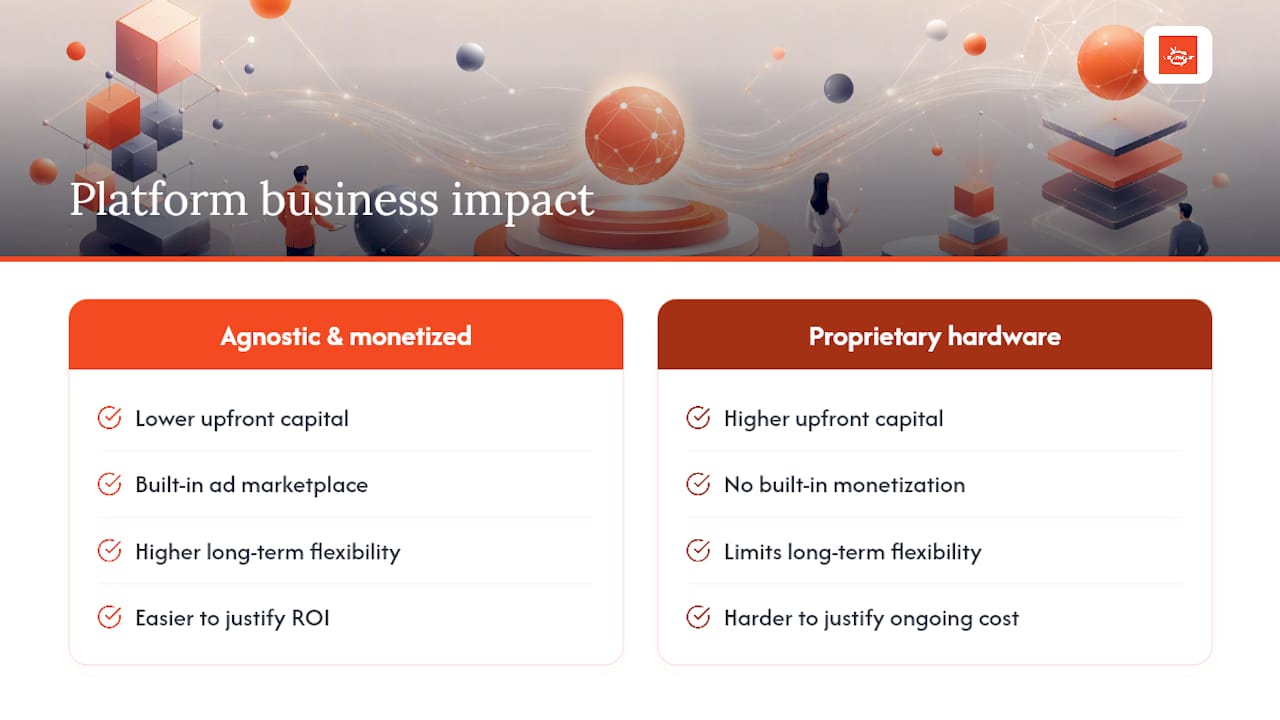
The conventional wisdom in this category is that enterprise governance — SSO, audit logs, MDM integration — is the primary selection criterion for serious buyers. That is true for IT-led procurement in regulated industries. But for the gym operator, the restaurant group, or the retail franchise, the more pressing question is whether the platform pays for itself. Hardware-agnostic deployment removes the upfront capital barrier. Built-in monetization removes the ongoing cost justification problem. Together, they make the business case for digital signage much easier to defend internally.
Platforms that require proprietary players are making a bet that their hardware margins are worth your long-term flexibility. In most multi-site deployments, that bet does not pay off for the buyer. The organizations that have gotten the most operational value from their signage networks tend to be the ones that chose flexibility early and monetization capability deliberately, rather than inheriting both constraints from a vendor’s hardware roadmap.
Signstream is built for operators who want screens to work harder
Most of the platforms compared here are solid tools for displaying content. Signstream does that too, but it also gives you something the others do not: a digital signage ad display network built directly into the platform, so your screens generate revenue while they inform and engage your customers.

Deploy across unlimited screens at no extra per-screen charge. Update content in real time from any device. Run your own custom TV channel with interactive ad placements. Track performance through built-in analytics. And use the ad-exchange marketplace to cross-promote with local businesses or sell ad slots to advertisers in your network. No proprietary hardware required — Signstream works on Smart TVs, Android devices, and any browser-capable display you already own.
If you are ready to see how the ad-exchange setup works for your specific screen inventory, request a demo at signstream.net and come prepared with your screen count, locations, and any existing ad contracts. The onboarding team will walk you through inventory mapping and pilot scope in the first session.
Useful sources for deeper research
Use these primary sources to verify current pricing, trial availability, and platform documentation before making a final decision. Pricing and features change; always confirm directly with vendors.
For additional platform comparisons and pricing roundups, the Signstream blog publishes ongoing industry analysis and product updates.
Recommended
Comments