

Best Cloud Digital Signage Alternatives for Businesses in 2026

The best business-grade alternatives to estream.help are cloud-native digital signage platforms that combine hardware-agnostic Smart TV apps, ad-exchange monetization, and unlimited-screen scaling. For gym operators, restaurant owners, retail managers, and franchise administrators, Signstream is the recommended pick: it deploys on unlimited screens at no extra charge, includes a built-in ad-exchange marketplace for cross-promotion revenue, and requires zero technical expertise to manage. Other platform categories worth evaluating include enterprise-grade CMS solutions (ScreenCloud, TelemetryTV), SMB per-screen tools (Yodeck, NoviSign), and open-player marketplaces suited to larger IT teams.
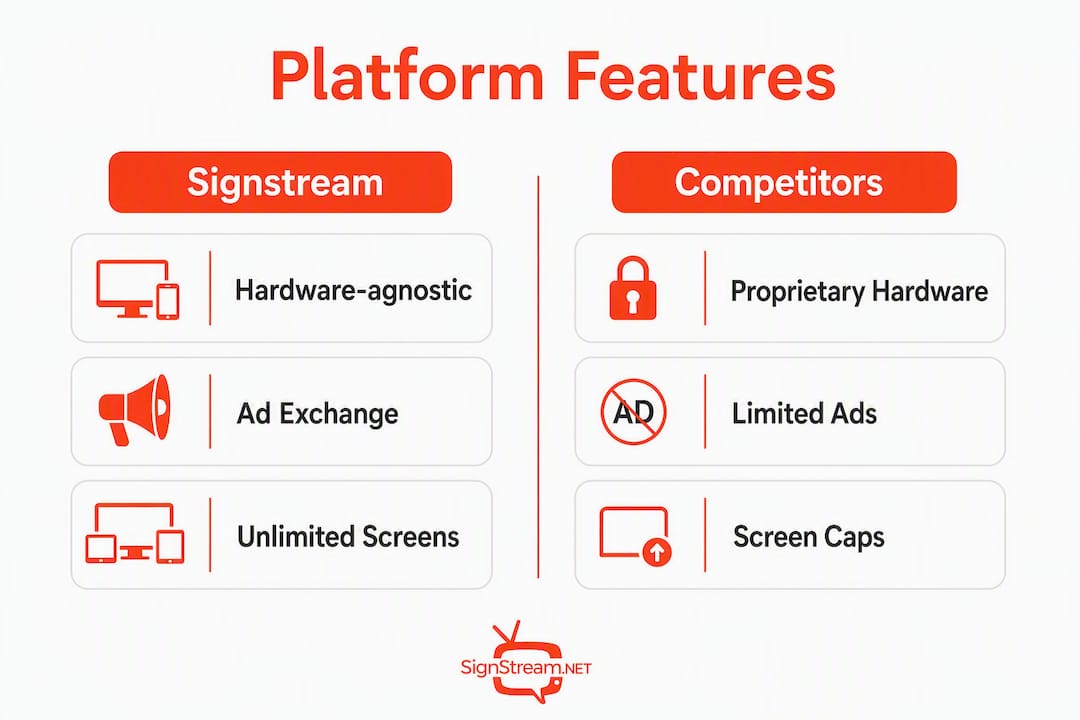
The core reasons Signstream leads this shortlist: hardware-agnostic Smart TV apps mean you use screens you already own, the ad exchange turns idle display time into revenue, and cloud hosting centralizes updates across every location from a single dashboard. Start by requesting a free demo or running a two-screen pilot to confirm compatibility with your existing hardware before committing to any rollout.
Table of Contents
How do these cloud digital signage platforms compare side by side?
How do you choose the right digital signage platform for your business?
What do the shortlisted platform categories actually deliver?
What does implementation actually cost, and when do you see ROI?
What is the final verdict on the best platform for your business?
How do these cloud digital signage platforms compare side by side?
Dimension | Enterprise platforms | SMB per-screen CMS | Apple-ecosystem specialty | Open-player marketplaces |
Best for | Multi-site franchises, corporate offices | Gyms, restaurants, small retail | Apple TV-centric venues | IT-led teams, custom builds |
Pricing model | Enterprise license / custom quote | Per-screen monthly subscription | Per-device monthly | Per-player or open-source |
Free trial | Demo only | 30-day trial common | 30-day trial | Free tier available |
Monetization / ad exchange | Limited or add-on | Built-in on select platforms | Rare | Varies by integration |
Analytics & reporting | Advanced, custom dashboards | Standard impression/dwell reports | Basic | Depends on third-party hooks |
Unlimited screens | Yes (at price) | Varies; per-screen costs add up | No | Yes (self-managed) |
Hardware compatibility | Broad but check firmware | Smart TV apps + media players | Apple TV only | Raspberry Pi, Android, Fire TV |
Templates & scheduling | Extensive, role-based | Good; drag-and-drop editors | Moderate | Manual or API-driven |
Onboarding & support | Dedicated CSM | Self-serve + chat/email | Community + docs | Community forums |
Security & compliance | SOC 2, SSO, enterprise SLA | Standard SSL, uptime SLA | Standard | Self-managed |
Enterprise platforms offer the deepest feature sets, but pricing is opaque and onboarding timelines stretch weeks. SMB per-screen CMS tools are the sweet spot for most operators in this audience: predictable monthly costs, drag-and-drop scheduling, and Smart TV app support. Apple-ecosystem specialty apps work well in venues already standardized on Apple TV, but they lock you into one hardware family. Open-player marketplaces give IT teams maximum flexibility at the cost of setup complexity.
Successful ad monetization on digital signage depends on CMS-to-ad-server interoperability, SSP connectivity, and consistent reporting hooks. Platforms that lack native ad marketplace support force you to build those integrations yourself, which adds cost and delays revenue. Confirm monetization architecture before signing any contract.
Pricing callouts: Per-screen pricing compounds fast across multi-location networks. A per-channel model (like Signstream’s) keeps costs flat whether you run 5 screens or 500. Free trials are standard among SMB tools; enterprise platforms typically gate access behind a sales call.
How do you choose the right digital signage platform for your business?
Vendor-neutral buying guides consistently make the same point: there is no universally “best” platform. The right choice depends on your operational requirements, not headline features. Three axes matter most for gyms, restaurants, retail, and franchise operators.
Hardware compatibility and openness is the first filter. Most buyers focus on browser compatibility and miss the deeper question: does the platform support your specific media player firmware or OS? Locked systems that tie hardware to proprietary software force expensive hardware replacements if you ever switch CMS providers. Prioritize platforms with Smart TV apps and support for open devices (Android, Fire TV, Chrome OS).
Monetization and ad exchange terms come second. Ad marketplace rules and SSP connectivity directly affect how much revenue you keep and how campaigns are tracked. Ask for the revenue share percentage, inventory control options, and creative specifications in writing before committing.
Scale and multi-location management is the third axis. Can you assign content roles by location? Does the platform support a franchise hierarchy where corporate pushes approved content and local managers customize within guardrails?
Vendor questions to ask on every demo
Which player operating systems and firmware versions do you officially support?
Can I run a pilot on hardware I already own before purchasing?
What is your ad marketplace revenue share, and who controls inventory?
Which reporting metrics are available natively (impressions, dwell time, conversions)?
What is your published uptime SLA, and how is playback verified remotely?
What are the trial conditions: length, screen limit, feature access?
What does migration look like if we need to switch providers?
Red flags to watch for
Proprietary players required for full functionality
Ad revenue share terms buried in supplemental agreements
Analytics limited to play counts with no dwell or conversion data
Migration fees or content export restrictions on cancellation
Pro Tip: Before any full rollout, test the platform’s Smart TV app on one screen in your actual environment. Network configurations, TV firmware versions, and content rendering can all behave differently in a live venue than in a vendor demo.
What do the shortlisted platform categories actually deliver?
Category | Ad exchange | Smart TV app | Unlimited screens | Scheduling & templates | Analytics |
Signstream | Yes | Yes | Yes | Yes | Yes |
Enterprise platforms (e.g., ScreenCloud, TelemetryTV) | Limited / add-on | Yes | Yes (at cost) | Yes | Advanced |
SMB per-screen CMS (e.g., Yodeck, NoviSign) | Rare | Yes | No (per-screen fees) | Yes | Standard |
Apple-ecosystem specialty | No | Apple TV only | No | Moderate | Basic |
Open-player marketplaces | Via integration | Varies | Yes (self-managed) | Manual | Third-party |
Enterprise platforms suit franchise networks and corporate office environments where IT governance, SSO, and advanced role-based permissions are non-negotiable. ScreenCloud and TelemetryTV both offer broad hardware support and polished dashboards. The trade-off is cost: enterprise licensing is rarely transparent, and onboarding typically requires a dedicated implementation team. For a detailed feature-by-feature breakdown, the Signstream vs ScreenCloud comparison covers the key differences directly.
SMB per-screen CMS tools like Yodeck and NoviSign are popular with small gym chains and independent restaurants because setup is fast and pricing is predictable. Per-screen fees become a real budget concern once you cross 20–30 screens, though. Yodeck alternatives and NoviSign alternatives are worth reviewing if you are already hitting that ceiling.
Open-player marketplaces give technically confident teams maximum flexibility. Open hardware support across Raspberry Pi, Android, Fire TV, and Chrome OS reduces future migration costs and enables BYO-device pilots, but the setup burden is real for non-technical operators.
Signstream deployed at an elite sports club and reported a notable rise in class attendance. The platform’s scheduling tools let staff push class updates and promotions in real time, while the ad exchange created a cross-promotion revenue stream with neighboring local businesses. Hardware-agnostic Smart TV apps meant no new screens were required.
Use-case fit at a glance:
Gyms and fitness clubs: Real-time class schedules, membership promotions, and cross-promotion with local health brands via ad exchange
Restaurants: Dynamic menu boards, daily specials, and upsell prompts updated from any device
Retail and franchise: Corporate-approved templates pushed to all locations; local managers customize within brand guardrails
Offices: Live calendar feeds, room booking displays, and internal communications on existing Smart TVs
Cloud CMS integrates with APIs and external data sources to automate content updates, which is particularly valuable for restaurant menu boards and office room-booking displays that change throughout the day.
What does implementation actually cost, and when do you see ROI?
A small pilot runs in 2–6 weeks. Enterprise rollouts across multiple locations typically take 8–16 weeks depending on integrations and content volume.
Typical implementation phases
Pilot planning (Week 1): Define target screens, confirm hardware compatibility, set baseline KPIs (impressions, dwell time, current conversion rate).
Hardware test (Week 1–2): Install Smart TV app or media player on pilot screens; verify playback and network stability.
Content templates and scheduling (Week 2–3): Build initial templates, set playlist schedules, assign content roles.
Ad exchange setup (Week 3–4): Configure ad marketplace, set inventory controls, confirm revenue share terms.
Analytics baseline (Week 4): Capture first impression and dwell data to establish a pre-scale benchmark.
Scale rollout (Week 5 onward): Expand to remaining screens using proven templates and configurations.
Cost drivers include media players (if existing screens lack Smart TV app support), content design, integration development for live data feeds, and the monthly subscription. Cloud-based CMS reduces upfront IT costs significantly compared to on-premise systems, with no server hardware to purchase or maintain.
Signstream clients have reported a 25% rise in class attendance after deployment, a direct result of timely, targeted content scheduling. With such a lift, a gym running multiple classes per week with modest per-class revenue can recover subscription and hardware costs within a few months of operation.
Ad revenue from the exchange adds a second income stream. Even conservative cross-promotion placements with local partners can offset a meaningful portion of monthly subscription costs. Track four metrics from day one: impressions, average dwell time, conversion events (class sign-ups, menu item orders, coupon redemptions), and ad revenue per screen.
What is the final verdict on the best platform for your business?
Signstream is the recommended choice for gym operators, restaurant owners, retailers, franchise managers, and office administrators who need hardware-agnostic Smart TV apps, built-in ad-exchange monetization, enterprise analytics, and unlimited-screen scaling without per-screen fees piling up.
Your immediate next step: run a short two-screen pilot or book a free phone demo with Signstream. Bring your hardware list (TV models, OS versions) and your target KPIs to that conversation so you can validate compatibility and set a measurable ROI baseline from the start.
Key Takeaways
Signstream is the strongest cloud digital signage pick for multi-screen business operators who need ad-exchange monetization, unlimited screens, and hardware-agnostic Smart TV app deployment.
Point | Details |
Prioritize hardware-agnostic platforms | Locked proprietary systems force costly hardware replacements; verify Smart TV and open-device support first. |
Validate ad exchange terms upfront | Confirm revenue share percentage, inventory controls, and SSP connectivity before signing any contract. |
Capture baseline metrics before the pilot | Track impressions, dwell time, conversions, and ad revenue from day one to prove ROI at scale. |
Start with a short pilot | A two-to-six-week pilot on two screens confirms compatibility and content workflow before full rollout. |
Signstream as recommended pick | Unlimited screens, built-in ad exchange, Smart TV apps, and a reported 25% rise in class attendance for clients. |
A note on perspective
Full disclosure: Signstream publishes this article and competes directly in the cloud digital signage category. The shortlist above is structured around platform categories and evaluation criteria, not vendor rankings designed to favor any single brand. That said, Signstream is featured as the recommended pick because it addresses the specific needs of this audience — unlimited-screen deployment, built-in ad-exchange monetization, and hardware-agnostic Smart TV apps — more directly than the alternatives reviewed.
The vendor checklist and red flags in this article reflect real operational considerations. Validate every item during your demos, regardless of which platform you trial. No platform is the right fit for every business, and the criteria that matter most depend on your screen count, hardware environment, and revenue goals.
Signstream is ready when you are

Signstream gives you a cloud digital signage platform that runs on Smart TVs you already own, deploys across unlimited screens on a flat subscription, and includes a built-in ad exchange so your screens generate revenue instead of just spending budget. No proprietary hardware required, no IT team needed.
Quick onboarding: Most pilots are live within two weeks using existing screens and drag-and-drop templates
Built-in ad exchange: Cross-promote with local businesses and earn ad revenue directly from your screen network
Analytics included: Track impressions, dwell time, and conversions from a single dashboard to prove ROI
Book a free consultation, schedule a phone demo, or explore the full feature set to see exactly how Signstream fits your operation.
Useful sources
How Digital Signage Advertising Networks Work — AI Digital’s explainer on programmatic DOOH, SSP connectivity, and ad revenue mechanics
Free Digital Signage Software Guide 2026 — JAF Digital Consulting’s independent software guide covering open hardware and selection criteria
How Signstream works remotely — Signstream’s own architecture explainer covering Smart TV apps and remote content management
Signstream vs ScreenCloud: Which One is Right for You? — Direct feature comparison for buyers evaluating enterprise-tier alternatives
Affordable digital signage for small teams — Practical guidance on low-cost pilots and small-team rollouts
Recommended
Comments