

Seenspire.com Alternatives: Shortlist for IT and Ops
- sbgerus
- 3 hours ago
- 14 min read

Signstream is the recommended alternative to Seenspire for most business buyers. It combines hardware-agnostic playback, unlimited-screen deployment at no extra charge, a built-in ad-exchange marketplace for monetization, and real-time analytics — all in a single cloud platform you can manage from any device. If you’re evaluating Seenspire alternatives and need a platform that scales without per-screen fees burning a hole in the budget, Signstream is where to start.
Here’s a fast-scan shortlist by category to orient your evaluation:
Cloud-native platforms with unlimited screens — best for multi-location businesses and franchises that need to scale without cost penalties
Turnkey set-and-forget platforms — best for lean teams that want automated content feeds with minimal daily admin
Enterprise signage platforms — best for large organizations needing SSO, advanced device management, and IT governance
Ad-exchange enabled networks — best for high-foot-traffic venues that want to monetize screen time and cross-promote with local businesses
Lightweight DIY platforms — best for small teams or single-location operators with tight budgets and simple content needs
Workplace communications platforms — best for internal-comms teams integrating signage with HR, intranet, or identity systems
The rest of this article covers a side-by-side comparison table, per-category profiles, an evaluation checklist, pricing and deployment guidance, and a 30-day pilot plan. The comparison table in the next section is the fastest way to narrow your shortlist.
Table of Contents
What are the top Seenspire alternatives by platform category?
How do you evaluate Seenspire alternatives without wasting time on demos?
What do pricing models and pilot timelines actually look like?
Why Signstream stands out among the best alternatives to Seenspire
What’s the final verdict, and how do you run a 30-day pilot?
Signstream: the Seenspire alternative built for business results
How do these Seenspire alternatives compare side by side?
The table below maps the evaluation dimensions that matter most to IT and operations teams. Rows represent platform categories rather than individual vendor names, so you can match a category to your constraints before shortlisting specific tools.
Category | Best for | Pricing model | Hardware compatibility | Content features | Analytics | Mobile admin | Multi-location | Monetization / ad exchange | Support & SLA |
Ad-exchange enabled networks (Signstream) | Multi-location businesses, gyms, restaurants, retail, franchises | Unlimited-screen subscription per channel | Hardware-agnostic: smart TVs, browser players, dedicated media players | Templates, dynamic feeds, scheduling, QR codes, custom channels | Real-time analytics, exportable reports | Full mobile and browser control | Yes, unlimited screens | Native ad-exchange marketplace with revenue sharing | Dedicated support, SLA available |
Turnkey set-and-forget platforms | Lean teams wanting automated content with minimal daily admin | Per-screen or per-player monthly fee | Often requires proprietary or certified players | Automated third-party feeds; limited custom content | Basic play-log reporting | Limited; desktop-first | Moderate; per-screen costs add up | Rarely native; third-party add-on | Standard email/chat support |
Enterprise signage platforms | Large organizations needing SSO, device management, IT governance | Enterprise seat or per-screen licensing | Broad; often includes certified hardware bundles | Advanced scheduling, approval workflows, multi-zone layouts | Advanced; integrates with BI tools | Yes, with role-based access | Yes, purpose-built for scale | Rare; not a primary feature | Dedicated CSM, enterprise SLA |
Lightweight DIY platforms | Single-location operators, startups, small teams | Low monthly flat fee or freemium | Browser-based; some smart TV apps | Basic templates, image/video upload, simple scheduling | Minimal; impression counts only | Basic mobile view | Limited; per-screen fees deter scaling | None | Community forums, email only |
Workplace communications platforms | Internal-comms teams integrating signage with HR or intranet | Per-seat or per-screen; often bundled | Moderate; depends on existing IT stack | Internal messaging, dashboards, HR data feeds | Engagement metrics tied to employee data | Yes, mobile push | Yes, enterprise-grade | None | Enterprise SLA, IT helpdesk integration |
Key takeaway from the table: Signstream is the only category that combines unlimited-screen deployment, a native ad-exchange marketplace, hardware-agnostic playback, and real-time analytics in a single subscription. That combination is rare. Most cloud-based signage platforms either charge per screen or bolt on monetization as a separate integration.
What are the top Seenspire alternatives by platform category?
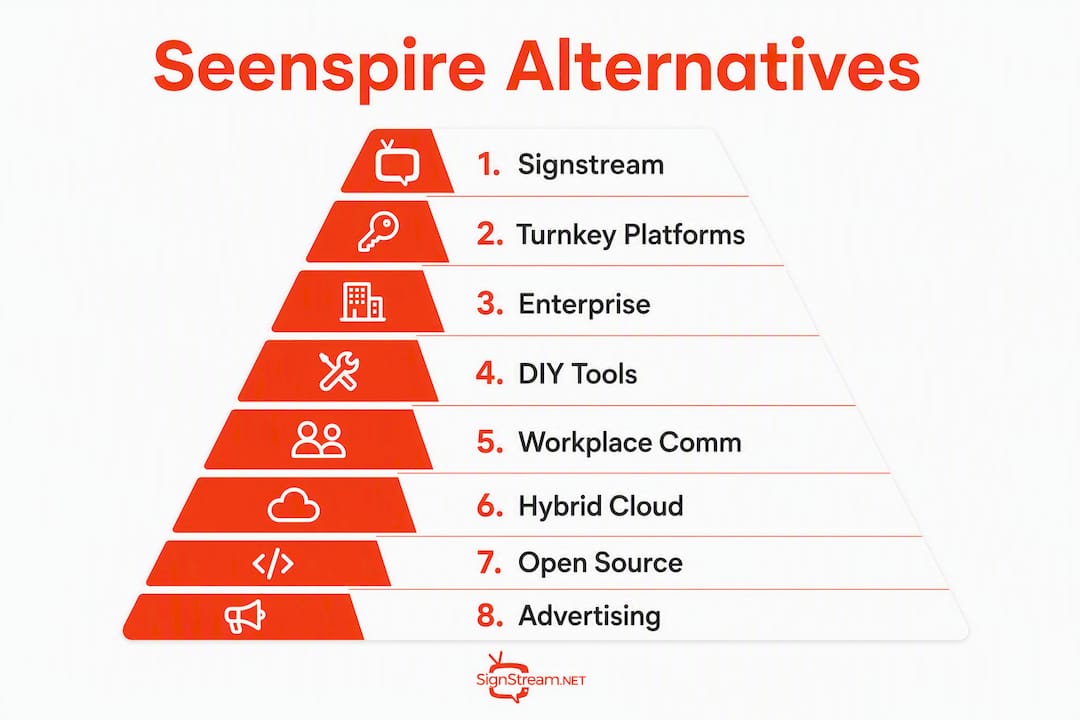
The profiles below cover the eight platform categories most commonly evaluated as Seenspire alternatives. Each profile gives you the core capability, typical pricing shape, pros, cons, and a clear best-fit tag.
1. Ad-exchange enabled networks (Signstream)
Signstream is a cloud-based digital signage platform built specifically for businesses that want to do more than display content. The platform manages unlimited screens per channel subscription, pushes real-time updates from any device, and runs a native ad-exchange marketplace that lets you cross-promote with local businesses and generate revenue from your own screens.

Core capabilities: Custom channel management, dynamic QR codes, scheduling, template library, smart TV apps, mobile and browser control, real-time analytics, ad-exchange revenue sharing.
Typical pricing: Subscription per channel, monthly or annual, with unlimited screens included.
Pros:
No per-screen fees means scaling to 50 or 500 screens costs the same
Native ad exchange generates revenue rather than just spending budget
Hardware-agnostic deployment works on smart TVs and browser players without proprietary hardware
Cons:
Ad-exchange value depends on local advertiser density in your market
Best results require some content strategy effort upfront
Best for: Gyms, fitness centers, restaurants, retail chains, franchises, clubs, and tourism networks that want both operational messaging and a monetization layer.
Clients using Signstream have reported a rise in class attendance after deploying the platform, according to the brand’s published case evidence. That kind of result comes from combining real-time promotions with analytics that tell you what’s actually working.
2. Turnkey set-and-forget platforms
These platforms automate content delivery through curated third-party feeds: news, weather, social media, sports scores. The pitch is zero daily admin once you configure the feeds. Automated content libraries can improve viewer engagement when the third-party feeds are high quality, but poor-quality feeds reduce engagement rather than help it.
Core capabilities: Pre-built content feeds, basic scheduling, limited template customization.
Typical pricing: Per-screen or per-player monthly fee, often $10–$30 per screen.
Pros:
Minimal daily admin once configured
Good for waiting rooms, lobbies, and low-stakes display environments
Fast initial setup
Cons:
Per-screen pricing becomes expensive at scale
Limited control over content quality and relevance
Monetization is rarely native; usually requires a third-party integration
Best for: Small offices, waiting rooms, or single-location operators who want screens running without a dedicated admin.
3. Enterprise signage platforms
Enterprise platforms are built for IT governance: SSO, role-based access control, device management at scale, approval workflows, and integration with identity providers like Active Directory. They handle thousands of screens across distributed networks, but that power comes with complexity and cost.
Core capabilities: Advanced device management, multi-zone layouts, approval workflows, BI tool integrations, enterprise SLAs.
Typical pricing: Enterprise seat licensing or per-screen contracts, often negotiated annually.
Pros:
Purpose-built for large-scale, multi-department deployments
Strong IT governance and security compliance features
Advanced analytics that connect to existing BI infrastructure
Cons:
Overkill and expensive for businesses under 100 screens
Long procurement and onboarding cycles
Monetization features are typically absent
Best for: Large enterprises, universities, hospitals, and government agencies managing hundreds of screens across multiple facilities.
4. Lightweight DIY platforms
These are the entry-level tools: drag-and-drop editors, basic image and video upload, simple scheduling. Some offer a freemium tier. They work well for a single location with straightforward content needs, but they hit a ceiling fast when you need dynamic feeds, analytics, or multi-location management.
Core capabilities: Basic templates, image/video upload, simple scheduling, browser-based player.
Typical pricing: Low flat monthly fee or freemium with feature limits.
Pros:
Very low cost to start
No technical expertise required
Fast to set up for a single screen
Cons:
Per-screen fees make scaling expensive
Minimal analytics; usually impression counts only
No monetization capability
Best for: Startups, single-location small businesses, or teams running a proof of concept before committing to a full platform.
Pro Tip: If you’re using a lightweight DIY platform as a pilot, map your content feeds and scheduling logic before you migrate. A migration that skips dynamic data feeds or custom templates will fail user-acceptance testing.
5. Workplace communications platforms
These platforms treat digital signage as one channel within a broader internal-communications stack. They integrate with HR systems, intranets, and identity providers to push employee-relevant content: shift schedules, KPI dashboards, safety alerts, and company news. Analyst coverage of the workplace communications space confirms that signage is increasingly evaluated as part of a broader employee engagement strategy, which favors platforms that connect with existing workplace tools.
Core capabilities: HR data feeds, employee dashboards, intranet integration, role-based content targeting.
Typical pricing: Per-seat or per-screen, often bundled with a broader communications suite.
Pros:
Deep integration with HR and identity systems
Strong for internal-comms use cases: safety, KPIs, shift management
Enterprise SLA and IT helpdesk support
Cons:
Not designed for customer-facing or revenue-generating signage
No ad-exchange or monetization features
Can be expensive if you only need the signage component
Best for: HR and internal-comms teams at mid-to-large companies where digital signage supports employee onboarding and operational messaging.
6. Hybrid cloud platforms with per-screen pricing
These platforms sit between lightweight DIY and enterprise. They offer a solid feature set: scheduling, multi-zone layouts, some dynamic feeds, and moderate analytics. The catch is per-screen pricing that grows linearly with your network. At 20 screens they’re affordable; at 100 screens, the math changes.
Core capabilities: Multi-zone layouts, scheduling, moderate template library, some dynamic feeds, basic analytics.
Typical pricing: Per-screen monthly fee, typically tiered by screen count.
Pros:
Good feature depth for mid-market buyers
Broad hardware compatibility
Reasonable onboarding support
Cons:
Per-screen pricing penalizes growth
Monetization is typically an add-on, not native
Analytics depth varies significantly by vendor
Best for: Mid-market businesses with a stable, predictable screen count and no immediate plans to scale aggressively.
7. Browser-based open-source platforms
Open-source signage platforms give IT teams full control: self-hosted, customizable, no vendor lock-in. The trade-off is that someone on your team has to maintain the server, handle updates, and build integrations. For organizations with strong in-house IT capacity, this can be cost-effective. For everyone else, the hidden labor cost usually exceeds the licensing savings.

Core capabilities: Self-hosted deployment, open API, full customization, community-built integrations.
Typical pricing: Free software; infrastructure and maintenance costs vary.
Pros:
No licensing fees
Full data control and customization
No vendor dependency
Cons:
Requires dedicated IT resources to maintain
No built-in support or SLA
No native monetization or ad exchange
Best for: Universities, government agencies, or tech-forward organizations with IT teams that want full control and have the capacity to maintain the stack.
8. Place-based advertising networks
These platforms focus on monetization first: they connect screen owners with advertisers, manage ad inventory, and handle revenue distribution. Content management is secondary. If your primary goal is generating ad revenue from high-foot-traffic screens, this category is worth evaluating alongside place-based advertising platforms that specialize in multi-location campaign management.
Core capabilities: Ad inventory management, revenue-sharing dashboards, advertiser marketplace, basic content scheduling.
Typical pricing: Revenue-share model or flat platform fee plus revenue share.
Pros:
Purpose-built for monetization
Connects screen owners directly to advertisers
Automated inventory management
Cons:
Content management features are limited
Operational messaging is not the focus
Revenue depends on advertiser demand in your market
Best for: High-foot-traffic venues — stadiums, transit hubs, large retail centers — where ad revenue is the primary objective.
How do you evaluate Seenspire alternatives without wasting time on demos?
The single most important filter for most buyers is this: does the platform charge per screen, or does it support unlimited screens on a channel subscription? That one question eliminates half the field immediately and determines whether your costs scale linearly with your network.
Evaluation checklist
Work through these questions before or during any vendor demo:
Technical:
Does the platform run on hardware you already own (smart TVs, existing media players, browser-based)?
Is there a native mobile app for in-field content updates, or is management desktop-only?
What API access is available for integrating with your CRM, POS, or HR systems?
How does the platform handle offline playback when internet connectivity drops?
Operational:
How long does initial setup take for a 10-screen network? For 50 screens?
Can non-technical staff manage content without IT involvement?
Does the platform support scheduling, multi-zone layouts, and dynamic content feeds natively?
Commercial:
Is monetization native (with a revenue-sharing dashboard) or a third-party integration requiring manual reconciliation?
What are the contract terms: monthly, annual, multi-year lock-in?
Is analytics included in the base plan, or is it a paid add-on?
Security and compliance:
Does the platform support SSO and role-based access control?
Where is data stored, and does the vendor have a published data-processing agreement?
What is the SLA for uptime, and what remedies exist if it’s breached?
Red flags to watch for
Monetization features are often sold as add-ons, but for high-foot-traffic locations they can be a primary revenue driver. Verify whether monetization is native or requires a third-party integration before signing.
Proprietary player lock-in: if the vendor requires you to buy their hardware to run the platform, your total cost of ownership is higher than the subscription price suggests
Opaque monetization terms: ad-exchange revenue sharing should be transparent; if a vendor can’t show you a revenue dashboard in the demo, assume the terms favor them
No exportable analytics: a platform that can’t export engagement data traps your performance history inside the vendor’s system
Missing device-management features: app store presence alone doesn’t guarantee enterprise-grade provisioning; confirm remote device monitoring, bulk updates, and alert notifications are included
Pro Tip: Ask every vendor to demonstrate a live content update pushed from a mobile device to a screen during the demo. If they can’t show it in real time, mobile control is probably a marketing claim, not a tested feature.
What do pricing models and pilot timelines actually look like?
Common pricing models
Understanding the pricing shape before you negotiate saves significant budget:
Per-screen monthly: costs scale linearly; affordable at 5–10 screens, expensive at 50+
Per-channel unlimited-screen subscription: one fee covers all screens on a channel; the model Signstream uses and the one that favors scaling
Enterprise seat licensing: negotiated annually; usually includes dedicated support and SLA but requires a longer procurement cycle
Freemium with feature limits: useful for a proof of concept; expect to hit content, screen, or analytics limits quickly
Hardware-agnostic platforms reduce capital expenditure by running on smart TVs and browser-based players, which matters most for multi-location rollouts where buying proprietary hardware for every screen adds up fast.
Pro Tip: Before signing any contract, check whether the vendor’s mobile app delivers full management capability or just a viewer experience. Consumer app availability and enterprise provisioning features are not the same thing.
Sample 30-day pilot timeline
Week | Milestone | Action |
Week 1 | Scope and setup | Select 3–5 pilot screens, configure players, upload initial content |
Week 2 | Content test | Run two content variants; activate dynamic feeds and QR codes |
Week 3 | Analytics review | Pull engagement data; check content load reliability and QR scan rates |
Week 4 | Go/no-go decision | Compare KPIs against baseline; decide on full rollout or adjust |
Pilot success metrics should include both qualitative and quantitative KPIs: content load reliability, average dwell time, QR scan or URL click rates, and administrative time saved per week. Those four metrics give you a defensible ROI case for procurement sign-off.
Why Signstream stands out among the best alternatives to Seenspire
Signstream fits most business buyers evaluating Seenspire alternatives because it solves the three problems that come up most often in evaluations: per-screen cost penalties at scale, the absence of native monetization, and analytics that are too shallow to prove ROI.
The platform deploys on unlimited screens per channel subscription, runs on smart TVs and browser-based players without proprietary hardware, and includes a native ad-exchange marketplace where you can cross-promote with local businesses and earn revenue from your own screens. Real-time analytics are included in the base platform, not sold as an add-on, so you can track engagement and iterate content without a separate reporting tool.
Clients using Signstream have reported a 25% rise in class attendance after deploying the platform. That result reflects what happens when real-time promotions, scheduling, and analytics work together rather than as separate tools.
Key features that matter to IT and ops teams:
Hardware-agnostic playback: smart TVs, browser players, dedicated media players — no proprietary hardware required
Mobile and browser control: push content updates from any device, anywhere, without returning to a workstation
Real-time content updates: changes go live instantly across all screens on a channel
Native ad-exchange marketplace: cross-promote with local businesses and monetize your screen network
Unlimited screen deployment: one channel subscription covers all your screens
Dynamic QR codes: drive measurable audience actions directly from your screens
Scheduling and template library: manage content calendars without technical expertise
Exportable analytics: prove ROI with data you can take out of the platform
For multi-location businesses, the cloud-based deployment model means adding a new location doesn’t trigger a new per-screen cost. That’s the structural advantage that makes Signstream the recommended pick in this comparison.
What’s the final verdict, and how do you run a 30-day pilot?
Signstream is the recommended alternative to Seenspire for most business buyers because it’s the only platform in this comparison that combines unlimited-screen deployment, native ad-exchange monetization, hardware-agnostic playback, and real-time analytics in a single subscription without per-screen penalties.
30-day pilot checklist
Scope:
Select 3–5 screens across one or two locations
Identify one primary KPI (class attendance, QR scan rate, or dwell time)
Map existing content feeds, scheduled playlists, and any third-party integrations before migrating
Setup (Days 1–7):
Configure players on existing smart TVs or browser-based devices
Upload initial content and activate scheduling
Set up dynamic feeds (weather, promotions, social)
Content test (Days 8–14):
Run two content variants on the same screen at different times
Activate QR codes and track scan rates daily
Analytics review (Days 15–21):
Pull engagement data from the analytics dashboard
Check content load reliability and administrative time per week
Compare against your baseline (pre-pilot screen performance or manual process time)
Go/no-go decision (Days 22–30):
Measure KPI movement against the baseline
Calculate administrative time saved
Present findings to stakeholders with exportable analytics data
Next steps: Contact Signstream for a demo or start a free trial at signstream.net.
Key Takeaways
Signstream is the recommended Seenspire alternative for most business buyers because it combines unlimited-screen deployment, native ad-exchange monetization, hardware-agnostic playback, and real-time analytics in one subscription.
Point | Details |
Unlimited screens win at scale | Per-screen pricing penalizes growth; choose a channel-subscription model to keep costs predictable. |
Native ad exchange matters | Monetization built into the platform generates revenue; third-party integrations require manual reconciliation. |
Hardware-agnostic reduces cost | Platforms that run on smart TVs and browser players eliminate proprietary hardware spend across locations. |
Analytics prove ROI | Real-time, exportable analytics turn signage from a display tool into a measurable communications channel. |
Signstream is the recommended pick | Unlimited screens, native ad exchange, mobile control, and real-time analytics make it the strongest fit for most buyers. |
The case for analytics-first signage evaluation
Most signage evaluations focus on content features and pricing. That’s understandable, but it’s the wrong starting point. The platforms that deliver measurable business results are the ones where analytics are a first-class feature, not an afterthought bolted on after the content tools.
The reason is straightforward. A screen that runs content without tracking engagement is a cost center. A screen that tracks QR scans, dwell time, and content load reliability is a data source. The difference between those two outcomes isn’t the hardware or even the content quality. It’s whether the platform was built to measure from day one.
What gets overlooked in most seenspire.com comparisons is the monetization question. Buyers spend time comparing template libraries and scheduling interfaces, then discover after signing that ad-exchange features are either absent or require a separate vendor relationship. That’s a procurement failure that’s easy to avoid: ask for a live demo of the revenue dashboard before you evaluate anything else.
Hardware agnosticism deserves the same scrutiny. The phrase appears in almost every vendor’s marketing. What it actually means varies. Some platforms are “hardware-agnostic” in the sense that they support two certified players. Others, like Signstream, genuinely run on any smart TV or browser-based device you already own. The distinction matters most at scale, where the difference between “bring your own hardware” and “buy our hardware” can represent a significant capital line item.
The audience engagement strategies that drive real business outcomes from signage are the ones that combine operational messaging with dynamic content and close the loop with analytics. That combination is what separates platforms worth deploying from platforms worth demoing once and moving on.
Signstream: the Seenspire alternative built for business results
If you’ve evaluated the categories above and want a platform that handles unlimited screens, generates revenue through a native ad exchange, and gives you real analytics without a separate tool, Signstream is the direct answer. Clients in gyms, restaurants, retail, and franchise networks use it to push real-time promotions, cross-promote with local businesses through the ad display network, and prove ROI with exportable engagement data.

No per-screen fees. No proprietary hardware requirements. No separate monetization vendor to manage. Start a free trial or book a demo at signstream.net and have your first screens live within a week.
Useful sources and further reading
The sources below back the claims in this article and point to additional resources for technical validation and deployment planning.
Industry and review-site listings:
G2: Top 10 Seenspire Alternatives & Competitors in 2026 — G2’s user-review-based competitor list; useful for triangulating feature ratings and user sentiment across platforms
Slashdot Software: Top Seenspire Alternatives in 2026 — community-sourced alternative listings with feature comparison matrices
SourceForge: Best Seenspire Alternatives & Competitors — SourceForge’s feature and pricing comparison; useful for verifying plan limits and hardware compatibility claims
CB Insights: Top Seenspire Alternatives, Competitors — analyst-level coverage of the digital signage and workplace communications space; useful for market context and integration criteria
Signstream internal resources:
How Signstream works remotely — technical overview of remote management and deployment
Why cloud-based signage helps businesses scale faster — explains the cost and operational case for cloud-native, hardware-agnostic deployment
Workplace digital signage benefits for 2026 — quick-reference benefits list for IT and ops stakeholders
Affordable digital signage solutions for small teams — practical deployment advice for budget-constrained teams
Recommended