

Best Pandadoc.com Alternatives for Multi-Location Businesses
- sbgerus
- Aug 8
- 6 min read

If you manage screens across multiple locations and need a platform that scales without burning a hole in the budget, the top digital signage alternatives are SignStream, ScreenCloud, Rise Vision, Yodeck, Enplug, NoviSign, and TelemetryTV. SignStream is the lead recommendation for most multi-location operators, thanks to unlimited-screen deployment at no extra charge, a built-in ad-exchange marketplace, and client-reported results including a significant increase in class attendance.
Quick shortlist:
SignStream — unlimited screens, ad-exchange monetization, smart TV apps, remote control
ScreenCloud — broad app ecosystem, general-purpose signage
Rise Vision — template-heavy, strong for education and public spaces
Yodeck — simple player-based setup, low cost for small networks
Enplug — live data feeds and social media integrations
NoviSign — drag-and-drop templates, fast content creation
TelemetryTV — dashboard displays, enterprise reporting
Key Takeaways
SignStream is the strongest choice for multi-location operators who need unlimited-screen scale, built-in ad-exchange monetization, and fast remote deployment without dedicated IT.
Point | Details |
Lead recommendation | SignStream supports unlimited screens at no extra charge, making it the most cost-effective pick as your network grows. |
Top selection criteria | Prioritize monetization capability, unlimited screen scale, and exportable analytics when evaluating any platform. |
Trial checklist | Test the full ad monetization flow, pull an analytics export, and confirm smart TV compatibility during your free trial. |
Red flags to watch | Hidden per-screen fees, no ad-revenue reporting, and locked analytics exports are signs a platform won’t scale well. |
Signstream result | A client-reported 25% attendance increase signals what active screen management can deliver — validate it in your own pilot. |
Table of Contents
How do these digital signage platforms compare side by side?
Platform | Best For | Pricing Model | Monetization / Ad Exchange | Unlimited Screens | Ease of Use | Analytics & Reporting | Hardware Compatibility | Templates & Scheduling | Support & Onboarding |
SignStream | Multi-location operators needing monetization + scale | Subscription per channel (monthly/yearly) | Yes — built-in ad-exchange marketplace | Yes, no extra charge | High — no IT required | Exportable reports, screen-level metrics, ad-revenue tracking | Smart TV apps, browser/mobile control | Templates + scheduling included | Account manager, training, managed onboarding |
ScreenCloud | General-purpose signage with app integrations | Per-screen subscription | No native ad exchange | Plan pricing varies depending on the chosen subscription level | High | Standard analytics | Smart TV, media players | Good template library | Self-serve + support tiers |
Rise Vision | Education and public-space announcements | Per-screen or per-location | No | Plan pricing varies depending on the chosen subscription level | Medium | Basic reporting | Media players, displays | Strong templates, scheduling focus | Self-serve onboarding |
Yodeck | Small-to-medium player-based networks | Per-player subscription | No | Limited by player count | High | Basic analytics | Raspberry Pi players, displays | Includes templates for content creation | Self-serve, community support |
Enplug | Brands needing live data and social feeds | Enterprise pricing, contact vendor | No native ad exchange | Varies / contact vendor | Medium | Advanced for enterprise | Media players, displays | Template options | Dedicated enterprise support |
NoviSign | Fast template-driven content creation | Per-screen subscription | No | Plan pricing varies depending on the chosen subscription level | High | Standard reporting | Android players, smart TVs | Strong drag-and-drop templates | Self-serve + email support |
TelemetryTV | Data-driven, dashboard-style enterprise displays | Per-device subscription | No | Plan pricing varies depending on the chosen subscription level | Medium | Strong dashboard reporting | Media players, smart TVs | Templates + scheduling | Enterprise onboarding |
Pricing shapes vary widely across these platforms. Most charge per screen or per player, which means costs climb fast as you add locations. SignStream’s per-channel model with unlimited screens at no extra charge is a genuine structural advantage for operators running 10, 50, or 200 displays. Typical deployment timelines run from a one-day pilot on a single screen to a full multi-site rollout within two to four weeks, depending on hardware readiness.
For hardware compatibility and player options, check whether a platform supports your existing smart TVs before committing. Several platforms on this list require a dedicated media player; SignStream’s smart TV app removes that dependency entirely.
Pro Tip: During your free trial, run the full monetization flow end to end — place a test ad, pull an analytics export, and confirm screen-level data is visible. Platforms that make this hard in trial will make it harder in production.
When should you choose SignStream vs. another platform?
SignStream is the right call when your priorities are scale, monetization, and fast deployment without a dedicated IT team. Specifically, choose SignStream if you:
Operate across multiple locations and need every screen on one subscription without per-screen fees stacking up.
Want to generate ad revenue from your displays through a cross-promotional ad-display network.
Need remote content control from a phone or browser, with no on-site hardware dependency.
Are running a gym, restaurant, retail location, or franchise where content changes frequently and staff time is limited.
Want managed onboarding with an account manager rather than a self-serve setup.
There are cases where another platform fits better. If your organization runs almost entirely on templated institutional schedules (think a school district or municipal office), Rise Vision’s scheduling depth may match your workflow more closely. If your enterprise already has a TelemetryTV contract with deep dashboard integrations, switching mid-deployment adds friction. And if your network is genuinely small (two or three screens, no monetization goals), Yodeck’s low-cost player model keeps things simple.
None of those scenarios make an alternative categorically better. They reflect specific constraints. For most multi-location business operators, SignStream’s combination of unlimited scale and built-in monetization is the stronger fit.
Pro Tip: Run a two-week pilot on one location before rolling out. Measure three things: content update time per week, screen uptime percentage, and any ad revenue generated. Those three numbers tell you everything you need to know about whether the platform will scale.
Why SignStream earns the top recommendation
The case for SignStream comes down to a few practical realities that matter once you’re managing more than a handful of screens.
Pricing per screen can be a significant cost that many operators may not initially anticipate. A platform that charges $10–$20 per screen per month sounds reasonable at five screens. At fifty, it’s a line item that demands a budget conversation. SignStream’s unlimited-screen model sidesteps that entirely, which is why it suits franchise operators and multi-site retail managers so well.
The ad-exchange marketplace is genuinely rare among mid-market signage platforms. Most competitors treat screens as a cost center. SignStream treats them as a revenue channel, letting you cross-promote with nearby businesses or sell placements directly. One client in the fitness sector reported a significant increase in class attendance after implementation — a client-reported result worth validating in your own pilot, not a universal guarantee. But it signals what’s possible when screens are used actively rather than passively.
Onboarding matters more than most buyers realize. Platforms that require IT involvement or a lengthy setup process lose momentum fast. SignStream’s remote deployment approach means a non-technical manager can get screens live quickly. Expect account manager support, structured training, and a setup timeline measured in days, not months.
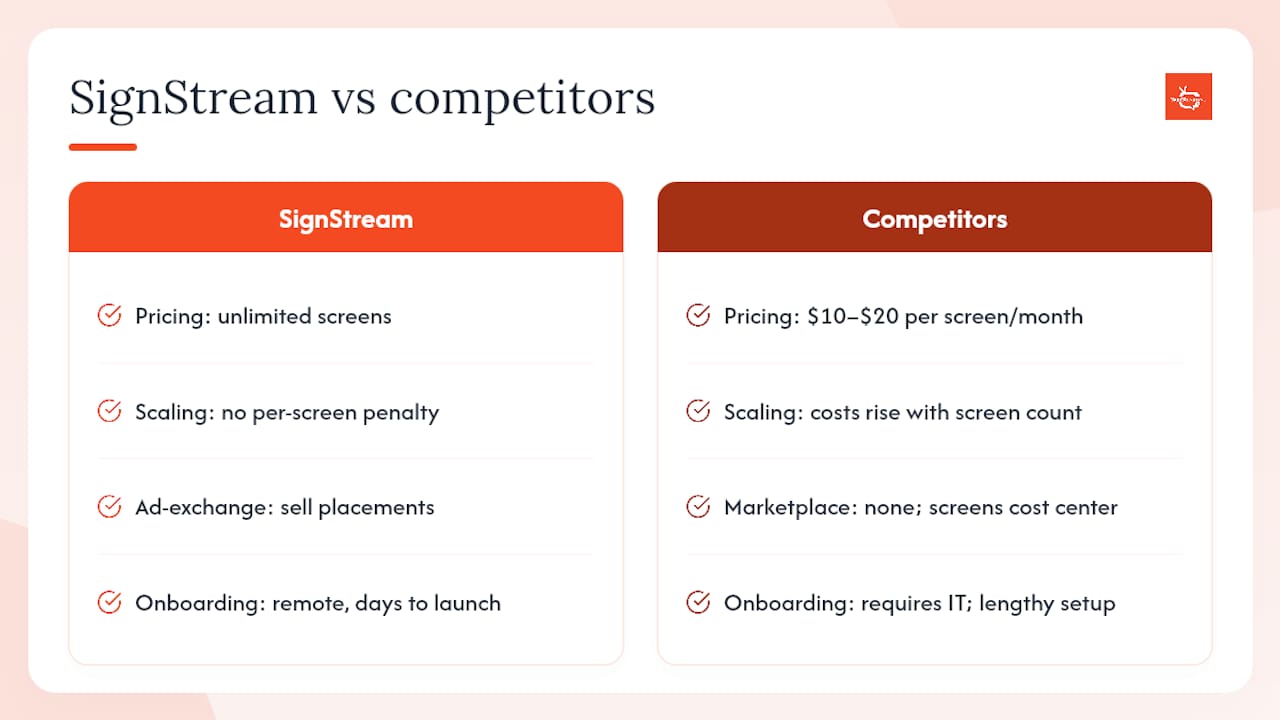
Signstream is the multi-location signage platform built for operators like you
SignStream gives you a cloud-based content management system, unlimited screen deployment, a live ad-display monetization marketplace, exportable analytics, templates, scheduling, and smart TV apps — all in one subscription. You control every screen from any device, update content in real time, and earn from your displays through cross-promotional ad placements.

The clearest next step: start a free trial, deploy one location, and spend the first week measuring content update time and ad revenue. If the numbers move, you’ll know the platform scales. Visit how it works to set expectations for your pilot, or explore the affiliate program if you manage networks for multiple clients.
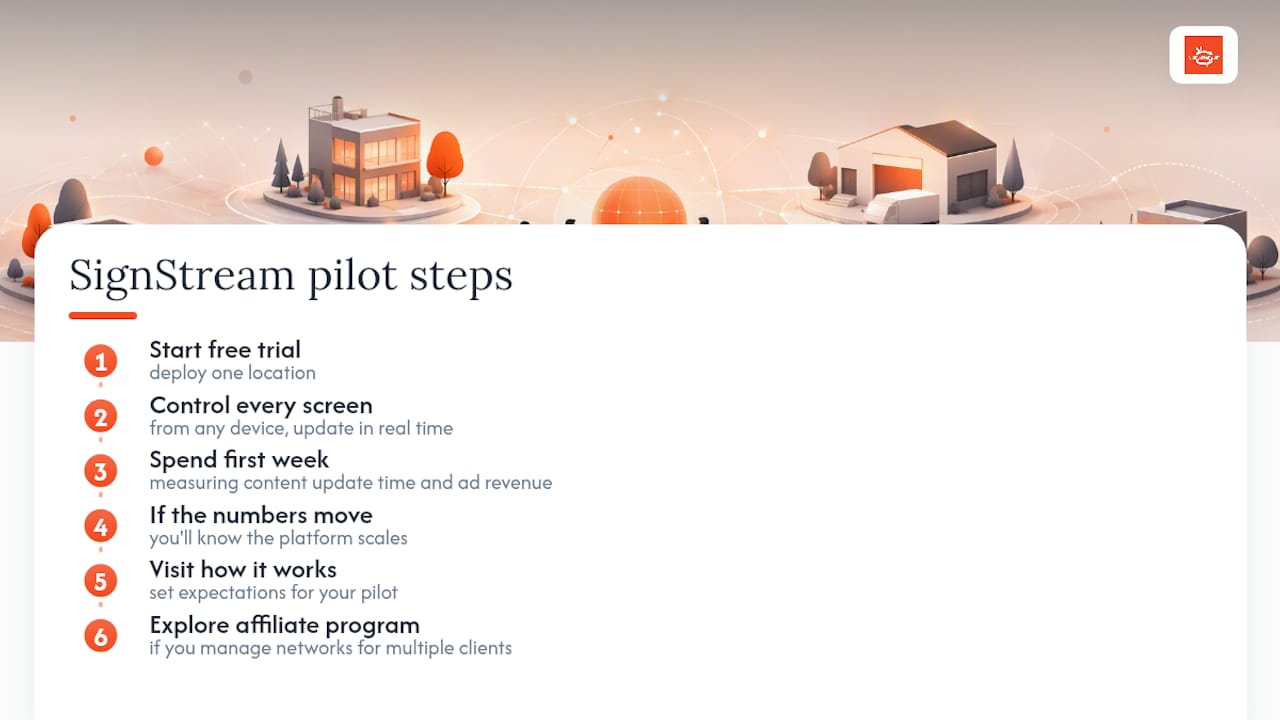
Useful resources to go deeper or start your pilot
Key SignStream pages worth bookmarking:
Affiliate and partner program — for operators who manage networks across multiple clients
Affordable signage for small teams — practical onboarding guidance for lean operations
ScreenCloud alternatives comparison — pricing model trade-offs across platforms
NoviSign alternatives comparison — hardware compatibility and scheduling feature notes
Resource | Trial / Demo | Typical Pilot Length | ROI Signal |
SignStream | Free trial available | 1–2 weeks (single location) | Client-reported significant attendance increase |
Start with one location, measure content update time saved, ad revenue generated, and screen uptime over two weeks. Those three metrics give you a clear picture before you commit to a full rollout.
Recommended
Comments