

How to Run Flash Sales on Screens That Convert

A flash sale is a time-limited discount event displayed across digital screens to trigger immediate buying decisions. When you run flash sales on screens effectively, revenue can spike by up to 35% within 24–48 hours. That figure is not a fluke. It reflects the power of urgency psychology combined with high-visibility digital signage. Countdown timers, limited stock indicators, and bold visuals work together to push customers from browsing to buying. The industry term for this tactic is “time-limited promotional signage,” and it sits at the intersection of digital out-of-home advertising and direct response marketing. Platforms like Signstream make this approach accessible to any business, regardless of technical skill.
How to run flash sales on screens: what to prepare first
A successful flash sale starts well before the content goes live. Your screen network, inventory records, and marketing channels all need to be ready before you schedule a single promotion.
Technical infrastructure checklist
Your screens must be connected to a content management system that supports real-time updates. Static display systems cannot push new content quickly enough to reflect live inventory or countdown changes. Check that your screens are online, your content player software is current, and you have remote access to update displays from any device. A retail promotion checklist covers every technical and content element worth verifying before launch.

Coordination across channels
Flash sales perform best when screens work alongside SMS and email. SMS delivers a 45% response rate and a 98% open rate, making it the fastest way to alert customers before a sale goes live on your screens. Email drives 25–30% of flash sale revenue and works well for pre-sale announcements. Align your screen content, SMS timing, and email schedule so all three channels fire within the same hour.
Before launch, confirm these items are ready:
Inventory counts are accurate and synced to your display system
Fulfillment staff are briefed on expected order volumes
A kill switch is configured to remove sale content the moment stock runs out
Backup screen content is ready if the primary campaign fails to load
Your website or point-of-sale system can handle a traffic surge
Pro Tip: Flash sales can generate up to 10x normal traffic. Run a load test on your website and screen network at least 48 hours before your sale goes live.
Requirement | Why it matters |
Real-time content management system | Lets you update screens instantly as inventory changes |
Synced inventory data | Prevents overselling and keeps urgency messaging accurate |
Multi-channel schedule | Aligns SMS, email, and screen timing for maximum reach |
Staff briefing | Prepares fulfillment teams for order surges |
Kill switch on signage | Removes expired offers automatically to protect brand trust |
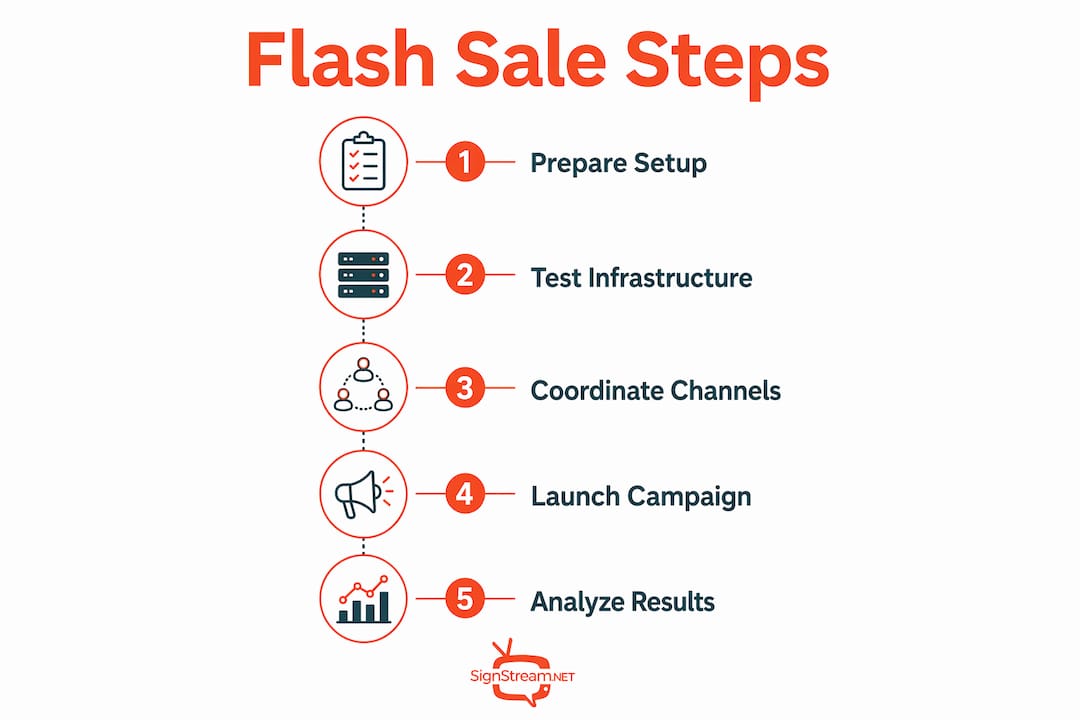
Step-by-step process to create and launch flash sale campaigns
Creating effective flash sale content is a craft. Every element on screen must communicate urgency without feeling cluttered.
Define your offer clearly. State the discount, the product, and the deadline in three lines or fewer. “40% off all running shoes. Today only. Ends at 6:00 PM.” That is the entire message. Customers should absorb it in under three seconds.
Set your sale window. The optimal duration depends on your goal. A two-hour window creates intense urgency. A 72-hour window from Friday at 6:00 PM to Monday at 6:00 PM captures weekend shopping peaks and gives customers time to act without killing the sense of scarcity.
Add a countdown timer. Countdown timers lift conversion by 8–32% across ecommerce studies. The same principle applies to in-store screens. A visible timer running down in real time tells customers the window is closing.
Include live stock indicators. Displaying “Only 7 left” next to a product image creates scarcity that static signs cannot replicate. Live stock counts under 10 units measurably increase perceived scarcity and push hesitant buyers to act.
Schedule and deploy. Use your content management system to schedule the campaign to go live and expire automatically. Manual switching introduces human error. Automation keeps your messaging accurate.
Sync with digital channels. Send your SMS alert 30 minutes before the sale starts. Schedule your email for the same morning. Post to social media as the sale goes live. Screens serve as the physical anchor for the urgency your digital channels create.
Pro Tip: Time your SMS to land 15–30 minutes before the screen campaign activates. Customers who see the text first arrive primed to buy.
Sale window | Best use case | Key message type |
2–4 hours | In-store traffic spikes during peak hours | Countdown timer with single product |
24 hours | Online and in-store combined campaigns | Discount percentage with stock counter |
48–72 hours | Weekend promotions timed after payday | Bundle offer with deadline date |
How to maximize customer engagement during flash sales on screens
High-converting flash sales use screens as the physical anchor for FOMO generated by synced digital channels. The screen is not just a display. It is the proof point that the sale is real and happening right now, in this location.
Placement and content strategy
Screen placement drives results as much as content quality. Position screens at entry points, near high-traffic product areas, and at the point of sale. A customer who sees the offer three times during a single store visit is far more likely to act than one who sees it once. For in-store digital promotions, placement near the promoted product category consistently outperforms generic lobby displays.
“Urgency messaging must be embedded in the customer experience, not just the sale announcement, to prompt impulse purchases. A countdown timer at checkout hits differently than one on a screen near the entrance.”
Real-time stock updates are the single most underused tool in flash sale signage. Showing inventory drop from 20 units to 8 units over the course of an hour creates a live narrative that static signs cannot match. Pair this with bold color contrasts, large fonts, and minimal text to keep the message readable from 10 feet away.
Avoid these common mistakes:
Running flash sales too frequently, which trains customers to wait for discounts and erodes brand equity
Discounting so deeply that margins disappear without a corresponding volume gain
Using screen content that is too complex, with multiple offers competing for attention
Failing to update screens when stock runs out, which destroys customer trust
Launching on a Tuesday morning when foot traffic and digital engagement are at their weekly low
Troubleshooting common challenges when running flash sales on screens
Technical and logistical problems during a flash sale cost you revenue and customer trust. Most of them are preventable.
The biggest risk is a traffic spike your systems cannot handle. Flash sales can bring up to 10x normal traffic, and a crashed website or frozen screen display signals to customers that the experience is unreliable. Test your infrastructure before every campaign, not just the first one.
Customer habituation is a slower but equally damaging problem. When customers learn that your store runs flash sales every Friday, they stop buying at full price. Vary your timing, rotate the products you discount, and use automated kill switches on signage to remove offers the moment inventory is depleted or the time window closes. This keeps the urgency genuine.
Assign one team member to monitor screen content and inventory sync in real time during the sale
Set up automated order routing to handle fulfillment surges without manual bottlenecks
Prepare a post-sale debrief template to capture what worked, what failed, and what to adjust next time
Keep a backup content slide ready to replace the flash sale screen if the campaign file fails to load
Pro Tip: Shipping automation platforms handle order surges by routing automatically, freeing your team to focus on exceptions rather than every transaction.
Creative screen flash sale ideas to engage modern shoppers
Fresh formats keep customers paying attention. If your flash sale looks the same every time, the urgency fades. These ideas work well across retail, hospitality, and fitness environments:
Animated countdown videos: A 15-second looping video showing a clock counting down to zero outperforms a static timer on every engagement metric. Pair it with product visuals and a bold price.
Hourly rotating offers: Change the discounted product every hour. Customers who missed the first deal stay engaged to see what comes next. This format works especially well in high-traffic venues.
Exclusive in-store screen offers: Display a promo code on your screen that is only visible in the physical location. This rewards foot traffic and creates an offer that online shoppers cannot access.
Social proof overlays: Show a live counter of how many units have sold in the last hour. “47 people bought this today” is a powerful nudge for undecided shoppers.
Cross-promotion with mobile alerts: Pair your screen content with a push notification that mirrors the on-screen message. Customers who see both are significantly more likely to convert than those who see only one channel.
For more screen flash sale ideas with real examples, the formats that drive the strongest results share one trait: they make the offer feel alive, not printed.
Key Takeaways
Running flash sales on screens converts best when urgency is genuine, timing is precise, and every channel fires in sync.
Point | Details |
Revenue impact is real | Well-executed flash sales can generate up to 35% of monthly revenue within 24–48 hours. |
Timing determines results | Weekend launches timed after payday consistently outperform midweek campaigns. |
Countdown timers lift conversion | Timers increase conversion by 8–32%; display them prominently on every screen. |
Multi-channel sync is non-negotiable | SMS, email, and screens must align within the same hour for maximum impact. |
Avoid habituation | Vary timing and products to keep urgency authentic and protect full-price sales. |
What I have learned from watching flash sales succeed and fail
The businesses that get the most from flash sales on screens are not the ones with the biggest discounts. They are the ones with the tightest execution. I have watched retailers slash prices by 50% and still underperform because their screens showed the wrong content, their SMS went out two hours late, and their staff had no idea the sale was happening.
The real edge comes from treating the screen as a live communication channel, not a poster. When a screen shows a countdown ticking down and a stock number dropping in real time, it creates a sense of event. Customers feel like they are watching something happen, not reading an ad. That shift in perception is worth more than an extra 10% off.
The mistake I see most often is over-discounting without a plan to recover margin. A flash sale that trains your best customers to wait for deals is not a marketing win. It is a slow erosion of the full-price business you built. The fix is simple: vary your timing, keep your offers genuinely limited, and use impulse purchase tactics that create desire rather than just price sensitivity. The businesses that do this well use flash sales to introduce new products, clear specific inventory, and reward loyal customers. They do not use them as a crutch for slow weeks.
One more thing worth saying plainly: measure every campaign. Track which screen placements drove the most engagement, which time windows produced the best conversion, and which offers generated repeat visits. Without that data, you are running the same experiment over and over without learning anything.
— DKS
Signstream makes flash sales on screens simple to manage
Running a high-impact flash sale on digital screens does not require a technical team or a complicated setup. Signstream gives you a platform where you can update every screen in your network instantly from any device, schedule campaigns to go live and expire automatically, and push real-time inventory updates without touching a single screen manually.

Signstream’s interactive ads platform is built for exactly this use case. You can design your flash sale content, set your countdown timer, and schedule your deployment in minutes. The platform also connects to Signstream’s ad exchange marketplace, so you can cross-promote offers in other local businesses and generate revenue from your own screens between campaigns. If you want to see how the platform works remotely, the full walkthrough is available on the Signstream website.
FAQ
What is the best duration for a flash sale on screens?
The most effective flash sale windows run between 2 hours and 72 hours. A Friday-to-Monday window captures weekend shopping peaks and consistently outperforms weekday launches.
How do countdown timers improve flash sale results?
Countdown timers increase conversion rates by 8–32% by making the deadline visible and real. Displaying one on your screen turns a passive viewer into an active buyer.
How often should I run flash sales on screens?
Running flash sales too frequently trains customers to wait for discounts, which harms full-price sales and brand equity. Vary timing and rotate products to keep urgency genuine.
What channels should I pair with screen flash sales?
SMS, email, and social media all amplify screen campaigns. SMS delivers a 45% response rate and should go out 15–30 minutes before your screen content activates.
Can I run flash sales on screens without technical expertise?
Yes. Platforms like Signstream are designed for business owners without technical backgrounds. You can schedule, update, and expire campaigns remotely from any device.
Recommended
Comments