

8 Cloud Digital Signage Checks for IT Managers: Does SignStream Pass?

For most multi-location businesses that need fast remote updates and low upfront cost, cloud digital signage is the practical choice. SignStream stands out because it removes IT complexity, scales to unlimited screens, and pays for itself through built-in ad monetization. The reasons come down to three things: lower upfront cost, easy scaling, and vendor-managed updates. Read on for the evaluation checklist, then request a consultation when you’re ready to move.
TL;DR:
Cloud digital signage offers rapid remote updates, costs less upfront, and scales quickly without renegotiating contracts as screen networks grow.
SignStream supports unlimited screens, supports smart TVs, and provides built-in analytics and ad marketplace, lowering the IT and operational burden.
Evaluate platforms based on scalability, integration ease, security, analytics, and support, while avoiding providers who cannot explain their update cadence or restrict pilot testing.
Hardware choice depends on display traffic; smart TV apps suit general content, while dedicated players ensure performance for critical displays.
A successful deployment involves pilot testing for at least two weeks, measuring performance and engagement before full-scale rollout.
Table of Contents
What Is Cloud Digital Signage, and Why Are Businesses Switching?
Cloud digital signage is a system where a hosted content management platform controls your screens remotely, whether they’re running on dedicated media players or built-in smart TV apps. You log in from a browser or phone, push an update, and it appears on every connected display within seconds.
On-premise signage works differently. It relies on local servers and often on-site IT staff to push changes, patch software, and troubleshoot outages. That setup can work for a single flagship location with heavy customization needs, but it becomes expensive and slow to manage the moment you add a second site.
Cloud-based signage lowers upfront hardware costs and scales more easily across multiple locations because vendors handle the software maintenance and infrastructure behind the scenes, according to AVIXA’s analysis of cloud and on-prem tradeoffs. Gyms with multiple locations, restaurant groups juggling daily specials, and retail chains running promotions all fit this pattern well.
What Are the Real Business Benefits of Cloud-Based Signage?
The appeal isn’t abstract. It shows up in your budget, your IT tickets, and your ability to open a new location without a six-week signage rollout.
Lower upfront cost: Subscription pricing (usually billed per channel, monthly or yearly) replaces the capital expense of servers and on-site installation work.
Scalability: Adding a screen at a new franchise location takes minutes, not a hardware order and a technician visit.
Reduced IT burden: The vendor pushes security patches, software updates, and uptime monitoring, so your team isn’t fielding late-night outage calls.
Monetization: Some platforms include ad-exchange marketplaces that let you cross-promote with other local businesses or sell screen time, turning a cost center into revenue, per industry roundups of leading digital signage providers.
Statistic to know: SignStream clients, including elite sports clubs, restaurants, and retailers, have reported a 25% rise in class attendance after implementing the platform, a direct result of sharper, faster-updated promotional content on their screens.
That kind of number matters because it ties signage directly to revenue, not just aesthetics. A screen that updates instantly with today’s class schedule or tonight’s specials does more work than one that’s still displaying last month’s flyer.
How Do You Evaluate a Cloud Digital Signage Platform?
Skip the feature-list comparison shopping. Focus on eight axes that actually predict whether a platform will hold up once you’re running 40 screens instead of four.
Scalability — Can you add screens without renegotiating your contract or hitting a hidden cap?
Content workflow — How many clicks does it take a non-technical manager to update a screen?
Player compatibility — Does it support smart TVs directly, or does every screen need a dedicated media player?
Integrations — Does it connect to your POS, scheduling software, or social feeds?
Security — Who patches the software, and how often?
Analytics — Can you see which content actually drives engagement or foot traffic?
SLAs and support — What’s the guaranteed uptime, and who do you call at 9 PM on a Saturday?
Pricing model — Is it per-screen, per-channel, or tiered, and does that scale predictably as you grow?
Ask vendors directly about single sign-on support, offline playback if the internet drops, API access for custom integrations, and who legally owns your content data. Buyers on platforms like Capterra consistently rank ease of use, integration depth, and security right alongside hardware support as top purchase drivers, so don’t let a flashy demo distract you from those fundamentals.
Pro Tip: Red flags worth walking away from: vendors who can’t explain their update cadence, platforms that charge extra per screen beyond a certain count, and any provider who won’t let you run a real pilot before signing.
What Should You Plan for During Deployment?
Hardware first. Smart TV apps work well for retail windows, waiting rooms, and office lobbies where you’re displaying standard content and want to avoid buying a separate media player for every screen. Dedicated players make more sense for high-traffic, mission-critical displays that need guaranteed performance or heavier local processing.
Network planning matters more than most buyers expect. You need enough bandwidth for content updates and a plan for brief outages, since good platforms cache content locally for offline playback rather than going blank.
Confirm Wi-Fi or ethernet reliability at each site before rollout, not after.
Verify the vendor’s security practices for patching and access control, since SaaS vendors handle infrastructure but you still own compliance.
Map integration points early: POS for pricing feeds, scheduling software for class boards, analytics for reporting.
Budget for screens, mounts, and player hardware if you’re not going smart-TV-only.
A realistic timeline runs pilot (one to two locations, two to four weeks) → adjustments → full rollout across remaining sites, which best-practice deployment guidance recommends specifically to catch integration issues before they multiply across your network. For guidance tailored to running signage across multiple locations, see how to manage digital signage across franchises.
When Does a Hybrid or On-Prem Approach Make More Sense?
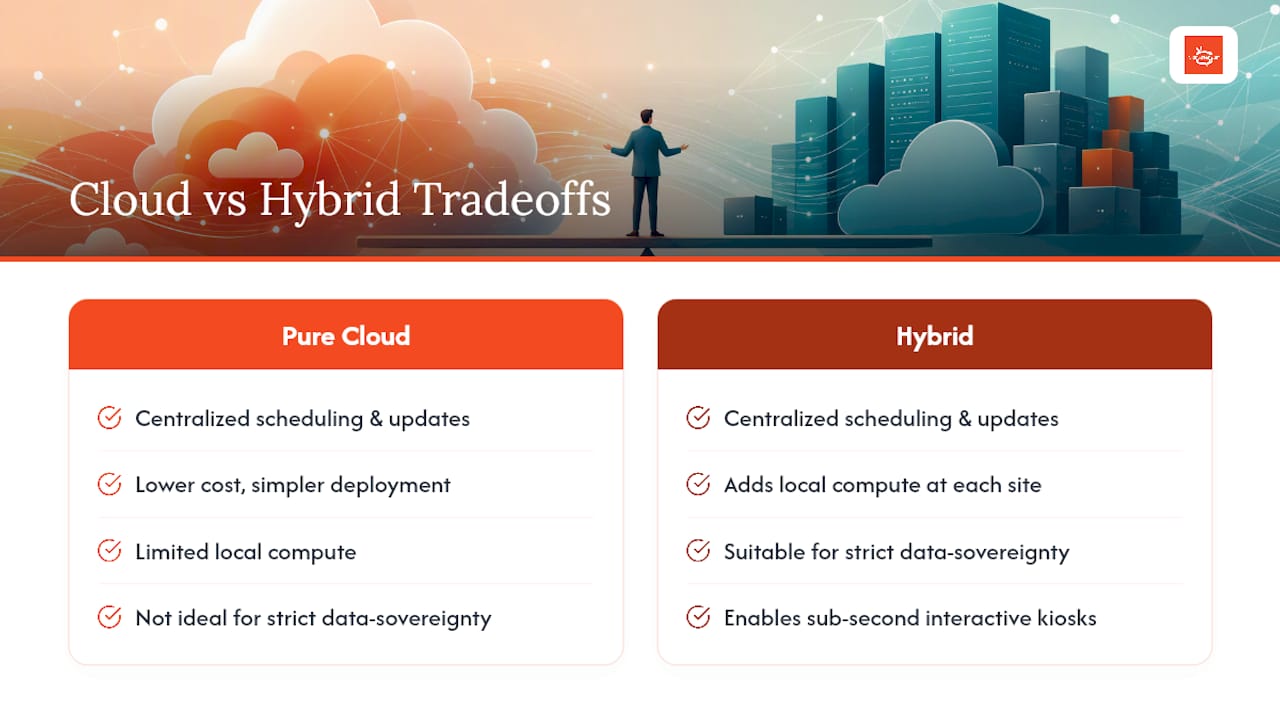
Hybrid architectures combine local compute at each site with centralized cloud management, giving you cloud-level convenience plus the horsepower for advanced interactivity or heavy local data processing.
Consider it if you operate under strict data sovereignty rules, need sub-second responsiveness for interactive kiosks, or require deep integration with proprietary local systems that can’t run cleanly through a cloud API. Analysts have tracked rising hybrid adoption precisely because it lets businesses keep cloud scheduling and remote updates while adding local horsepower where it counts. For most retail, restaurant, gym, and office deployments, though, pure cloud still wins on cost and simplicity. You can read more on alternative signage architectures if your use case leans this direction.
How Does SignStream Meet These Buyer Criteria?
Match SignStream’s feature set against the checklist above and the fit becomes obvious. It’s built specifically to solve the scalability, workflow, and IT-burden problems that trip up growing businesses.
Unlimited screens deployable across your custom media network at no extra charge, so scaling doesn’t mean renegotiating pricing.
Instant updates from any device, meaning a manager updates a class schedule or dinner special from their phone without touching a server.
Smart TV app support, letting you skip dedicated players at locations where a standard display works fine.
Built-in analytics and an ad exchange marketplace, so you can track what’s working and generate revenue by cross-promoting with other local businesses.
Clients including elite sports clubs, restaurants, and retailers have reported a 25% increase in class attendance after switching, evidence that the platform’s speed and ease of updates translate into measurable foot traffic. Because SignStream’s interface requires no technical expertise, IT teams stop fielding routine screen-update requests entirely, freeing them for higher-value work while the business scales into new locations without adding signage headcount.
What Should Your First 90 Days Look Like?
My recommendation is simple: pilot, measure, scale. Run one or two screens for two to four weeks before committing network-wide. During the pilot, track uptime, how fast an update actually appears on-screen, and whether foot traffic or engagement shifts at all. . Don’t skip the measurement step. A pilot without metrics is just a longer sales demo, and it won’t tell you anything about how the platform performs once real content and real managers are involved.
— DKS
Ready to Put Cloud Signage to Work in Your Locations?
SignStream fits the criteria this guide just walked through: unlimited screens on one plan, updates you can push from a phone, and an ad exchange that turns your displays into a revenue line instead of just a cost. If you’ve been comparing options and keep landing on the same tradeoff (cheap and rigid, or flexible and expensive) this is where that tradeoff disappears.

You can see the mechanics of remote management in detail on the how it works page, or explore how the marketplace lets you monetize your screen network by cross-promoting with nearby businesses. Every plan includes a trial period, so there’s no need to commit before you’ve seen it running on your own content. The fastest way to start: book a free consult and walk through your specific locations, or request an on-site consultation if you’re planning a multi-site rollout and want a deployment plan built around your actual floor layout.
Where to Go for Deeper Technical Detail
The claims in this guide draw on established industry analysis rather than marketing copy alone. Worth bookmarking if you’re building an internal business case:
AVIXA’s breakdown of cloud versus on-prem tradeoffs for a vendor-neutral look at infrastructure decisions.
Fortune Business Insights’ digital signage market report for hybrid adoption trends and market direction.
Digital Signage Today’s provider roundup for a broader view of hardware-agnostic platform expectations.
PHENYX’s independent software roundup for a second perspective on market trends and hybrid setups.
Sources
Recommended
Comments