

What a Screen Advertising Rate Card Really Costs You
- sbgerus
- 12 minutes ago
- 14 min read
A screen advertising rate card is the publisher’s published price list for placing ads on digital or static screens covering everything from a single retail monitor to a Times Square-style billboard. If you’re pricing out a campaign, expect three main pricing units: per-play rates (often a few cents to a few dollars per slot), CPM bands for digital signage and billboards (roughly $5 to $80 depending on market), and flat weekly or monthly fees for traditional out-of-home placements.
Screen pricing swings harder than almost any other ad channel. Across 24 major cities, the screens-weighted median price of a single play ranges from about $0.04 on San Francisco urban panels to $2.81 on New York billboards, with the median across the whole index landing around $0.52 per play. That’s a 70x spread depending on where the screen sits and who walks past it.
Before you sign anything or push back on a quoted price, you need to know which unit you’re actually comparing. Here are the three you’ll see most often:
Per-play (or per-slot) pricing — a flat fee for each individual ad rotation, common on smaller networks and pay-as-you-go platforms.
CPM (cost per thousand impressions) — the standard for digital billboards and larger signage networks, calculated from estimated audience reach.
Flat weekly or monthly fees — typical for traditional billboard-style buys where you’re renting the whole board or a fixed rotation slot.
Key Takeaways
Screen advertising rate cards vary by 70x or more across markets and screen types, so converting every quote to CPM before comparing is the single most useful habit an advertiser can build.
Point | Details |
Know your unit | Confirm whether you’re quoted per-play, CPM, or flat fee before comparing publishers. |
Convert to CPM | Use cost ÷ impressions × 1,000 to compare offers on equal footing. |
Verify impressions | Ask how the publisher measures audience data before trusting the number. |
Negotiate past list rate | Push for off-peak bundling, trial runs, or waived setup fees on larger buys. |
Use a transparent platform | Signstream lets publishers list clear rate-card pricing and lets advertisers monetize or buy screen inventory through a built-in ad exchange. |
Table of Contents
What Is a Screen Advertising Rate Card, Exactly?
A rate card is a publisher’s formal price sheet: the list of placements, formats, durations, and dollar amounts they’ll sell you before anyone starts negotiating. For screens specifically, that means retail networks, transit displays, mall kiosks, in-venue monitors, and digital billboards each publish (or hand out on request) a document that spells out what a slot costs and under what terms.
People confuse this constantly with a media kit, and the mix-up costs advertisers time. A media kit sells you on the audience: foot traffic counts, demographic breakdowns, case studies, maybe a client logo wall. A rate card sells you on the price: the actual numbers you’ll pay, the minimum spend, and the fine print around cancellation.
Here’s how the two split in practice:
Document | What it tells you | When you use it |
Rate card | List prices, units, minimums, cancellation terms | Quick budgeting, comparing publishers, initial scoping |
Media kit | Audience size, demographics, past results, creative examples | Deciding if the audience fits your brand before you negotiate |
Negotiated proposal | Custom pricing, guaranteed inventory, bundled terms | Larger buys, exclusivity requests, multi-market campaigns |
If you’re a media planner evaluating ten screen networks in an afternoon, the rate card is your fastest filter. If you’re deciding whether a specific gym chain’s screens actually reach your target shopper, you want the media kit instead. Most serious buys eventually pull in all three documents before a contract gets signed.
What Shows Up on a Screen Advertising Rate Card
Rate cards vary by publisher, but a well-built one covers the same core fields every time. Here’s what to expect on a legitimate card, and what a vague one tries to skip:
Placement identifier — a specific screen, zone, or network segment (not just “retail screens” but “Screen 3, Front Checkout, Downtown Location”).
Format and size — resolution, orientation, and physical dimensions if it’s a billboard-style unit.
Duration or slot length — commonly notated as “8s play” or “15s loop,” meaning your ad runs for that many seconds within a rotation.
Unit rate — per-play, CPM, or flat rate, clearly labeled so you’re not guessing.
Dayparting premiums — higher prices for peak hours (commuter windows, lunch rush, prime-time evening slots).
Minimum buy — the smallest package the publisher will sell, often stated in weeks or total impressions.
Audience estimates — impressions or foot-traffic data, when the publisher chooses to share it.
Measurement terms — how they verify your ad actually played (proof-of-play logs, third-party audits, or nothing at all).
Creative specs — file formats, dimensions, and any restrictions on motion or color.
Cancellation and lead-time policy — how much notice you need to give and any penalties for early exit.
Added fees — setup charges, electrical costs for outdoor units, or creative production add-ons.
Two things buyers routinely fail to ask about: impression methodology (is that number based on foot traffic counters, third-party panel data, or a guess?) and duplication across screens (are you paying full CPM on five screens showing the same person the same ad?). Publishers rarely volunteer either answer.
The Pricing Models Behind the Numbers
Screen advertising runs on five pricing structures, and knowing which one you’re being quoted changes how you evaluate the deal.
Per-play pricing charges you per individual ad rotation. It’s common on pay-as-you-go networks and smaller venue-based screens.
CPM (cost per thousand impressions) is the standard for larger digital signage and billboard networks. It’s calculated as cost divided by impressions, multiplied by 1,000.
Flat weekly or monthly fees rent you a fixed slot or entire board regardless of exact play count, typical for traditional billboard buys.
CPV (cost per view) shows up on some in-venue networks that track actual dwell or glance data rather than raw impressions.
Programmatic bidding lets you buy inventory in an open marketplace, often at a discount to guaranteed rates, with pricing that fluctuates by demand.
The core formula you’ll use constantly:
CPM = (Total Cost ÷ Total Impressions) × 1,000
And for total campaign cost:
Total Cost = Unit Price × Number of Slots × Duration
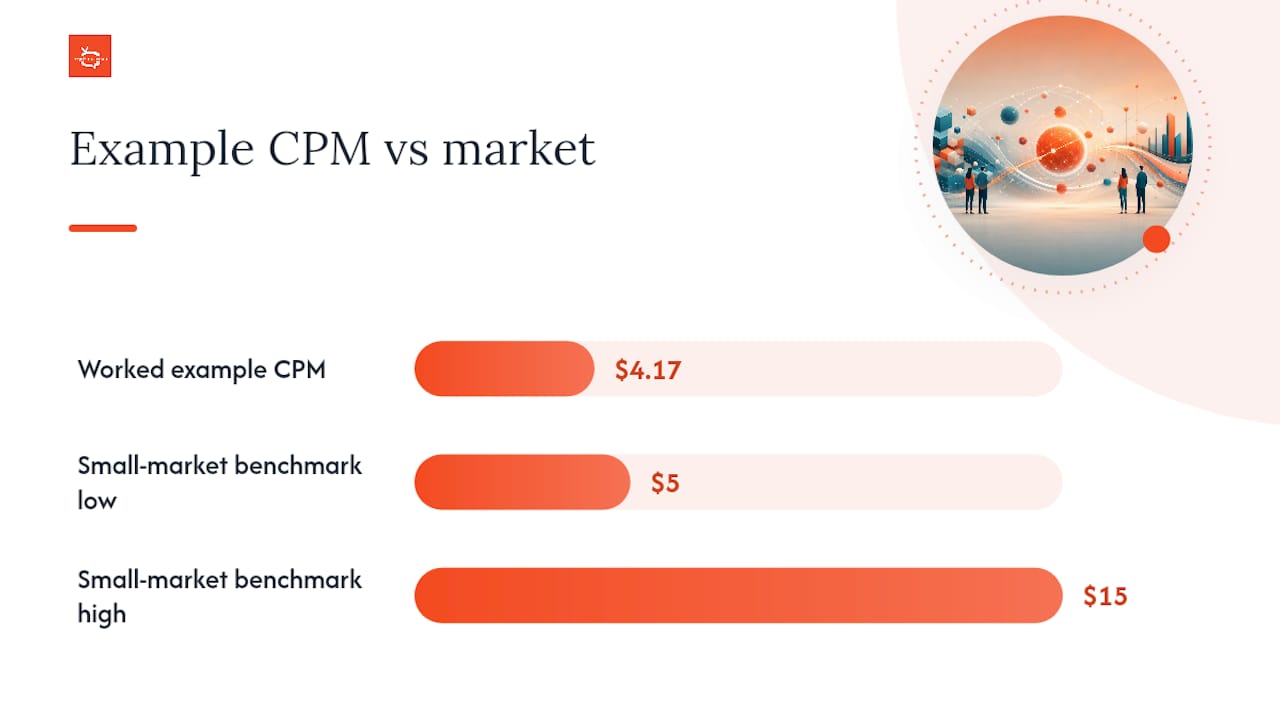
Here’s a worked example. Say a publisher quotes you $0.75 per play, and their data suggests each play reaches roughly 180 impressions (based on average dwell and foot traffic near the screen). Buying 500 plays over two weeks costs you $375. To convert that into CPM: your total impressions would be 500 plays × 180 impressions = 90,000 impressions. CPM = ($375 ÷ 90,000) × 1,000 = $4.17 CPM. That’s a strong rate compared to published benchmarks, which puts small-market digital billboards in the $5 to $15 CPM range.
The inventory type you’re buying changes how flexible those numbers are. Guaranteed managed buys lock in a fixed price and placement, which is safer for campaigns with a hard launch date. Open-market programmatic inventory lets prices float with demand, and some platforms list per-display pricing starting as low as $0.01 with no monthly minimum, which is worth knowing if your budget is thin and your timeline is flexible.
Realistic Rate Ranges by Screen Type
Budgeting gets a lot easier once you have real ranges to anchor against instead of guessing. These figures come from published market benchmarks, and every screen network will vary from them based on location and demand, but they give you a starting point for a proposal.
A single ultra-premium slot can blow past every number in that table. One published rate card lists £18,000 for a 10-second slot on a major Canary Wharf screen in London, a reminder that iconic locations play by their own rules entirely. Cinema advertising follows a different structure altogether, often priced per cinema, per week rather than per play. This makes it a poor direct comparison to digital signage CPM.
For context on where screen pricing sits relative to digital channels, display ads through networks like Google Display commonly run $3 to $10 CPM. That means a mid-tier digital billboard buy can cost double or triple what you’d pay for comparable online display reach, though the physical, unskippable nature of screen advertising is exactly why brands still pay the premium.
Treat every number above as a starting point for a conversation, not a locked-in figure. Screen pricing shifts with seasonality, local events, and how aggressively a publisher wants to fill unsold inventory that week.
What Actually Moves the Price Up or Down
Two screens in the same city, same format, same size, can carry wildly different rates. Here’s what explains the gap:
Location and traffic volume — a screen facing a commuter tunnel entrance beats one in a quiet office hallway, every time.
Dwell time — screens people stand near for 30+ seconds (elevator lobbies, checkout lines) often command more than screens people glance at for two seconds.
Audience demographics and quality — a gym network delivering health-conscious 25 to 45 year olds prices differently than a generic mall directory.
Daypart and peak-hour premiums — morning commute and evening prime-time windows routinely carry a 1.0 to 1.7x premium over off-peak hours, according to the DOOH pricing index.
Creative impact — full-motion video generally commands a higher rate than a static image on the same screen.
Exclusivity and adjacency — paying to be the only ad in a category, or to avoid running next to a competitor, adds cost.
Supply and demand seasonality — holiday retail season and major local events push prices up across the board.
Measurement and verification options — publishers offering proof-of-play data or third-party audits often charge more, because you’re paying for accountability.
Pro Tip: Ask about bundling off-peak hours with your peak-hour buy. Many publishers will drop your blended CPM significantly if you agree to fill unsold late-night or midday inventory alongside your prime slots, and your total reach barely suffers because off-peak impressions still count toward your campaign total.
How to Read a Rate Card and Push Back on the Price
Getting a rate card in your inbox is the easy part. Reading it correctly, and knowing what to challenge, is where most advertisers leave money on the table.
Run through this before you approve anything:
Confirm exactly what unit you’re buying (per-play, CPM, or flat fee) and get the definition in writing.
Ask how the publisher measures impressions, foot traffic sensors, third-party panel data, or estimates.
Request time-of-day pricing broken out, not just a blended average.
Verify current inventory availability for your target dates before you commit.
Ask for proof-of-play reporting or a sample measurement report from a past campaign.
Read the minimum buy requirement and cancellation window carefully.
Confirm whether you’re getting exclusivity in your category or running alongside competitors.
Ask about adjacency rules, will your ad ever run directly next to a competing brand?
Once you’ve read the card, negotiate. Publishers expect it, and list rates are rarely the final number for anyone buying more than a token amount of inventory.
Ask for a trial run or an off-peak test block before committing to a full campaign.
Request transparent, itemized impression logs rather than a single summary number.
Propose a performance tie: bonus plays if delivery falls short of the promised impression count.
Ask if creative production or setup fees can be waived for a multi-week commitment.
Push for a lower blended CPM if you agree to mix in unsold off-peak inventory.
A handful of direct questions to ask any publisher rep before you sign: How do you measure impressions? What’s your cancellation policy? Is pricing negotiable below a certain volume? Can I see a sample verification report? What’s included in the minimum buy? Are there setup or creative fees? What happens if my ad doesn’t run as scheduled? Is this inventory exclusive to my category? Can I test a smaller block before scaling up? What’s your standard proof-of-play format? Solid campaign measurement practices start with asking these questions before the first dollar changes hands, not after.
Rate Card, Media Kit, or Custom Proposal: Which One Do You Need?
Not every buy calls for the same document. Matching the right artifact to your situation saves both sides a round of back-and-forth.
Go straight to the rate card when you’re comparing several publishers quickly, running a smaller test campaign, or buying standard inventory with no special requirements. It’s the fastest path to a number you can put in a budget spreadsheet.
Ask for the media kit when you’re deciding whether the audience actually fits your brand, especially for a first-time buy with a new publisher. You want to see traffic data, demographic breakdowns, and ideally results from past advertisers before you commit real spend.
Push for a custom negotiated proposal when you need guaranteed inventory across multiple markets, want category exclusivity, or are buying at a scale that justifies bespoke terms (bundled dayparts, waived setup fees, performance guarantees). Anyone spending in the tens of thousands across multiple markets should skip the list rate entirely and go direct to a sales rep.
Accept the list rate as-is only for small, low-risk test buys. The moment your spend or your requirements grow, push for custom terms, most publishers have far more flexibility than their published card suggests.
Building a Rate Card That Actually Attracts Buyers
If you operate screens, whether a single retail network or a multi-venue chain, publishing a clear rate card is one of the fastest ways to convert casual inquiries into booked campaigns. Here’s what to include:
Clear placement IDs for every screen or zone, not vague location descriptions.
Format and technical specs, including resolution and orientation.
Unit pricing with the unit clearly labeled (per-play, CPM, or flat fee, never left ambiguous).
Impressions methodology, explain exactly how you calculate audience numbers.
Dayparts and peak premiums, spelled out with specific hours.
Minimum buy requirements appropriate to your network size.
Sample creative specs so advertisers know what formats you accept.
A clear booking process and contact path.
Reporting and verification options, even a simple proof-of-play log builds trust.
For a small network just getting started, a low minimum buy (a single week or a few hundred plays) does more to attract first-time advertisers than an aggressive volume floor. Consider listing per-play pricing alongside CPM estimates too, some advertisers think in per-slot terms, others only think in CPM, and giving both removes a step from their evaluation.
If you’re managing a retail or restaurant network, pairing your rate card with real in-store promotion examples helps advertisers picture what their creative will actually look like on your screens, which speeds up the decision.
How Publishing Platforms Handle Rate Cards and Monetization
Publishers running screen networks today increasingly manage their rate cards, inventory, and buyer relationships through a single platform rather than juggling spreadsheets and email quotes. The workflow typically looks like this: list your placements and specs, set your unit pricing (per-play or CPM), publish availability, and let advertisers browse or request a buy directly.
An ad exchange marketplace adds a second layer: instead of only selling your own inventory, you can cross-promote with other local businesses and generate revenue from screens that would otherwise sit idle during off-peak hours. That’s a meaningful shift from the old model, where unsold slots were just unsold slots.
One documented example of screen advertising’s impact: elite sports clubs using digital signage to promote class schedules and offers reported a 25% rise in class attendance after implementation, a result tied directly to how visible and timely the on-screen promotion was rather than to price alone.

Pro Tip: If you’re a publisher packaging inventory for sale, don’t lump every screen into one blanket rate. Segment by dwell time and traffic quality, then price your highest-dwell screens at a premium. You’ll sell out weaker inventory faster once it’s priced to match its actual reach instead of dragging down your best placements to a single average rate.
A few things worth building into your own network from day one:
Publish both per-play and CPM pricing so buyers can compare however they think.
Offer proof-of-play or basic impression reporting, even simple data builds buyer trust fast.
Keep your minimum buy low enough that first-time advertisers can test without a big commitment.
Where Rate Card Buyers and Sellers Go Wrong
The mistakes on both sides of a screen advertising deal are remarkably consistent. Buyers tend to treat the published list rate as fixed, when in reality most publishers expect negotiation past a certain spend level. That single assumption alone costs advertisers real money every year. The fix is simple: always ask if the rate is negotiable, especially for multi-week or multi-screen buys.
Buyers also skip the impressions methodology question far too often. If a publisher can’t explain how they count impressions, that number is closer to a guess than a metric, and you shouldn’t build your CPM math around it. Ask for the methodology before you accept the figure.
The third common buyer mistake is skipping verification entirely. Without proof-of-play data, you have no way to confirm your ad ran as scheduled. Build a reporting requirement into every contract, even a basic weekly log protects you.
On the seller side, publishing vague units is the biggest self-inflicted wound. A rate card that just says “$500/week” without specifying play count, loop length, or daypart makes advertisers nervous and slows down every negotiation. Spell out the unit, always.
Hidden fees are the second seller mistake. Setup charges, electrical costs, or creative production fees that only surface after a buyer commits create distrust that follows a publisher into future deals. List every fee upfront, even if the total looks less attractive at first glance.
The third seller mistake is failing to clarify dayparts. If your card lists one blended rate but peak hours actually cost more, say so before the advertiser signs, not after they see the invoice.
How Signstream Makes Rate Cards and Screen Monetization Simple
If you’re managing screens across a gym, restaurant, retail location, or franchise network, Signstream gives you a direct path to publish clear pricing and start monetizing inventory without hiring a sales team to manage every quote. Instead of stitching together spreadsheets, email chains, and guesswork about what a “play” even means, you get one platform that handles content updates, scheduling, and ad sales in the same place.

Signstream lets you deploy unlimited screens under one custom media network at no extra charge, which matters if you’re trying to build a rate card that scales without your costs scaling right alongside it. The built-in ad exchange marketplace lets you cross-promote with other local businesses and turn unsold screen time into real revenue, addressing the exact problem publishers run into when off-peak inventory just sits empty. Analytics track performance so you can adjust pricing based on actual results instead of guesswork, and the interface requires no technical background to run day to day.
If you’re ready to see how the platform manages screens, pricing, and monetization in practice, explore how the platform works. Publishers looking specifically to sell inventory through the ad exchange can go straight to set up monetization on the ad display network and start listing screens for cross-promotion today.
Frequently Asked Questions
What is a screen advertising rate card? A screen advertising rate card is a publisher’s published price list for placing ads on their screens, listing unit prices (per-play, CPM, or flat fee), minimum buys, and standard terms like cancellation windows and creative specs.
How do I convert a per-play rate into CPM? Multiply your number of plays by the estimated impressions per play to get total impressions, then divide your total cost by total impressions and multiply by 1,000. That gives you a CPM figure you can compare against published benchmarks.
Are rate card prices negotiable? Yes, almost always past a certain spend level. Publishers expect negotiation for multi-week bookings, bundled dayparts, or larger campaigns, and list rates function more as a starting point than a fixed price.
What’s a realistic CPM for digital billboards? Small-market digital billboards commonly run $5 to $15 CPM, major-metro placements run $12 to $30 CPM, and premium or iconic locations can reach $30 to $80 CPM or higher, depending on demand and exclusivity.
Why do two similar screens have such different prices? Location and traffic volume matter most, followed by dwell time, audience demographics, daypart premiums, and whether the placement offers exclusivity or verified measurement data.
Sources
Rate benchmarks in this guide draw from a mix of pricing indexes, platform pricing pages, and published rate cards. Here’s where to dig deeper:
Screen pricing shifts constantly with demand and season, so treat every figure here as a planning benchmark and always confirm live rates directly with the publisher before finalizing a budget.
Recommended
Comments