

Audit Ready Proof of Play Signage: 12 Month Retention
Proof of play is a time-stamped, per-play record tying a content item to a screen, time, and duration. It’s the delivery receipt advertisers, partners, and auditors accept in place of an estimate. For billing disputes, co-op reimbursements, and compliance reviews, that record is the difference between a defensible answer and a guess. Getting it right just requires player-level logging and reports your team can actually pull on demand.
TL;DR:
Ensuring proof-of-play logs are enabled before campaigns start and maintaining consistent naming conventions are critical for accurate tracking and dispute resolution.
Regularly testing offline recovery, sync processes, and tamper-evidence features helps prevent data gaps and substantiates report integrity.
Reports should include timestamped events, device status, and granular data like screen location, exposure count, and play duration to support audit and billing needs.
The industry relies on a patchwork of standards, so specifying report formats and fields in contracts improves interoperability and reduces confusion.
Implementing disciplined data retention policies and clear naming schemes enhances audit readiness and enables reliable ROI measurement from verified play data.
Table of Contents
What Is Proof of Play Signage, and How Does It Differ From Proof of Performance?
Proof of play (PoP) is an automated log that captures what content played, when, where, for how long, and how many times. A typical entry includes the filename or content ID, campaign name, timestamp, screen ID, location, and play duration. That level of detail is what makes PoP useful for co-op billing and reimbursement claims, where a brand partner wants proof their creative actually ran, not just that it was scheduled.
Proof of performance is a different animal. It answers whether anyone saw the content, using camera-based audience analytics, footfall counters, or dwell-time sensors. You need PoP any time a contract or audit asks “did this play?” You need proof of performance when the question shifts to “did anyone notice?”
A solid PoP record typically includes:
Media ID or filename and campaign name
Exact timestamp for each play event
Screen ID and physical location or zone
Play duration in seconds
Cumulative play count for the reporting period
Per-play granularity matters because aggregated summaries hide gaps. If a screen goes dark for six hours during a paid campaign, a monthly total might still look fine. A raw log exposes the hole immediately.
How Does Proof-of-Play Logging Work From Player to Report?
Every play event starts at the player. The device generates a log entry the moment content renders, capturing the timestamp, screen ID, and duration in real time. That event either transmits immediately to the content management system or, if the screen is offline, queues locally until connectivity returns.
Here’s the typical path an event takes:
Player renders content and writes a local log entry with media ID, timestamp, and duration.
Local cache holds the record if the network is down, preventing data loss during outages.
Sync and reconciliation push queued events to the CMS once the connection restores, matching offline plays to the correct time slots rather than dumping them all at reconnection time.
Storage layer commits the entry, ideally as an append-only log or with a cryptographic signature so records can’t be quietly edited after the fact.
API endpoints expose the data for dashboards, partner integrations, or scheduled exports.
This is also where raw versus aggregated data becomes a real decision point. Dashboards love summaries. Auditors don’t. A rolled-up “1,200 plays this month” number is fine for a quick glance, but if a partner disputes delivery, you need the individual timestamped entries to show exactly which plays happened and which didn’t.
Pro Tip: Test your offline recovery process before launch, not during a live campaign. Pull the network cable on a test screen, let it run for an hour, then reconnect and confirm every queued play event lands in the report with the correct original timestamp, not the reconnection time.
What Should a Proof-of-Play Report Include?
A usable report has to answer two questions at a glance: what ran, and can you prove it? Most platforms structure this around a standard set of columns: media name, media type, number of exposures, total exposure time, and how many distinct screens played the creative.
Device-level reporting matters just as much as content-level reporting. You want visibility into player uptime, offline periods, and any failed play attempts, since those gaps directly affect what you can bill or defend.
A report worth handing to a partner or auditor typically covers:
Media name, type, and campaign or content ID
Total exposures and cumulative play time per media item
Screen count and location breakdown
Per-play timestamps, not just daily or monthly totals
Device uptime, offline windows, and failed play flags
Export flexibility matters more than most operators expect until they’re asked for it. CSV works for spreadsheet analysis and quick partner shares. PDF suits formal audit packages where formatting and signatures matter. API access lets larger partners pull data programmatically into their own systems. Scheduled delivery through email, SFTP, or API removes the manual step entirely, which matters once you’re managing more than a handful of screens or advertisers.
Formatting for audit readiness comes down to consistency: use the same date format, screen ID scheme, and campaign naming convention every time, so a report from March lines up cleanly against one from September.
What Should Be on Your Proof-of-Play Configuration Checklist?
Most PoP failures trace back to setup, not the technology itself. Someone forgets to flip on logging before launch, or names files inconsistently, and three months later nobody can reconstruct what actually happened.
Run through this before any campaign goes live:
Enable logging before the first play, and confirm your retention policy holds records for at least 12 months, since brands and partners sometimes request historical data well after a campaign wraps.
Standardize naming and metadata across content, using a consistent scheme for campaign ID, run dates, and screen zone so records reconcile cleanly later.
Automate report delivery and archival through email, SFTP, or API, so exports happen on schedule instead of depending on someone remembering.
Monitor player health continuously, with alerts for offline screens, and document what content plays as a fallback when a screen loses connectivity.
Confirm tamper-evident logging is active, and keep a record of who accessed or exported reports, since that access trail matters as much as the play data itself in a dispute.
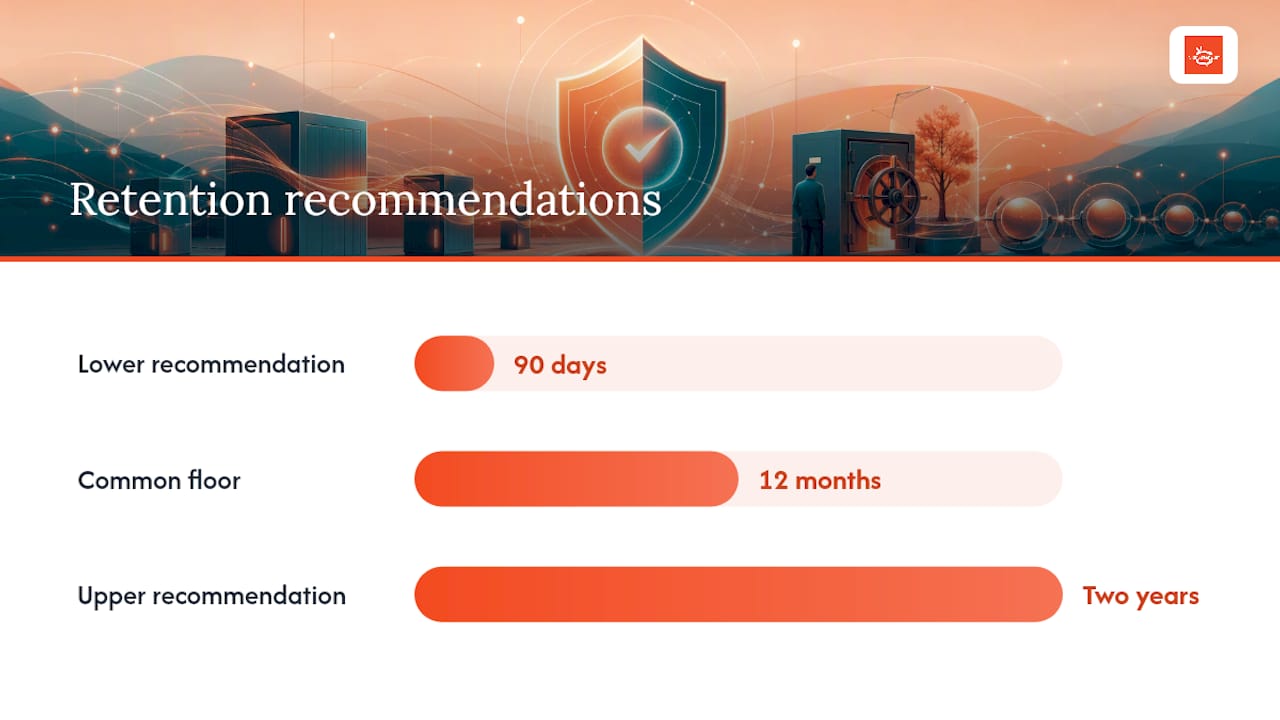
Retention discipline deserves its own emphasis. Recommendations range from 90 days to two years depending on contract terms, but a 12-month floor covers most co-op and compliance scenarios without forcing you to guess what a partner might ask for later.
Pro Tip: Audit your own naming conventions quarterly. A file named “promo_final_v3.mp4” tells an auditor nothing. A file named “SpringPromo2026_ZoneA_Q2” tells them everything they need in one glance.
How Do You Apply Proof of Play in Billing, Audits, and Testing?
Different use cases pull different fields from the same underlying log, so it helps to know what each scenario actually demands before a partner or auditor asks.
Co-op billing: Brands typically want media name, exposure count, total play time, and screen-level breakdowns delivered on a fixed schedule, often monthly, matching whatever cadence the reimbursement agreement specifies.
SLA disputes: When a partner claims underdelivery, per-play evidence settles it. Pull the raw timestamped log for the disputed window and show exactly which plays occurred, rather than arguing from a monthly summary that can’t isolate the gap.
Regulatory audits: Retention length, tamper evidence, and how quickly you can retrieve a specific record all get tested here. An auditor asking for six-month-old data shouldn’t turn into a scavenger hunt.
A/B placement testing: Aligning PoP timestamps with dwell-time or footfall data lets you compare how the same creative performs across screen zones, as long as your test controls keep everything else (time of day, screen type) consistent.
Each scenario rewards the same underlying habit: clean, granular, consistently formatted logs that don’t need translation before someone outside your team can read them.
How SignStream Implements Proof of Play in Real Deployments
Signstream builds per-play logging into the platform from the ground up, so device-level delivery confirmation happens automatically across every screen in a network, not as a bolted-on reporting layer. That data flows into exportable reports and feeds Signstream’s analytics dashboards, giving operators a clear view of what ran, where, and how often.
One elite sports club using Signstream’s platform and analytics reported a notable rise in class attendance after implementation, a result tied directly to being able to see what content actually drove engagement and adjusting accordingly.
If you’re setting up PoP reporting for the first time, prioritize these steps:
Confirm logging is active across every screen before your first advertiser campaign launches.
Set up scheduled report exports so partners receive data automatically instead of on request.
Review your content naming conventions against Signstream’s workflow recommendations before scaling to multiple screens or zones.
Check your access logs and tamper-evidence settings against Signstream’s security documentation at least once per quarter.
Which Industry Standards Govern Proof-of-Play Data?
No single universal protocol governs proof-of-play formatting the way, say, HTTPS governs secure web traffic. Instead, the industry relies on a patchwork of vendor conventions, contractual specifications, and guidance from bodies like the Digital Signage Federation, which collects best practices operators can reference when building reporting standards into their own operations.
What’s emerged as informal consensus looks fairly consistent across platforms: timestamped entries, unique screen identifiers, media identifiers tied to a content management system, and duration logged in seconds. Most CMS platforms that support programmatic or ad exchange integrations also expose this data through REST APIs, which has become the de facto interoperability layer even without a formal industry-wide spec.
Cloud integration patterns reinforce this. Vendor partnerships with major cloud providers typically standardize how PoP data gets stored and accessed, since cloud infrastructure imposes its own conventions around API structure and data retention that vendors build around rather than resist.
For advertisers working across multiple signage networks, this lack of a single formal standard means contract language matters more than it should. Specify exactly which fields a partner’s reports must include, in what format, and on what schedule, rather than assuming “proof of play” means the same thing to every vendor you work with. It usually doesn’t, at least not down to the field level.
What Metrics Should You Track From Proof-of-Play Data?
Raw play logs are only useful once you translate them into metrics that answer a business question. A handful matter more than the rest.
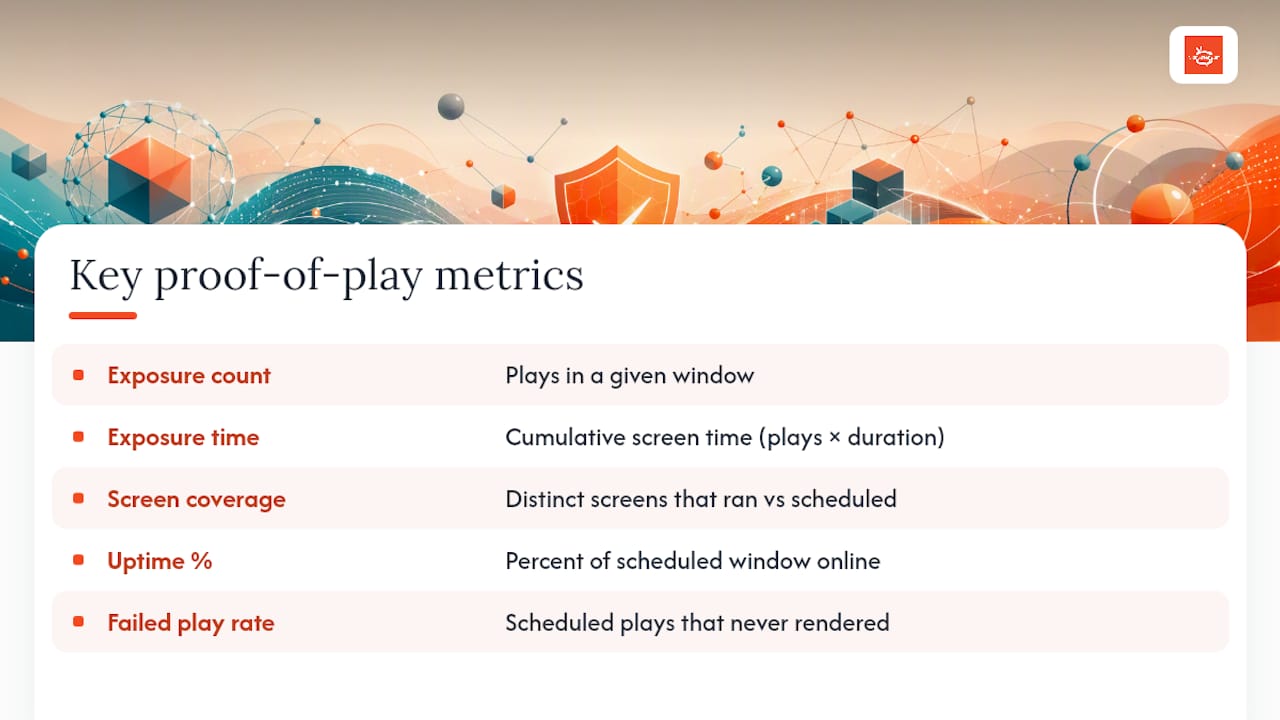
Exposure count is the simplest: how many times a piece of content played in a given window. It’s the baseline for co-op billing and the first number most partners ask for.
Total exposure time multiplies plays by duration, giving you a cumulative view of screen time delivered. This matters more than raw play count when creative lengths vary across a campaign.
Screen coverage tracks how many distinct screens ran a piece of content against how many were scheduled to. A gap here signals either a technical failure or a scheduling error, and it’s usually the first thing a partner will ask about if delivered impressions look low.
Uptime percentage measures how much of the scheduled window a screen was actually online and playing versus offline or in a fallback state. Low uptime on a specific screen or zone often points to a hardware or connectivity issue worth investigating before it affects billing.
Failed play rate flags content that was scheduled but never rendered, whether from a file error, a sync failure, or a player crash. Tracking this over time helps you catch systemic issues, like a specific screen model that consistently drops a certain file format, before they become a pattern across dozens of screens.
Together, these metrics turn a pile of timestamped log entries into something a manager can act on weekly rather than something only an auditor reads once a year.
How Does Proof of Play Affect Advertising ROI Measurement?
Proof of play changed the economics of digital-out-of-home advertising by replacing modeled estimates with verified delivery records. Instead of paying for a “rented window” of screen time based on projected audience reach, buyers now pay for logged displays, meaning the invoice matches what actually happened rather than what a media plan predicted.
That shift has real consequences for ROI measurement. When PoP data lines up with attribution signals, whether that’s footfall counts, point-of-sale data, or dwell-time analytics, advertisers can connect specific exposure windows to specific outcomes. Industry observers have pointed to this alignment as the mechanism that lets DOOH compete credibly against more heavily instrumented digital channels for ad budget.
For operators running an ad exchange or cross-promotion marketplace, this matters twice over. Verified play data justifies premium pricing for high-traffic screens and gives advertisers the confidence to renew placements, since they’re working from delivery receipts rather than promises. A partner considering attribution and revenue-impact reporting tools will find PoP data is the raw input those reports depend on entirely.
The practical takeaway: the more granular and reliable your PoP logs, the stronger a case you can make that your screens deserve a bigger share of an advertiser’s budget next cycle.
How Do You Troubleshoot Proof-of-Play Data Gaps?
Discrepancies almost always trace back to one of five causes, and working through them in order saves time.
Start with connectivity gaps. A screen that drops offline queues its play events locally, and if sync logic has a bug, some of those queued entries never make it to the CMS. Check the player’s local cache directly if a report shows fewer plays than the schedule called for.
Next, check clock drift. Players with unsynced internal clocks can log correct plays with wrong timestamps, which throws off any report that filters by time window. Confirm your players sync to a network time source regularly, not just at setup.
File naming inconsistencies cause a surprising number of “missing” plays that aren’t actually missing, just misfiled under a different campaign ID because someone renamed a file mid-flight. This is exactly why standardized naming conventions matter before launch, not after a dispute.
Aggregation errors happen when a dashboard rolls up raw logs incorrectly, often by double-counting plays that span a reporting boundary at midnight. When a summary number looks wrong, always cross-check it against the raw per-play log rather than assuming the raw data is the problem.
Finally, rule out hardware faults. A player that’s overheating or running failing storage can drop log-writing entirely, silently producing gaps that look like network issues on paper. If offline periods keep hitting the same screen, treat it as a hardware inspection candidate before you treat it as a software bug.
What the Data Actually Tells Operators to Prioritize
Most proof-of-play advice online reads like a feature list: enable this setting, export in this format, done. That framing undersells the real work. The evidence in this piece points to a simpler judgment call: reporting is only as good as the discipline behind it, and discipline means naming conventions and retention policy get decided before a campaign launches, not reverse-engineered after a partner asks a hard question.
The conventional advice also overweights the technology and underweights the process. Tamper-evident logs and API exports matter, but they’re table stakes on most modern platforms now. What separates operators who sail through an audit from those who scramble is whether they treated PoP as infrastructure from day one or bolted it on after the first billing dispute.
If you take one thing from this guide, make it the 12-month retention floor and the naming convention habit. Everything else, the export formats, the KPI dashboards, the troubleshooting steps, is easier to fix later. A messy first three months of unlabeled logs never gets easier to untangle.
— DKS
Turn Verified Playback Into a Revenue Stream With Signstream
Signstream gives you per-play logging and exportable reports built into the platform from day one, so you’re not retrofitting proof of play onto a system that wasn’t designed for it. You can update unlimited screens instantly from any device, and every play gets logged automatically, ready for the audit-ready reports this guide walks through.

Where Signstream goes further than a standard signage platform is monetization. Its ad exchange marketplace lets you cross-promote with other local businesses and turn verified playback data into actual revenue, not just a compliance record sitting in a folder. If you already generate foot traffic or screen time worth something to nearby advertisers, that verified log becomes your pitch deck.
Start a trial, connect your first screen, and see your first proof-of-play report generate automatically within a day. If you’re curious about the revenue side, the affiliate program details outline how operators earn from screens they already own.
Sources
For deeper technical grounding, the Digital Signage Federation maintains industry guidance on measurement and reporting standards worth bookmarking. NoviSign’s help center documentation breaks down report field structures in vendor-neutral detail. For hardware and installation context, A3M’s digital signage resources cover the display side of the equation that PoP logging depends on.
Recommended
Comments