

How Multi-Location Screen Networks Work in 2026

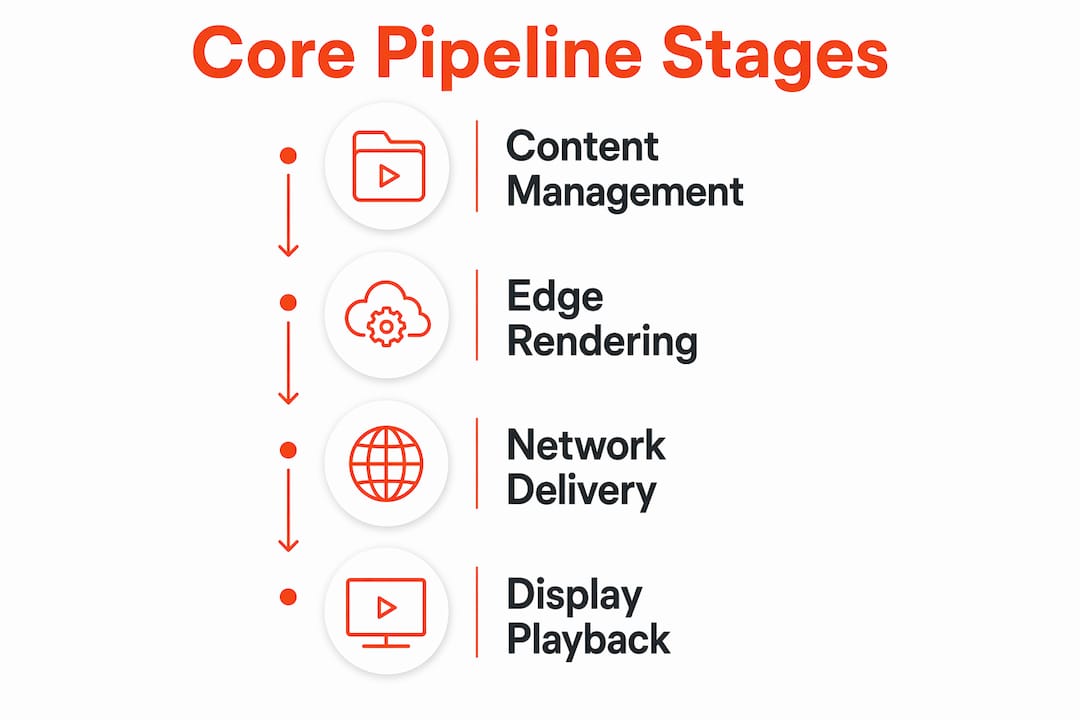
Multi-location screen networks are integrated digital signage ecosystems that centrally manage and deliver tailored content to numerous displays across multiple sites simultaneously. Understanding how multi-location screen networks work is the difference between running a fragmented patchwork of screens and operating a unified, revenue-driving media channel. The system connects four core components: a content management system (CMS), media players, network infrastructure, and display hardware. Together, they form an automated pipeline that pushes the right message to the right screen at the right time, whether you manage 5 locations or 500.
How multi-location screen networks work: the core technical components
Professional digital signage networks function as four-part automated pipelines, and every component has a specific, non-negotiable role. Skipping or cheapening any one of them creates the kind of failures that show up as blank screens during peak hours.
The content management system
The CMS is the central brain of the entire operation. It stores your media assets, defines playback schedules, assigns content to specific screens or groups of screens, and tracks what is playing where. Enterprise-grade platforms like Arya provide role-based fleet management with dashboards showing player status, content versions, and network connectivity across every location from a single interface. This means a marketing manager in Chicago can update a promotion running in Miami without touching a single device on-site.
Media players and edge rendering
Media players are the physical or software-based devices connected to each display. They receive content from the CMS, cache it locally, and handle all rendering on-site. Hardware accelerated rendering reduces power consumption to as low as 6W per player while supporting 24/7 operation with minimal human intervention. This is a critical distinction from consumer setups: enterprise players are purpose-built for continuous operation, not occasional use.

Network infrastructure and displays
The network layer delivers content efficiently across wide area networks (WAN) and VPN connections. Displays are the final output device, ranging from commercial-grade LCD panels to LED walls. Commercial displays differ from consumer TVs in brightness levels, duty cycles, and remote management capabilities.
Pro Tip: Always specify commercial-grade displays rated for 16/7 or 24/7 operation. Consumer TVs are not designed for continuous use and will fail faster in a business environment, creating unnecessary maintenance costs.
Key infrastructure requirements for a reliable multi-location display network include:
A cloud-based or on-premise CMS with multi-site support
Dedicated media players with local storage and hardware acceleration
Stable WAN or LTE backup connectivity at each site
Commercial-grade displays with remote power management
VLAN segmentation to isolate signage traffic from other business systems
How do networks manage content deployment and synchronization at scale?
Scaling beyond 10 locations exposes a fundamental problem with manual content management: it does not hold up. Pushing updates one by one to individual players creates latency, synchronization errors, and an operations burden that grows with every new site you add.
The solution is a shift from push-based to pull-based content delivery. With pull-based delivery, each media player periodically checks the CMS for updates and downloads only what has changed. This approach improves stability across diverse internet conditions and removes the need for a central server to actively manage every player connection.
Hierarchical group management
The most efficient multi-location networks organize players into a hierarchy: region, city, site, and zone. Hierarchical grouping enables global and local content overrides without individual player configuration. A national retailer can push a brand-wide promotion to all 300 locations while simultaneously allowing regional managers to schedule locally relevant content within their assigned zones. This structure reduces manual configuration time dramatically and keeps brand standards intact.
Here is how a typical content hierarchy maps to operational roles:
Level | Who controls it | Content type |
Region | Corporate marketing | Brand campaigns, national promotions |
City | Regional manager | Local events, city-specific offers |
Site | Store manager | In-store promotions, daily specials |
Zone | Automated rules | Dynamic data feeds, real-time pricing |
Bandwidth optimization through delta updates
Delta updates push only the changed bytes of a file rather than re-uploading the entire asset. This preserves bandwidth and prevents signage traffic from competing with point-of-sale systems or guest Wi-Fi during business hours. Scheduling heavy synchronization during off-peak hours, such as overnight, compounds this benefit.
Audit your current network bandwidth at each location before deployment.
Configure delta update intervals based on content change frequency.
Schedule large asset syncs between midnight and 6 AM local time.
Set up alerts for failed sync events so issues surface before opening hours.
Test playback continuity by simulating a network drop at each site type.
Pro Tip: If your locations span multiple time zones, configure sync schedules per region rather than using a single global window. A 2 AM sync in New York is 11 PM in Los Angeles, which may still be peak operating hours for some venues.
What are the operational benefits and challenges of multi-site screen networks?
The clearest benefit of multi-location display technology is consistent brand messaging delivered without manual effort at each site. Every screen reflects the same campaign, the same pricing, and the same visual standards, regardless of whether a location is in a flagship city or a secondary market. Signstream clients, including elite sports clubs and retailers, have reported measurable outcomes such as a 25% rise in class attendance after deploying coordinated screen networks.
Beyond brand consistency, the real power lies in localized customization. Data-driven content templates pull from live sources such as weather feeds, inventory systems, or loyalty program data to display contextually relevant messages. A gym in Phoenix can show hydration reminders during a heat advisory while a location in Seattle shows indoor class schedules. The CMS handles this automatically once the templates and data connections are configured.
Multi-location signage also enables unified storytelling across screens at scale. The EON Network, developed by Watchfire and WOW, manages 60 or more high-resolution displays across 10 or more sites as a single medium, using patented synchronization to create immersive, city-wide visual experiences. This level of coordination opens marketing opportunities that static signage or disconnected screens simply cannot match.
The operational challenges are real, though. The most common failure points include:
Network latency causing content to play out of sync across locations
Bandwidth saturation during simultaneous updates disrupting other business systems
Synchronization errors when players run different firmware or content versions
Black screen failures that go undetected for hours without automated monitoring
Inconsistent hardware across locations creating unpredictable rendering behavior
Each of these is solvable with the right architecture and monitoring setup, covered in the next section.
How does network architecture affect reliability and uptime?
Network design is where most multi-location screen deployments succeed or fail at scale. Flat network architectures, where all devices share the same broadcast domain, cause broadcast storms that degrade performance across every connected device. The fix is straightforward: segment signage traffic into dedicated VLANs with quality-of-service (QoS) rules and firewall policies that prioritize display traffic without interfering with POS or corporate systems.
Proactive alerting prevents black screen failures that manual reporting consistently misses. Integrating your signage CMS with IT monitoring tools such as Zabbix or ServiceNow creates automated alerts when a player goes offline, a content version mismatches, or network connectivity drops below threshold. This shifts your team from reactive troubleshooting to scheduled maintenance, which is a significant operational improvement at any scale.
Offline-first design as a reliability baseline
Enterprise signage players cache content locally in an offline-first design, meaning playback continues uninterrupted even when the network connection drops. The player stores all scheduled content on local storage and syncs changes only when connectivity is restored. This design is non-negotiable for locations with inconsistent internet, such as rural sites, basement venues, or markets with unreliable ISPs.
Architecture approach | Reliability | Scalability | Management complexity |
Flat network, push-based | Low | Poor | High |
VLAN-segmented, pull-based | High | Strong | Moderate |
VLAN + offline-first + monitoring | Very high | Excellent | Low (automated) |
Role-based access control adds another layer of operational stability. When regional managers can only modify content within their assigned hierarchy, the risk of accidental global overrides drops to near zero. Hierarchical content control reduces manual configurations while supporting regional autonomy within defined brand guardrails.
Pro Tip: Before going live across all locations, run a tabletop exercise simulating an ISP outage at your highest-traffic site. Verify that offline caching kicks in correctly and that your monitoring system generates the right alert within five minutes.
Key takeaways
Multi-location screen networks deliver consistent, scalable, and reliable digital signage through four integrated components, pull-based delivery, hierarchical group management, and proactive monitoring.
Point | Details |
Four-part pipeline | CMS, media players, network infrastructure, and displays each serve a distinct, required role. |
Pull-based delivery scales | Switching from push to pull updates reduces latency and synchronization errors across large networks. |
Hierarchical grouping saves time | Organizing players by region, city, site, and zone eliminates individual player configuration at scale. |
Delta updates protect bandwidth | Pushing only changed file bytes prevents signage traffic from disrupting POS or guest Wi-Fi systems. |
Offline-first design prevents downtime | Local content caching keeps screens running during network outages without any manual intervention. |
What I have learned running multi-location screen networks
The biggest mistake I see marketing and operations teams make is treating screen network management as a content problem when it is actually an infrastructure problem. Teams spend weeks perfecting creative assets and then deploy them on a flat network with no monitoring, no VLAN segmentation, and no offline caching. The screens look great on day one and start failing silently by week three.
The shift to pull-based updates is not optional at scale. I have watched organizations with 50-plus locations try to maintain push-based workflows and spend more time troubleshooting sync errors than actually managing content. The moment you move to a pull architecture with delta updates and off-hours scheduling, the operational burden drops sharply.
Hierarchical group management is the other piece most teams underestimate. The ability to set a national campaign at the top level and let regional managers customize within guardrails is not just efficient. It is the only way to maintain brand consistency without micromanaging every location. Platforms that support this natively, rather than requiring workarounds, are worth the investment.
Finally, monitoring is not optional once you pass five locations. A black screen at a flagship store during a product launch is a brand failure, not just a tech failure. Integrating your CMS alerts with tools your IT team already uses means problems get fixed before customers notice them.
— DKS
How Signstream simplifies multi-location screen network management

Signstream is built specifically for the operational reality of managing screens across multiple locations. The cloud-based platform gives you centralized content control, group-based scheduling, and real-time monitoring from any device, without requiring technical expertise on-site. You can deploy content to unlimited screens, assign regional managers their own access levels, and track performance through built-in analytics. Signstream also includes an ad exchange marketplace, so your screens can generate revenue by cross-promoting with other local businesses. If you are ready to see what a properly structured multi-location screen network looks like in practice, explore Signstream’s pricing plans and get started today.
FAQ
What is a multi-location screen network?
A multi-location screen network is an integrated digital signage system that centrally manages and delivers content to displays across multiple physical sites from a single platform. It connects a CMS, media players, network infrastructure, and displays into one automated pipeline.
How does content get updated across all locations at once?
Content updates are delivered through pull-based synchronization, where each media player checks the CMS for changes and downloads only updated files. Delta updates push only changed bytes, reducing bandwidth use and keeping all screens current without manual intervention at each site.
What happens to screens when the internet goes down?
Enterprise media players use offline-first caching to store all scheduled content locally, so playback continues uninterrupted during network outages. The player syncs any new content automatically once connectivity is restored.
How do large networks prevent one location’s content from overriding another?
Hierarchical group management assigns content control at region, city, site, and zone levels, so each manager can only modify content within their designated scope. This structure maintains global brand standards while allowing localized customization where needed.
What network setup does multi-location digital signage require?
Signage traffic should be segmented into dedicated VLANs with QoS rules to prevent interference with POS systems or guest Wi-Fi. Flat network architectures cause broadcast storms at scale, so VLAN segmentation combined with offline-first players and automated monitoring is the recommended baseline for any multi-site screen deployment.
Recommended
Comments