

Best StreamOnScreen.com Alternatives for Business Signage

For businesses that need unlimited, monetizable multi-screen digital signage, Signstream is the recommended alternative to StreamOnScreen. It covers every dimension that matters to operators: unlimited screen deployment at no extra charge, a built-in ad exchange marketplace, real-time analytics, and an interface that requires zero technical expertise to manage.
Best for: Gyms, restaurants, retail chains, franchises, and clubs managing multiple locations
Top reasons to choose Signstream: Unlimited screens, native ad monetization, and fast onboarding
Next step: Book a demo at signstream.net to see a live deployment and confirm it fits your setup
Table of Contents
How do StreamOnScreen.com alternatives compare at a glance?
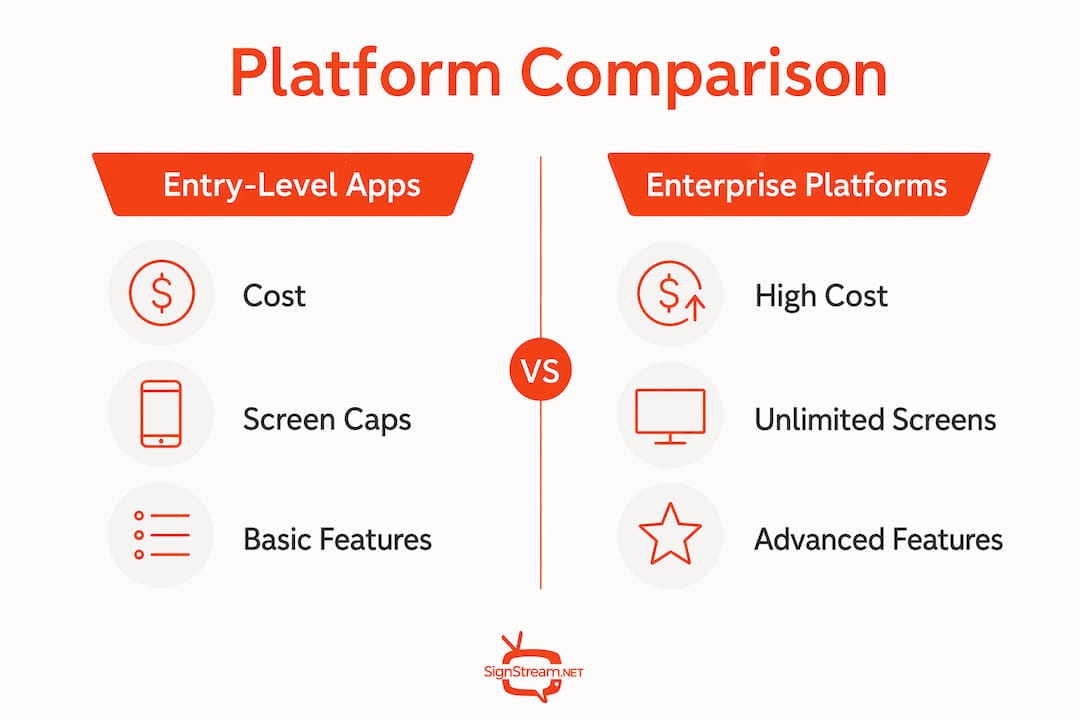
Dimension | Signstream | Entry-level cloud apps | Enterprise signage platforms |
Recommended for | Multi-location businesses needing monetization + scale | Single-location or small pilots | Large corporate or broadcast networks |
Pricing & trial | Tiered subscription, free trial available | Low monthly flat fee, limited trial | Custom quote, long sales cycle |
Screens / scaling | Unlimited screens, no per-screen surcharge | Often capped at 1–5 screens | Unlimited but expensive at scale |
Monetization / ad exchange | Native ad marketplace, cross-promotion tools | None or manual ad insertion | Limited; requires third-party ad server |
Analytics & reporting | Built-in KPI dashboard, real-time data | Basic play-log only | Advanced but complex to configure |
Ease of use / deploy | No technical expertise needed, browser + mobile | Simple but feature-limited | Steep learning curve, IT-dependent |
Hardware compatibility | Smart TV apps, media players, hardware-agnostic | Limited device support | Broad but proprietary hardware preferred |
Templates & content tools | Dynamic templates, QR codes, scheduling | Basic templates | Custom builds, agency-dependent |
Integrations & scheduling | CMS, CRM, social media, API access | Minimal integrations | Deep API but complex setup |
Support & onboarding | Guided onboarding, responsive support | Self-serve only | Dedicated account manager, slow to start |
Signstream sits in the middle of this spectrum in the best possible way: it scales like an enterprise platform but deploys like an entry-level app. The ad display network is the feature most alternatives simply do not offer natively.
What practical differences should you expect between platforms?
Monetization and ad exchange
Most cloud signage apps treat monetization as an afterthought. Signstream builds it into the core product: a native ad marketplace lets you cross-promote with other local businesses and sell ad inventory directly from your screens. Platforms without this force you to manage ad insertion manually, which adds staff time and reduces revenue consistency.
Scaling and screen limits
Entry-level apps frequently cap deployments at a handful of screens. Signstream charges per channel, not per screen, so adding a second TV in a gym or a third display in a restaurant lobby does not trigger a new fee. That model matters when you are managing 20 or 200 locations.

Analytics and KPIs
A basic play-log tells you content ran. Signstream’s dashboard tells you what performed, when, and against which KPIs. That distinction is what lets a fitness club confirm a 25% attendance lift rather than just assume the screens are working.
Ease of use and onboarding
Browser and mobile control means any manager can update content from a phone without calling IT. Enterprise platforms often require on-site configuration and dedicated training, adding weeks to deployment.
Hardware compatibility
Signstream’s smart TV apps make it hardware-agnostic. You can run it on existing screens without buying proprietary media players, which keeps upfront costs low.
Templates, scheduling, and integrations
Dynamic QR codes, social media feeds, and CMS connections are built in. Scheduling lets you push different content to different screens at different times automatically.
Quick category guide:
Entry-level cloud apps: Best for single-location pilots with no monetization need
White-label OTT platforms: Best for businesses that need branded subscription video channels (a different job than in-venue signage)
Enterprise signage suites: Best for large corporate networks with dedicated IT teams and custom compliance requirements
Pro Tip: If a vendor cannot show you a live ad marketplace demo during the sales call, assume the monetization feature is underdeveloped or not yet production-ready.
How do you choose the right digital signage platform?
Decision checklist
Monetization first. If revenue from screens is part of your business model, confirm the platform has a native ad marketplace before evaluating anything else. A bolt-on solution adds complexity and cost.
Unlimited screens or per-screen pricing? Per-screen fees compound fast across multiple locations. Confirm the pricing model in writing before signing.
Analytics depth. Ask for a demo of the reporting dashboard, not a screenshot. You need to see whether the platform tracks the KPIs that matter to your business (attendance, dwell time, conversion).
Hardware flexibility. Confirm the platform runs on your existing screens. Replacing hardware to fit a platform’s requirements adds significant upfront cost.
Integration readiness. If you use a CRM, POS system, or social media scheduler, ask whether the platform connects via API or native integration.
Security and compliance. Confirm data encryption, user access controls, and any relevant compliance certifications before committing.
Support SLA. Know the response time for critical issues before you deploy across multiple locations.
Questions to ask vendors in demos
What is the exact pricing model — per channel, per screen, or per location?
Does the platform include a native ad marketplace, and what are the revenue-share terms?
Are there any screen or location limits at my subscription tier?
What APIs are available, and is there documentation I can review before signing?
What is the typical onboarding timeline for a deployment of my size?
What is the uptime SLA, and how are outages communicated?
Can I export my analytics data, and in what format?
Red flags: Contract lock-ins longer than 12 months without a pilot period, hidden per-screen fees that appear only at renewal, no native ad marketplace, and reporting limited to a basic play-log.
Typical rollout timeline and cost ranges
Deployment size | Screens | Typical timeline | Ballpark monthly cost |
Small | 1–10 | 1–3 days | Low (entry-tier subscription) |
Mid-size | 10–100 | 1–2 weeks | Mid-tier subscription |
Enterprise | 100+ | 2–6 weeks | Custom or volume pricing |
Pro Tip: Run a 30–60 day pilot that includes ad placement rules, inventory controls, and revenue reporting before committing to a full rollout. That window is enough to validate monetization ROI against a specific KPI like attendance or foot traffic.
What results do Signstream clients actually see?
A fitness club using Signstream’s targeted in-venue promotions and scheduling reported a significant increase in class attendance after implementation. The club used Signstream’s scheduling tools to push class-specific promotions to screens at peak check-in times, then tracked attendance changes through the analytics dashboard.
That result is measurable because the platform ties content performance to real KPIs, not just playback logs. During your demo, ask the Signstream team to walk through the analytics view for a similar use case and confirm which metrics are tracked out of the box.
Proof point: 25% class attendance increase for a fitness/club client
Tactic used: Targeted scheduling of class promotions at peak check-in times
Measurement tool: Signstream’s built-in analytics dashboard
What is the final verdict on StreamOnScreen.com alternatives?
Signstream is the recommended alternative for business owners who need unlimited screens, native ad monetization, and analytics without a long IT-dependent setup. If your priority is a branded subscription video channel for consumer audiences, a white-label OTT provider is a better fit for that specific job. If you are running a 500-screen corporate network with a full IT department, an enterprise suite may match your compliance requirements.
For the majority of operators managing gyms, restaurants, retail locations, clubs, or franchise networks, Signstream covers the full requirement set at a price that does not require a procurement committee.
Two immediate next steps:
Book a demo at signstream.net and ask to see the ad marketplace and analytics dashboard live
Bring the vendor questions from the buying guide above into that demo to confirm pricing, screen limits, and API availability before you commit
What does Signstream’s pricing model look like?
Signstream uses a tiered subscription model billed per channel, with both monthly and yearly options. A free trial is available, giving you time to test the platform across real screens before committing. Yearly plans typically offer a lower effective monthly rate than month-to-month billing. Pricing details are listed at signstream.net.
Does Signstream support unlimited screens?
Yes. Signstream deploys across unlimited screens at no extra per-screen charge. You pay per channel, not per display, so scaling from 5 screens to 50 does not change your subscription tier. That model is a direct contrast to entry-level apps that cap screen counts or charge incremental fees per device.
How does the ad exchange marketplace work?
Signstream’s ad marketplace lets you monetize your screens by selling ad inventory to local businesses or cross-promoting with nearby venues. You control placement rules and inventory, and revenue reporting is built into the dashboard. Businesses that want faster ROI from their screen network benefit most from a native marketplace because it removes the manual work of sourcing and inserting ads independently.
What analytics does Signstream provide?
Signstream tracks content performance against real KPIs through a built-in dashboard. You can monitor which content ran, when, and how it correlated with measurable outcomes like attendance or foot traffic. Data export is available for teams that want to pull results into external reporting tools.
How quickly can you set up Signstream?
Most small deployments (1–10 screens) go live within 1–3 days. The platform runs in a browser and on mobile, so no IT team is required. Smart TV apps mean you can install on existing hardware without buying new media players. Guided onboarding support is included.
Which hardware works with Signstream?
Signstream is hardware-agnostic. Smart TV apps cover most modern commercial displays, and the platform also supports standard media players. You are not locked into proprietary hardware, which keeps upfront costs manageable and gives you flexibility when replacing or adding screens.
Where does Signstream work best?
Signstream is purpose-built for physical business environments: gyms and fitness clubs, restaurants and cafes, retail stores, franchise networks, offices, clubs, and tourism venues. The combination of real-time content updates, scheduling, and the ad marketplace makes it particularly effective for multi-location operators who need consistent messaging across sites and want to generate revenue from their screen network.
What should you ask vendors when evaluating alternatives?
Focus on five areas: pricing structure (per screen vs. per channel), ad marketplace availability and revenue terms, screen and location limits, API and integration options, and support response times. The vendor questions listed in the buying guide section above cover each of these in detail. Use them in every demo, not just with Signstream.
How long does deployment take, and what does it cost?
Small deployments typically go live in 1–3 days. Mid-size rollouts covering 10–100 screens usually take 1–2 weeks, accounting for content setup and scheduling configuration. Enterprise deployments of 100+ screens can run 2–6 weeks depending on integration complexity. Costs scale with subscription tier; Signstream’s per-channel model keeps costs predictable as you add screens. See the deployment table in the buying guide section for a quick reference.
What integrations does Signstream support?
Signstream connects with CMS platforms, CRM systems, social media feeds, and third-party scheduling tools via API. That means content can pull from existing data sources automatically, reducing manual updates. For franchise operators or multi-location retailers, API access is the feature that most directly reduces staff time during ongoing content management.
How secure is Signstream?
Signstream uses encrypted data transmission and role-based user access controls, so only authorized team members can update content or access analytics. For businesses in regulated industries or those handling customer data on-screen, confirm specific compliance certifications directly with the Signstream team during your demo.
How flexible is Signstream for custom content?
Signstream supports dynamic templates, branded channel customization, and interactive ad formats. You can build a content layout that matches your brand without hiring a designer for every update. Dynamic QR codes let you connect on-screen content to digital actions like menu views, class bookings, or promotional landing pages.
What content management and scheduling features does Signstream include?
Signstream’s scheduling tools let you assign specific content to specific screens at specific times, automatically. A gym can push a morning class promo to lobby screens at 6 AM and switch to a retail offer at noon without any manual intervention. Content libraries, playlist management, and real-time updates from any device round out the management toolkit.
Key Takeaways
Signstream is the strongest StreamOnScreen.com alternative for business operators who need unlimited screens, native ad monetization, and measurable analytics without a complex IT setup.
Point | Details |
Top recommendation | Signstream covers unlimited screens, ad marketplace, and analytics in one subscription. |
Critical selection criteria | Confirm monetization, screen limits, and API access before signing any platform contract. |
Red flag to avoid | Per-screen fees and no native ad marketplace signal a platform not built for multi-location operators. |
Proven client result | A fitness club saw a 25% class attendance increase after deploying Signstream’s targeted scheduling. |
Signstream next step | Book a demo at signstream.net to see the ad marketplace and analytics dashboard live before committing. |
The part most buyers overlook when switching platforms
Most operators evaluating StreamOnScreen.com alternatives spend the bulk of their time comparing interface screenshots and pricing tiers. That is the wrong order of operations. The feature that separates a signage platform from a genuinely useful business tool is whether it can generate revenue, not just display content.
A screen that only shows your own promotions is a cost center. A screen connected to a native ad marketplace, where local businesses pay to reach your audience, becomes a revenue line. That shift in framing changes the ROI calculation entirely, and it is the reason Signstream’s ad exchange is worth more attention than most buyers give it during demos.
The second overlooked factor is the pricing model shape. Per-screen fees feel manageable at five screens and punishing at fifty. Confirming the scaling model before you sign is not a detail; it is the decision that determines whether the platform stays affordable as your business grows.
See Signstream in action before you decide
Screens that pay for themselves are not a marketing claim. Signstream’s ad display network gives your locations real monetization tools: local ad inventory, cross-promotion with nearby businesses, and revenue reporting built into the same dashboard you use to manage content.

A demo takes under 30 minutes and covers the full platform: unlimited screen deployment, the ad marketplace, analytics, and scheduling. You will leave knowing exactly what a pilot would look like for your locations and what KPIs to track in the first 30–60 days. Start at signstream.net to book your session.
Sources and further reading
The claims in this article draw on Signstream’s published platform documentation, client outcome data, and third-party market context. The links below are the primary sources used and are worth reviewing if you want to dig deeper before your demo.
How Signstream’s digital signage platform works — platform features, unlimited screen deployment, and client proof points
Signstream ad display network — ad marketplace capabilities and monetization tools
Signstream vs. ScreenCloud comparison — where Signstream fits versus other cloud signage approaches
Top 5 ScreenCloud alternatives — broader shortlist context for buyers evaluating multiple platforms
Affordable digital signage for small teams — guidance for smaller deployments and quick-start hardware options
StreamOnScreen company profile — Tracxn — background on StreamOnScreen and the competitive field
SaaSHub: ScreenStream alternatives — market breadth context and community-reviewed alternatives
NerdWallet: how to pick a streaming service — selection criteria framework applied to business platform decisions
This article is general information for business decision-makers evaluating digital signage platforms. Confirm current pricing, features, and compliance details directly with vendors before making a purchase decision.
Recommended
Comments