

How Brand Standards Apply to Digital Screens Effectively

Most brand managers assume their existing style guide covers digital signage. After all, the fonts, colors, and logo rules are already documented. But understanding how brand standards apply to digital screens reveals a far more complex challenge. Digital signage governance, the operational system that controls who publishes what content, when, and with what approval, requires its own framework entirely. Print standards tell you what your brand should look like. Digital signage governance tells you how to make sure it actually does, across dozens or hundreds of screens, in real time, without losing control.
Table of Contents
Key takeaways
Point | Details |
Digital screens need their own standards | Traditional brand guidelines do not account for screen brightness, viewing angles, dynamic content, or governance requirements. |
Governance depth matches screen risk | Customer-facing and regulated screens require stricter approval workflows than internal-only displays. |
Locked templates enforce brand rules | Restricting editable fields in your CMS turns brand standards from suggestions into enforced constraints. |
Hardware affects brand fidelity | Ambient light sensors and high-nit displays are required to maintain accurate color reproduction in variable lighting. |
Proof-of-play closes the loop | Approved content is not the same as verified content. Proof-of-play confirms what actually ran on each screen. |
How brand standards apply to digital screens
The core challenge is environmental. A logo printed on a banner behaves predictably. The same logo displayed on an outdoor screen at noon competes with direct sunlight, variable glare, and ambient heat distortion. Indoor screens in lobbies, gyms, and restaurants face different conditions: varying distances, multiple viewing angles, and content scheduled across different times of day.
Digital screens also introduce dynamic complexity that static media never faces. Content changes. Schedules shift. Multiple team members at different locations can publish to screens, sometimes without central oversight. That last point is where brand consistency in digital environments most often breaks down. It is not usually a design problem. It is a governance problem.
Here is what makes branding for digital media uniquely demanding:
Brightness and legibility: Screens in high-ambient-light environments require significantly higher brightness levels to maintain readable, brand-accurate visuals.
Color profile control: RGB color rendering on screens differs from CMYK print. Without profile settings built into your CMS templates, colors drift from brand specifications.
Multiple screen contexts: A retail floor display, a drive-through menu board, and a corporate lobby screen all represent your brand differently and require different standards applied at the template level.
Real-time publishing risk: Unlike a print run, digital screens can go off-brand within seconds if governance is absent. Shadow publishing, where local staff upload unapproved content, is a real and common problem.
Pro Tip: Build a separate digital addendum to your brand style guide that addresses screen-specific variables: minimum contrast ratios, approved brightness ranges, safe zones for text near screen edges, and color profiles for RGB display.
Inconsistency across digital touchpoints erodes brand trust and measurably harms engagement and revenue. Customers perceive every screen as part of your brand. One off-brand slide on a waiting room display is enough to create doubt.
Governance frameworks for screen networks
Think of digital signage governance as an operating system for content control. It governs who can publish, what they can change, and what approval path their content must follow before it reaches a screen. Without this structure, brand standards exist only on paper.
The starting point is screen risk classification. Not every screen carries equal brand exposure or regulatory sensitivity. An internal employee bulletin board operates at low risk. A customer-facing menu board at a regulated franchise location operates at high risk. Governance depth should be proportional to screen risk, not to how senior the editor is.
Screen type | Risk level | Governance model |
Internal employee displays | Low | Decentralized: local editors publish with minimal review |
Corporate lobbies and event screens | Medium | Hybrid: regional approval before publishing |
Customer-facing retail and menu boards | High | Centralized: brand team approves all content |
Regulated environments (healthcare, finance) | Very high | Full audit trail, legal and brand co-approval required |
For most mid-size organizations managing between a few hundred and a few thousand screens, a hybrid governance model is the practical default. Corporate sets the locked template structure and brand assets. Regional teams manage scheduling and localized content within those boundaries. Local staff can only edit pre-approved fields.
This is not just a policy structure. It must be enforced inside your content management system through role-based access control (RBAC). Policies without technical enforcement create audit gaps. When a local manager can overwrite a brand-locked logo zone because the CMS has no restriction in place, the governance framework fails regardless of what the style guide says.

Pro Tip: Require mandatory audit logging for every content publish event across your screen network. Logs should capture who published, what was published, to which screens, and when. This is not just for compliance. It is your first line of defense for identifying brand drift before it spreads.
Technical and design controls for brand compliance
Governance tells you who can do what. Technical controls make sure the content itself stays on-brand regardless of who builds it. The most reliable method is locking brand zones inside CMS templates. When locked brand zones restrict editing to pre-approved areas, the logo, primary color fields, and typography become fixed constraints rather than guidelines. Editors can only modify localized content fields, such as location-specific promotions, hours, or event names.
Here is what a well-structured digital signage template locks versus exposes:
Locked zones: Logo placement, primary and secondary brand colors, approved typefaces, background patterns, layout grids, and legal disclaimers.
Editable zones: Local event names, pricing, rotating promotional images from an approved asset library, and scheduling time slots.
This distinction is the difference between brand standards functioning as advice and functioning as architecture. When brand rules are built into the template structure itself, no amount of local creativity can produce an off-brand result.
Hardware is an equally important factor. Outdoor signage at 3,500-nit brightness combined with ambient light sensors preserves brand visuals under varied environmental conditions. Without adequate brightness and adaptive sensors, your brand colors shift. What appears as a rich, accurate blue in your template can look washed out and gray on a screen facing a south-facing window at midday.
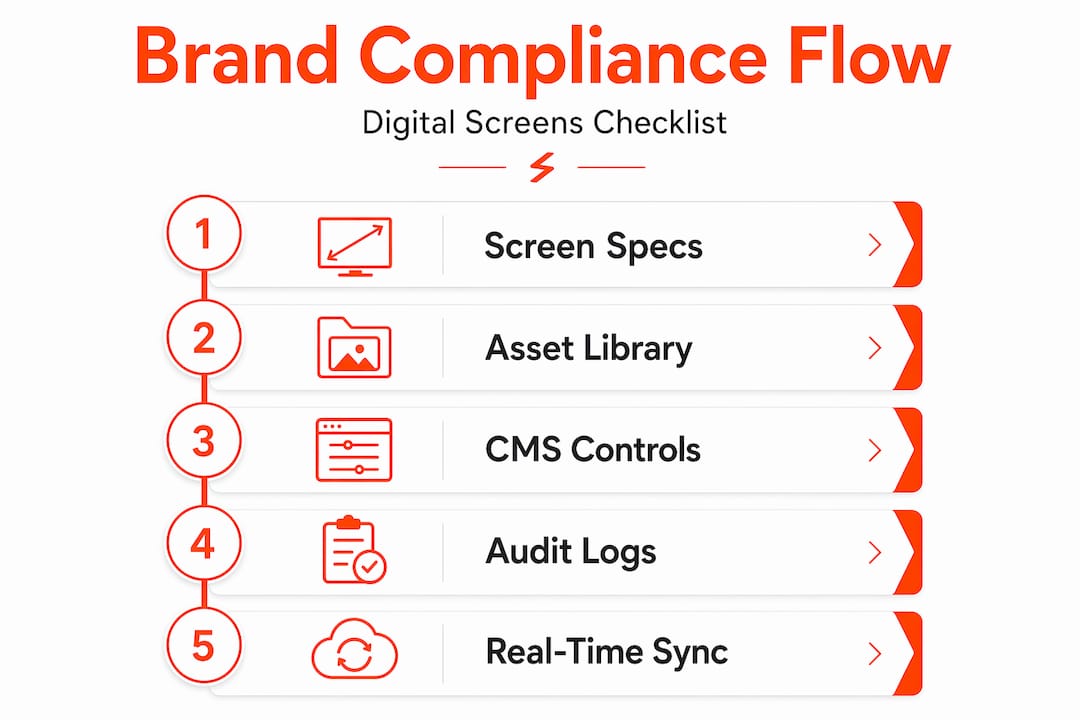
Your digital branding guidelines should specify:
Specification | Recommended standard |
Indoor brightness | 400 to 700 nits |
Outdoor or high-ambient | 2,500 to 5,000 nits |
Color profile | sRGB for screen rendering |
Minimum contrast ratio | 4.5:1 for text legibility |
Safe zone margin | 10% buffer from all screen edges |
Pair hardware specs with an approved digital asset library. When editors have immediate access to pre-approved images, animations, and layouts in a centralized repository, the temptation to use off-brand assets disappears because the right ones are easier to find.
Operational best practices across distributed networks
The biggest brand consistency failures happen at the operational level, not the design level. A well-designed template means nothing if your team structure does not reinforce it. Here is how to build operational accountability into your digital screen network:
Define explicit scope boundaries. Document what corporate, regional, and local teams are each allowed to edit and publish. Ambiguity creates gaps. Someone always fills a gap with something off-brand.
Assign digital touchpoint ownership. Every screen location should have a named owner responsible for content accuracy and brand compliance. Shared responsibility is no responsibility.
Centralize your brand assets. Digital asset management platforms and digital brand hubs prevent version-control failures. When a local team pulls last year’s logo from a shared folder because the hub was confusing to navigate, you have a brand consistency problem that no governance policy fixes. Read more about unifying branding across screens to see how platform architecture supports this.
Schedule regular brand audits. Monthly spot-checks of live screen content across your network catch brand drift before it becomes the new normal. Use screenshots or remote monitoring built into your CMS to make this manageable.
Use analytics to detect anomalies. Sudden changes in content duration, publishing frequency, or asset type at a specific location often signal that a local editor has gone outside approved boundaries.
Pro Tip: Create a digital brand hub, a single internal page where all approved assets, templates, screen specs, and governance guidelines live. Make it the easiest place to find what people need, and they will use it rather than improvising.
Managing a multi-venue screen network introduces additional complexity around avoiding costly platform mistakes. Operational maturity at the platform level is what separates a brand that looks polished across 50 locations from one that looks like 50 different brands.
Measuring and validating brand adherence
Approving content is only half the job. Knowing that approved content actually ran, on the right screens, at the right time, is the other half. This is where proof-of-play reports become critical. These logs confirm that specific content files played on specific screens at scheduled times. For regulated industries like healthcare or finance, proof-of-play is not optional. It is a compliance record.
Here is what a complete measurement and validation system covers:
Scheduling verification: Confirm that content playlists executed as programmed, without gaps, overrides, or unscheduled interruptions.
Proof-of-play logs: Time-stamped records of every content item that played, on every screen, for every day.
Automated brand audits: Some CMS platforms support image recognition or hash verification to confirm that locked assets have not been swapped at the file level.
Incident response protocols: Define what happens when off-brand content is detected. Who gets notified? Who has override access to push a corrected version immediately?
For distributed screen networks, real-time monitoring is the best early-warning system available. When ambient light sensors and hardware specs are paired with live monitoring dashboards, brand managers have full visibility into what is running and whether it meets brand standards at any given moment.
My take on why governance is the missing piece
I have seen a lot of marketing teams invest heavily in developing genuinely excellent brand standards, beautiful typography systems, precise color specifications, and well-thought-out digital branding guidelines, and then watch brand consistency fall apart within weeks of launching a new screen network. The failure point is almost never the design. It is the absence of governance treated as an operating system.
What I have learned is that most teams treat governance as a policy document. Write the rules, distribute them, and trust people to follow them. But digital signage does not work that way. Content publishing is fast, screens are distributed, and local staff are busy. Without technical enforcement built into the CMS itself, brand drift is inevitable. Not through malice. Through convenience.
The other oversight I see constantly is the failure to classify screens by risk. A team will apply the same approval process to an internal break room display as to a customer-facing promotional board in a flagship store. That creates either over-governed low-risk screens wasting everyone’s time, or under-governed high-risk screens creating real brand exposure. Matching governance depth to screen risk is the most practical, efficient framework I have encountered.
The balance between control and local flexibility is real. Over-lock your templates and local teams cannot communicate anything relevant to their customers. Under-lock them and you get 50 locations running 50 different versions of your brand. The answer is a tiered model with clear boundaries, technical enforcement, and a brand hub that makes doing the right thing easier than doing the wrong thing.
— DKS
How Signstream brings brand governance to life
If you are responsible for maintaining brand consistency across multiple screens and locations, Signstream is built specifically for your situation.

Signstream’s cloud-based digital signage platform gives marketing and brand teams locked templates with RBAC, a centralized asset library, and proof-of-play reporting built in. You control what is locked and what local teams can edit, and every publishing event is logged. You can push brand updates to unlimited screens from any device, instantly, without requiring technical expertise from your team. Book a free consultation to see how Signstream’s governance tools can protect your brand across every screen in your network, or schedule a live demo to walk through the platform’s template and access control capabilities firsthand.
FAQ
What makes digital screens different from print for brand standards?
Digital screens introduce variables that print cannot. Brightness, ambient light, viewing angle, real-time publishing, and multi-user access all require governance and technical controls that a standard print style guide does not address.
How do you enforce brand standards on digital signage?
The most reliable method combines locked CMS templates with role-based access control, restricting editors to pre-approved fields while keeping brand zones like logos, colors, and typography fixed at the template level.
What is proof-of-play and why does it matter?
Proof-of-play is a log that confirms specific content played on a specific screen at a scheduled time. It completes the compliance picture by verifying that approved content actually ran, not just that it was approved.
How should screen risk classification work?
Assign each screen to a risk class based on audience exposure, regulatory requirements, and brand impact. Customer-facing and regulated screens require deeper approval workflows and stricter audit requirements than internal displays.
How many screens require a hybrid governance model?
Hybrid governance is the recommended default for networks managing roughly 300 to 2,000 screens, using corporate, regional, and local tiers with CMS-enforced handoff boundaries at each level.
Recommended
Comments