

Why Multi-Location Retailers Unify Screen Content

Multi-location retailers unify screen content because fragmented displays cost money, erode brand trust, and slow campaigns to a crawl. A centralized CMS pushes one update to every location simultaneously, cutting the lag between a promotion going live at headquarters and appearing in every store from days to seconds. The payoff is real: Signstream clients have reported a rise in class attendance after switching to unified, dynamically updated screens.
Three outcomes drive the decision for most retail leaders:
Brand consistency — every customer sees the same visual standards, pricing, and messaging, regardless of which location they walk into.
Speed to market — coordinated seasonal pivots and flash promotions reach all stores at once, capturing peak-window revenue before competitors react.
Measurable ROI — engagement lifts, ad revenue from unused screen inventory, and reduced field-team labor all show up on the bottom line.
Table of Contents
1. Why unified screen content is the core of multi-location retail strategy
2. How unified content changes operations and how to measure ROI
3. What does a solid CMS architecture and governance model look like?
4. How do you build a content playbook that actually scales?
6. How unified systems cut IT support load and keep screens running
Signstream makes unified signage straightforward for growing retailers
The operational case is stronger than most retailers realize
1. Why unified screen content is the core of multi-location retail strategy
The primary scaling challenge is not screen count. Experts at Stratus Unlimited and AcumenCMS point out that adding screens without centralized control multiplies inconsistency and operational work rather than amplifying reach. A store running an outdated promotion while another runs the current one does not just look sloppy — it actively undermines customer trust and can create compliance exposure on regulated claims.
Unified content solves this at the source. When every screen draws from one content library, brand standards are enforced automatically. Customers in Phoenix see the same campaign as customers in Chicago, with the same logo placement, the same color palette, and the same legal copy. That consistency builds the kind of brand recognition that converts browsers into buyers.
Local relevance does not have to be sacrificed. Template-based systems let central marketing lock the brand frame while local managers swap in store-specific offers, hours, or event details. The result is a message that feels personal to each community without drifting off-brand.
Faster campaign rollout: coordinated store resets can be completed in 7–14 days, and every day of delay during a peak window is lost revenue.
Fewer execution errors at store level, since local staff no longer manually assemble or upload content.
Compliance monitoring becomes centralized, with a single audit trail instead of location-by-location spot checks.
2. How unified content changes operations and how to measure ROI
Operational savings are often the fastest justification for investment. When store managers no longer spend time uploading USB drives or calling IT to fix a frozen screen, that labor goes back to the floor. Uniform player hardware and a single approved media player image let IT diagnose and fix issues remotely rather than dispatching a technician.
Track these metrics to build your ROI case:
Content uptime — percentage of screens displaying scheduled content at any given moment.
Promotion time-to-live — how quickly a new campaign appears across all locations after approval.
Engagement lift — dwell time, interaction rates, or foot traffic changes tied to specific content windows.
Ad revenue per screen — income generated by selling unused inventory through an ad exchange network.
Field labor saved — hours per week recaptured from manual content tasks at store level.
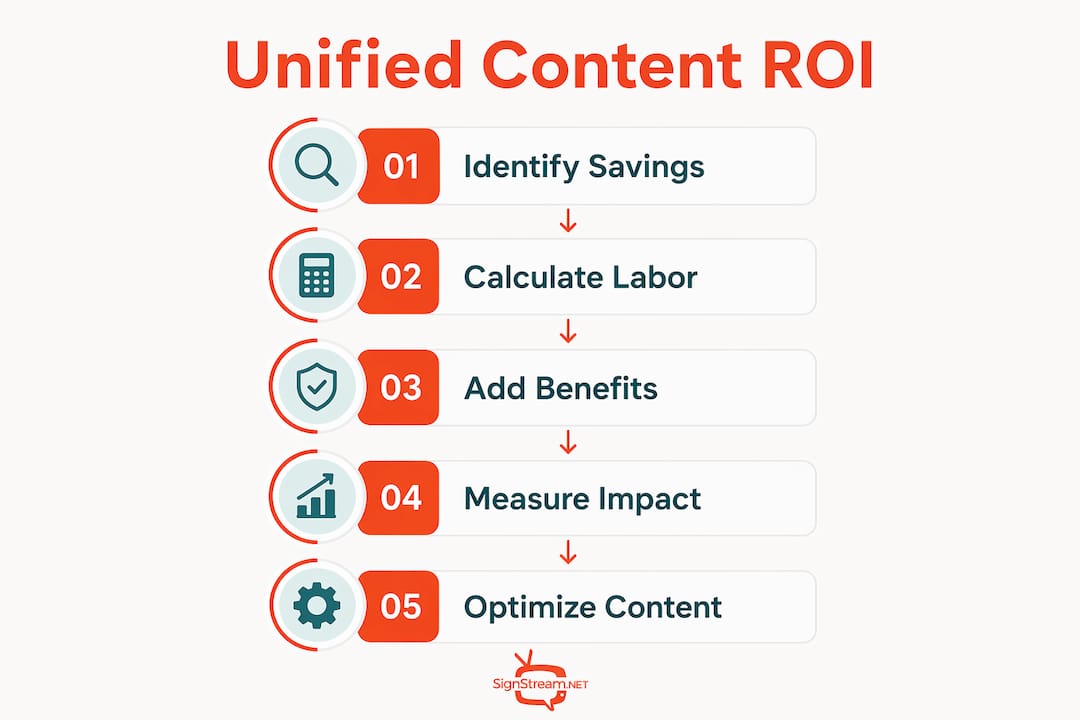
A simple payback model: estimate weekly hours saved across all locations, multiply by average labor cost, add incremental revenue from faster campaigns and ad inventory, then divide total investment by that combined monthly figure. Most multi-location retailers reach payback within the first year.
3. What does a solid CMS architecture and governance model look like?
A cloud-based CMS sits at the center, connected to a content library, a templating engine, player software on each screen, and a monitoring dashboard. Integration points with POS, inventory, and CRM systems allow screens to display data-driven content — think real-time stock levels, loyalty offers, or dynamic pricing — without manual intervention.
Governance defines who can do what. A practical RACI for most retail organizations:
Central marketing — owns master templates, brand rules, and campaign approval.
Regional ops — manages scheduling for their cluster, approves local token submissions, and monitors compliance.
Local managers — can edit approved token fields (store hours, local offer text) but cannot alter locked brand elements.
Pro Tip: Standardize one approved media player image and a minimal hardware spec across every location. This single decision is what makes remote diagnostics and scripted fixes reliable at scale — without it, every troubleshooting call becomes a custom job.
Template strategy follows the same logic. Master templates carry locked zones (logo, color palette, legal copy) and editable zones (local offer tile, store-specific event). A two-tier approval workflow — local submit, regional approve — keeps brand control intact while giving stores the flexibility they need. For in-store promotional screens, this structure is the difference between a campaign that lands consistently and one that looks different in every window.

Unified ecosystems also reduce the number of isolated tools an organization operates, lowering total cost of ownership compared to running separate specialized systems for signage, safety alerts, and presentations.
4. How do you build a content playbook that actually scales?
A documented multi-location marketing playbook defines brand rules, template inventory, allowed local tokens, scheduling rules, and performance thresholds. Without it, even a well-configured CMS drifts over time as local teams improvise.
Core playbook components:
Seasonal promo template — locked brand frame, editable offer and date fields, pre-approved imagery library.
Local offer tile — small-format content block for store-specific deals, with character limits to prevent layout breaks.
Ad inventory slot — a defined screen zone reserved for cross-promotion or paid partner content.
Emergency/default messaging template — corporate branding plus a local contact number, auto-displayed when scheduled content fails.
Local adaptation rules should be explicit: local teams can change offer text, store hours, and event names. They cannot change the logo, color palette, font, or any legal copy. Ambiguity here is where brand drift starts.
For QA, run A/B tests on creative variants in a staging environment before pushing to all locations. Use canary releases — push to 5–10% of screens first, monitor for errors, then scale. Photo-verified compliance checks after major campaigns confirm that what was scheduled actually played.
Pro Tip: Version your template library and require a post-campaign compliance snapshot for high-impact windows like Black Friday or back-to-school. A versioned record protects you in disputes and gives your team a clean baseline for the next cycle.
5. What does a realistic rollout timeline look like?
Phased deployment reduces risk and builds internal confidence. Here is a practical sequence:
Pilot (weeks 1–8): Select 3–5 representative stores. Validate hardware spec, integrate one data source (POS or inventory), and run live content for 4–8 weeks. Measure uptime and time-to-live against your baseline.
Stabilize (days 30–60 post-pilot): Centralize templates, train regional admins, configure monitoring alerts, and run compliance checks. Fix any integration gaps before scaling.
Regional rollout (months 2–6): Roll out by cluster. Automate device enrollment, enable local tokens, and launch regional campaigns. Simplifying screen management at this stage means having your playbook and training materials ready before the first cluster goes live.
National scale (months 6–12): Full deployment across all locations, with automated health monitoring and a centralized incident playbook for IT.
Network readiness, power and placement, training materials, and defined go/no-go metrics at each gate are non-negotiable checklist items. Skipping the pilot gate is the most common reason multi-location rollouts stall at the regional stage.
6. How unified systems cut IT support load and keep screens running
Adaptive screens automatically switch context — defaulting to emergency or corporate messaging when idle or when scheduled content fails — which removes an entire category of support tickets. Remote reboots, staged patching, and centralized alerting for offline devices mean most issues are resolved before a store manager even notices.
Key monitoring targets:
Heartbeat checks every 5 minutes to confirm player connectivity.
Content playback logs to verify scheduled assets actually ran.
Screen brightness and resolution alerts to catch hardware drift before it affects campaigns.
Security practices matter at scale. Use signed media files, least-privilege player accounts, and staged patch rollouts to avoid pushing a bad update to every location at once. Scripted fixes and centralized incident playbooks cut average resolution time dramatically compared to ad-hoc troubleshooting.
Pro Tip: Set up a “safe state” default asset on every player — corporate messaging plus the local store contact number. Whenever a player loses its scheduled content feed, it falls back to this asset automatically, so customers always see something professional rather than a blank screen.
Signstream makes unified signage straightforward for growing retailers

Signstream’s cloud-based platform covers the full operational picture: a central CMS with role-based permissions, a templating engine that locks brand elements while freeing local tokens, an ad exchange marketplace for monetizing unused screen inventory, and remote device management that handles health monitoring and staged rollouts without requiring on-site IT. The platform deploys on unlimited screens at no extra charge and is built for business owners who do not have a technical background — setup is fast, and updates push from any device in seconds.
The results speak clearly. A Signstream client reported a rise in class attendance after implementation, a direct outcome of timely, relevant content reaching the right audience at the right moment. For retailers running cross-location promotional screens, that kind of lift translates into real revenue, not just better-looking displays.
See exactly how the platform works and request a pilot for your locations today.
Key Takeaways
Multi-location retailers that centralize screen content gain brand consistency, faster campaigns, and measurable ROI — making unified digital signage a core operational decision, not a cosmetic upgrade.
Point | Details |
Centralize before you scale | Adding screens without a central CMS multiplies inconsistency; fix the architecture first. |
Measure time-to-live | Track how fast a new campaign reaches all screens — this is your primary speed-to-market metric. |
Lock brand, free local tokens | Templates should lock logo, color, and legal copy while letting local managers edit offers and hours. |
Phase your rollout | Pilot 3–5 stores for 4–8 weeks, stabilize for 30–60 days, then scale by cluster to reduce risk. |
Signstream for multi-location control | Signstream’s platform covers CMS, templating, ad exchange, and remote device management on unlimited screens. |
The operational case is stronger than most retailers realize
Most conversations about digital signage focus on creative — better visuals, more dynamic content, fresher campaigns. That is the wrong starting point. The real value of unifying screen content is operational: you eliminate a category of manual work, you gain a single point of control for compliance, and you create the infrastructure that makes every future campaign faster and cheaper to execute.
What gets underestimated is how quickly fragmentation compounds. One location running last month’s promotion is a minor embarrassment. Fifty locations doing it during a peak sales window is a revenue problem and a brand problem simultaneously. The governance model — RACI, templates, approval workflows — is not bureaucracy. It is the mechanism that keeps 50 or 500 locations moving as one.
The retailers who get the most from unified signage treat it as a media network, not a display system. They monetize unused inventory, they use analytics to optimize content by location, and they build the playbook before they scale. That mindset shift is what separates a well-run digital signage program from a collection of expensive screens.
Useful sources
Centralized Digital Signage Solutions: The Secret to Brand Consistency — Stratus Unlimited: Core reference for CMS architecture, hardware standardization, and the expert insight on system control as the primary scaling challenge.
Shared Screen Experiences: Why Integrators Must Rethink Room Connectivity — Commercial Integrator: Source for adaptive/default messaging behavior and unified ecosystem cost-of-ownership arguments.
Multi-Location Marketing Playbook for Scalable Growth — Thisisld: Basis for the content playbook framework, template governance, and local adaptation rules.
Retail Revenue Optimization: 7 Strategies for Multi-Location Brands — T-ROC: Source for coordinated rollout speed data (7–14 days for store resets) and photo-verified compliance methodology.
Signstream — platform overview: Source for the 25% class attendance uplift case study, ad exchange capability, and platform feature claims used throughout the article.
Recommended
Comments