

30 Day Pilot: Real Time Digital Signage for Marketers and Ops

Real-time digital signage displays up-to-the-minute information by pulling live feeds and triggers into your screens, so content stays relevant the moment conditions change. The core business case is simple: static, pre-scheduled screens tell customers and staff yesterday’s news, while a real-time feed lets you respond instantly to inventory, wait times, or a KPI shift. The rest of this guide covers how to set it up, connect it to your data, and measure whether it’s actually working.
TL;DR:
Real-time signage updates content instantly by pulling from live data sources such as POS systems, APIs, sensors, and dashboards, reducing manual intervention.
Implementing WebSocket connections enhances update speed and reliability by maintaining a persistent link for instant content pushes, especially during emergencies.
A focused pilot on high-traffic screens with clear KPIs and governance ensures effective deployment and prevents delays caused by attempting to overhaul all displays at once.
Accurate data feeds and proper security measures, including authentication and fallback content, are vital for consistent performance and trustworthiness.
Tracking engagement metrics and operational uptime helps measure the system’s effectiveness, ensuring the signage influences customer behavior and stays operational.
Table of Contents
What Does “Real-Time” Actually Mean for Digital Signage?
Scheduled signage runs a fixed playlist. You upload content Monday, it loops all week, and nothing changes unless someone manually edits it. Real-time digital signage works differently: screens pull from live data sources and update automatically, without a person touching the content management system.
That distinction shows up the moment something changes on the ground. A retail screen tied to your point-of-sale system can flag low stock on a bestseller within minutes. A transit display connected to a live schedule feed can post a delay before a single customer asks a staff member about it. A corporate dashboard can update a sales number the second it changes in your CRM.
Common live data sources feeding real-time signage include:
APIs from booking, scheduling, or inventory systems
IoT sensors tracking occupancy, temperature, or equipment status
POS systems reporting sales and stock in real time
Business intelligence dashboards pushing KPIs
Social media feeds and review platforms
The practical difference is responsiveness. Scheduled content answers “what do we want to say this week?” Real-time content answers “what’s true right now?”
What Are the Business Benefits of Real-Time Signage?
Relevance drives engagement. A screen showing a live promotion tied to actual foot traffic or current inventory holds attention longer than a static loop, because the content reflects what’s happening in the room right now rather than what a marketer scheduled two weeks ago.
Operational efficiency is the less obvious win. Instead of emailing staff about a schedule change or printing new signs for a price update, you push one update from any device and it appears across every connected screen at once. That cuts the lag between “we need to communicate this” and “customers and staff see it.”
Real-time signage also opens revenue paths that static content can’t touch:
Time-limited promotions that expire automatically when a sale window closes
Ad monetization through cross-promotion or a screen advertising marketplace
Urgent takeover messages for safety alerts, weather closures, or emergency notices
Dynamic pricing displays tied to demand or inventory levels
Fitness clubs that pair live class schedules and countdown promotions with their screens have reported a 25% rise in class attendance after making the switch from static boards. That kind of lift comes from immediacy, not better design.
Where Does Real-Time Digital Signage Work Best?
Every environment with foot traffic and changing conditions benefits from a live feed. The applications differ by sector, but the underlying logic stays the same: show what’s true now, not what was true when someone last updated a slide.
Retail. Inventory-driven displays flag low stock or highlight overstocked items, and queue-length sensors can trigger prompts directing shoppers to a faster checkout lane.
Hospitality and restaurants. Digital menu boards adjust for sold-out items instantly, wait-time displays update from a live reservation system, and happy-hour pricing can switch on and off automatically.
Transportation. Live schedule feeds and disruption alerts keep travelers informed without staff intervention, which matters most exactly when things go wrong.
Corporate offices. Live sales dashboards, meeting room availability, and internal announcements replace the static “welcome” slide most lobby screens still run.
Events and fitness. Schedule changes, live leaderboard stats, and sponsor ads rotate based on what’s actually happening on the floor, not a printed program from last month.
A gym class board and a transit departure sign look nothing alike, but both solve the same problem: closing the gap between an event happening and a customer learning about it.
How Do You Roll Out Real-Time Signage From Pilot to Full Deployment?
Start narrow. A rollout that tries to fix every screen and every use case at once tends to stall in planning meetings. A tight pilot with one clear win produces the proof you need to expand with confidence.
Set the goal and pick your KPI. Decide what you’re solving, whether it’s class attendance, table turnover, or reducing “where’s my order” questions, and pick one number you’ll track before and after launch.
Choose your locations and content mix. Start with one or two high-traffic screens rather than the whole network, and decide what mix of promotional, informational, and live-feed content each screen needs.
Select your hardware. Commercial-grade displays cost more upfront but handle 24/7 operation better than consumer TVs; a consumer TV paired with a dedicated media player is a reasonable budget option for lower-traffic locations.
Confirm your software checklist. Your content management system needs to support live-feed integration, remote device pairing, flexible scheduling, and built-in analytics. Confirm it supports standard formats like MP4 and HLS so content displays correctly across players.
Pair devices and test feeds. Modern cloud platforms let you pair a new screen and provision it remotely, often with a virtual preview before it ever ships to a location, cutting install time from days to minutes.
Train staff and set a rollout timeline. Give the team that manages content a short walkthrough, then plan a short to moderate window to move from pilot to full deployment based on your KPI results.
Assign governance roles. Decide who can publish directly and who needs approval, and build templates so urgent updates don’t require rebuilding a layout from scratch every time.
Pro Tip: Build your emergency takeover template before you need it. A screen that can flip to a weather alert or closure notice in seconds is far more valuable than one that only looks good when everything’s running normally.
How Do APIs and WebSockets Power Real-Time Updates?
The architecture behind your signage determines how fast “real time” actually is. Three integration patterns dominate: polling, webhooks, and WebSockets, and the choice affects both latency and reliability.
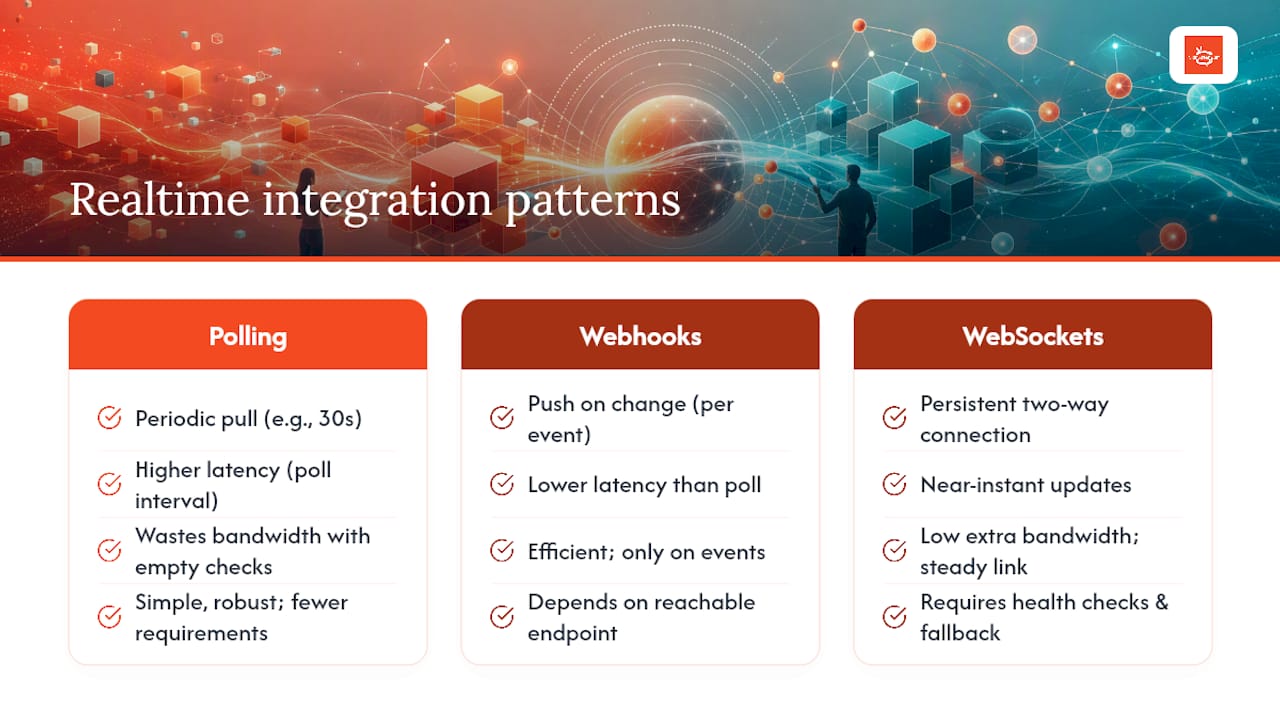
Polling has your display check a server on a fixed interval, say every 30 seconds, asking “anything new?” It’s simple to build but introduces built-in lag, and it wastes bandwidth checking for updates that usually aren’t there. Webhooks flip that model: the source system notifies your display only when something changes, which cuts unnecessary traffic but still depends on a request/response cycle for each update.
WebSocket connections keep a persistent, two-way link open between server and screen, so updates push instantly instead of waiting for the next poll cycle. This is what makes emergency messages, live sports scores, or instant price changes actually feel instant rather than delayed by a refresh cycle. Some cloud signage platforms use WebSocket-based rollouts specifically to keep displays always online and ready for instant command and content pushes, including remote reload and emergency override commands.
A persistent connection means a change entered anywhere in your system, whether it’s a POS update, a CRM figure, or a manual override, can reach a screen across the building or across the country in roughly the time it takes to hit “save.”
Common data sources feeding these connections include POS systems, CRM platforms, BI dashboards, transit APIs, weather feeds, and social channels. On the security side, confirm your platform uses authenticated connections, runs regular device health checks, and has fallback content ready so a failed feed doesn’t leave a screen blank or broken. Before launch, simulate a data change and time how long it takes to appear on screen. That single test tells you what SLA is realistic for your setup.
How Do You Measure Whether Real-Time Signage Is Working?
Track two categories side by side: content performance and system health. One tells you if people are engaging, the other tells you if the system is even running.
Impressions and dwell time measure whether content is being noticed at all.
Conversions, including QR code scans and promo redemptions, tie signage directly to revenue.
Uptime and error rates flag when a screen goes dark or a feed drops before it becomes a customer complaint.
Run time-of-day experiments. A promotion that performs well at lunch might flop during a morning rush, and you won’t know without testing content windows against traffic patterns. Pairing dwell-time and click data with operational metrics like uptime gives a fuller picture of performance than either measure alone, and it’s what turns a screen from decoration into a monitored business asset.
What Do Successful Deployments Get Right That Others Miss?
The clients getting real results from real-time signage aren’t the ones with the flashiest motion graphics. They’re the ones who picked one high-impact use case, measured it honestly, and built governance around it before scaling. The gyms and fitness clubs reporting a 25% jump in class attendance after switching to live-updated schedules didn’t get there with fancier animations. They got there by making the schedule board actually current, every time, with zero manual updates.
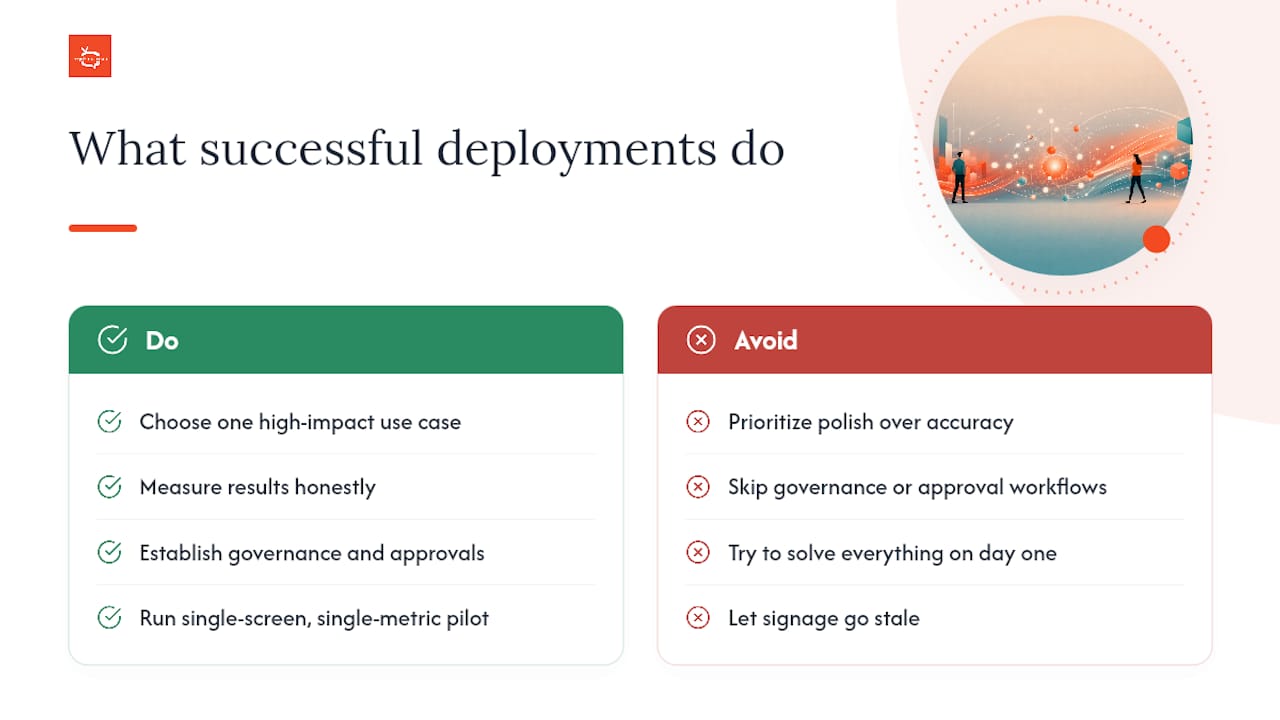
What most teams underestimate is how much governance matters compared to design polish. A gorgeous template that displays outdated pricing is worse than a plain one that’s always accurate. Templates and approval workflows prevent the slow drift where “real-time” signage quietly becomes stale signage because nobody owns the update process.
The other pattern worth naming: teams that try to solve everything on day one usually stall. The ones that pick a single screen, a single metric, and a 30 day window tend to have the evidence they need to justify network-wide rollout by the time competitors are still debating hardware specs.
— DKS
See What SignStream Looks Like on Your Screens
SignStream maps directly onto the needs covered in this guide: instant updates pushed to multiple screens from any device, an ad exchange marketplace to help offset subscription costs, and built-in analytics so you can prove what’s working instead of guessing.

If you’re running class schedules, menu boards, or lobby dashboards on anything static right now, a free consult is the fastest way to see how SignStream’s platform works remotely on your existing hardware. You’ll walk through your specific use case, see how content pushes update across screens in real time, and get a straight answer on what a pilot would look like for your locations. Book the consult and bring one problem you want solved. That’s usually enough to see the fit.
Recommended
Comments