

How Clearance Promotions Display on Screens Effectively

Digital signage for clearance promotions is defined as a real-time display system that links inventory data to on-screen content, triggering promotional messages only when clearance stock is available. The most effective clearance promotions on screens combine live inventory feeds with visually compelling digital signage to boost product sales and protect brand value. Research shows that featuring products on in-store digital screens produces a 7% lift in sales and a 4% brand halo effect. That combination of revenue gain and brand reinforcement is exactly why business owners and marketing managers are moving away from static signs toward dynamic digital displays. Understanding how clearance promotions display on screens gives you a real competitive edge at the shelf level.
How clearance promotions display on screens using real-time inventory

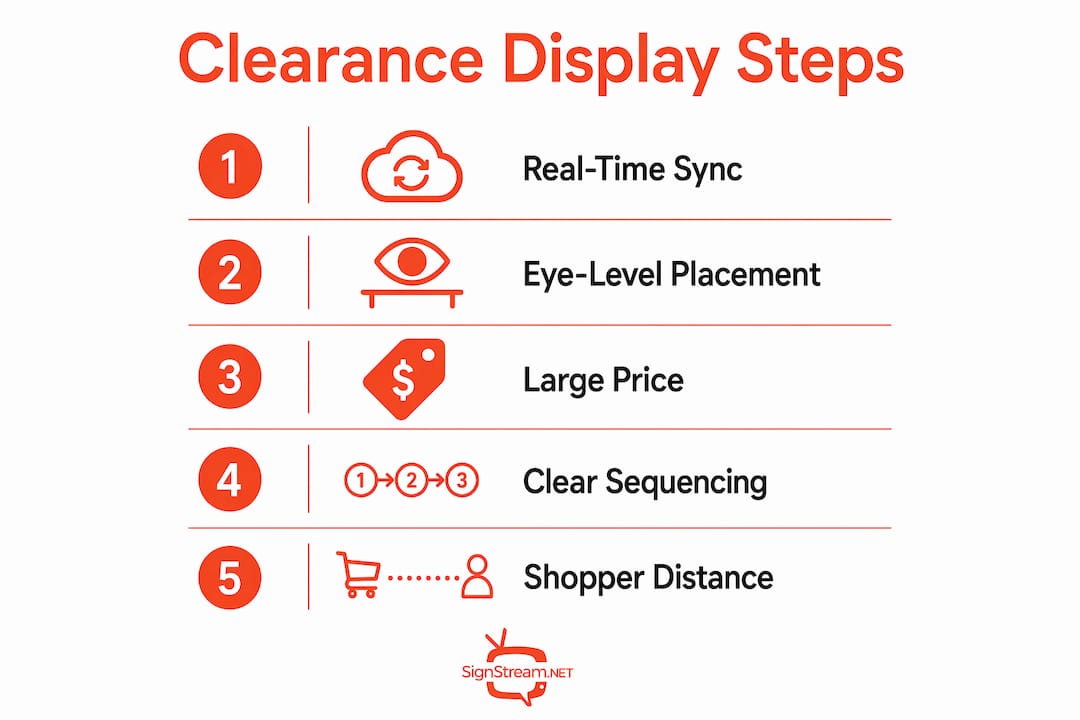
The most accurate clearance promotion displays run on automated, rules-based frameworks that connect your inventory system directly to your screens. Inventory-fed digital signage pulls live stock data and triggers promotional content only when a clearance item is confirmed as available. When stock drops to zero, the system suppresses the promotion automatically. That prevents the frustrating customer experience of seeing a clearance offer on screen and then finding empty shelves.
This approach also scales well. A single manager can control dozens of screens across multiple locations without manually updating each one. The rules-based logic handles the heavy lifting, so your team focuses on strategy rather than screen maintenance. Retailers using real-time inventory feeds report fewer pricing disputes at checkout because the screen and the shelf always match.
Automated suppression: Promotions disappear from screens the moment stock runs out, removing the risk of advertising unavailable items.
Rules-based triggers: Set conditions such as “display clearance badge when quantity falls below 20 units” to create urgency without manual input.
Multi-location sync: One update pushes to every screen in your network instantly, keeping messaging consistent across all stores.
Audit trail: Digital systems log when each promotion ran and for how long, giving you data to refine future clearance campaigns.
Pro Tip: Connect your point-of-sale system to your digital signage platform so that every sale automatically updates the on-screen stock count. Shoppers respond strongly to real-time scarcity cues.
Which visual elements optimize clearance sale displays on screens?
Visual design is the difference between a clearance screen that stops shoppers and one they walk past. The industry standard for displaying clearance promotions uses a specific set of visual cues that communicate urgency without cluttering the screen.
Red clearance badges. Red signals urgency and discount. Badge color psychology confirms that red drives faster purchase decisions, while gold or yellow signals premium value. Use red exclusively for clearance to avoid confusing shoppers who see the same color on full-price items.
Strike-through pricing. Show the original price with a visible strikethrough next to the clearance price. This format communicates the value of the deal at a glance and reinforces the discount without requiring the shopper to do mental math.
“CLEARANCE” label in the badge. Generic “SALE” labels dilute impact. Specific clearance messaging tells shoppers exactly what they are looking at and sets the right expectation before they reach the product.
Separate clearance sections on screen. Mixing clearance items with full-price products on the same screen damages full-price perception. Keep clearance content in its own zone or on dedicated screens to protect your brand’s value signals.
Minimum font size and contrast. Test every badge on a range of screen sizes. Small text and low contrast make badges invisible from a normal viewing distance, which defeats the purpose of the display entirely.
Pro Tip: Always preview your clearance screen layout from the distance a shopper would actually stand. A badge that looks sharp on your laptop may be unreadable from six feet away on a 55-inch display.
The sequencing of your discount information also matters. Lead with the clearance price in large type, follow with the original price in smaller strike-through text, and close with the percentage saved. That order matches the way shoppers process price information, moving from “what do I pay” to “what do I save.”
Where should you position clearance promotion screens in your store?
Screen placement determines whether your clearance promotion gets seen or ignored. Digital screens placed 15–20 feet from the relevant aisle catch shopper eye movement without competing with shelf-level product displays. That distance gives shoppers time to process the message before they reach the product, which increases the chance they stop and engage.
Endcap positions are the highest-value placement for clearance screens. Shoppers naturally pause at endcaps, making them ideal decision moments. Digital endcap displays also allow you to swap campaigns quickly and track impressions and dwell time, which static signs cannot do.
Placement type | Best use case | Key benefit |
Endcap screen | High-traffic clearance categories | Maximum visibility at natural pause points |
Aisle-adjacent screen | Category-specific clearance items | Reaches shoppers mid-browse |
Entrance display | Store-wide clearance events | Sets shopper expectations on entry |
Checkout area screen | Last-chance clearance items | Captures impulse decisions at payment |
Physical merchandising works best when it reinforces what the screen shows. Tiered tables and clear signage placed directly below or beside a clearance screen guide customers from the digital message to the physical product without confusion. Staff demonstrations near clearance screens add a live scarcity cue that digital alone cannot replicate.
Content tone at the screen level matters as much as placement. Digital end-cap content performs best when it feels informational rather than purely promotional. A screen that tells shoppers why a product is on clearance, such as end-of-season stock or a model update, builds trust and moves product faster than a screen that simply flashes a price.
What are the common pitfalls in displaying clearance promotions digitally?
The most common failure in digital clearance displays is a technical one: clearance badges disappear from the screen because product variant pricing is inconsistent. Every variant must carry a compare-at price that is higher than the selling price for the clearance badge to appear on a digital grid. If even one size or color variant lacks that setting, the badge drops from the entire product listing.
Inconsistent compare-at prices: Set the compare-at price on every single variant, not just the default. One missing entry removes the badge across all variants.
Theme or platform settings blocking badges: Some digital signage platforms and e-commerce themes require a specific setting to be enabled before sale or clearance badges display visually. Check your platform’s badge display settings before launch.
Mixed messaging on the same screen: Running a full-price brand story and a clearance promotion on the same screen at the same time confuses shoppers. Dedicate screens to one message type per session.
Outdated content after stock sells out: Without automated suppression, screens continue advertising clearance items that are no longer available. This erodes shopper trust faster than any pricing error.
Low-contrast badge design: A red badge on a dark background can become unreadable under store lighting. Test badge visibility under the actual lighting conditions of your retail floor, not just on a monitor.
Avoiding these errors requires a pre-launch checklist. Run through every variant, every screen, and every lighting condition before a clearance event goes live. A retail promotion checklist built specifically for digital screens helps you catch these issues before they cost you sales.
Key Takeaways
Clearance promotions display most effectively on screens when real-time inventory data, precise visual design, and strategic placement work together as a single system.
Point | Details |
Real-time inventory sync | Connect your inventory system to digital screens so promotions appear and disappear automatically based on stock. |
Red badges and strike-through pricing | Use red clearance badges and visible strike-through pricing to communicate urgency and discount value instantly. |
Optimal screen placement | Position screens 15–20 feet from the relevant aisle or at endcaps to capture shopper attention at decision moments. |
Separate clearance from full-price | Keep clearance content on dedicated screens or zones to protect full-price brand perception. |
Variant pricing consistency | Set a compare-at price on every product variant to prevent clearance badges from disappearing on digital grids. |
The detail most retailers overlook
Most articles on displaying clearance promotions focus on the visual layer: badge color, font size, screen brightness. Those details matter. But the retailers I have seen get the best results from clearance screens are the ones who treat the screen as a storytelling tool, not a price board.
A screen that explains why something is on clearance, whether it is end-of-season stock, a discontinued color, or a model refresh, gives shoppers a reason to trust the discount. It removes the subconscious worry that the product is on clearance because something is wrong with it. That trust converts browsers into buyers faster than any badge design.
The second thing I have found consistently undervalued is the physical-to-digital handoff. A clearance screen that points to a tiered table three feet away, with a staff member nearby who can answer questions, creates a complete purchase environment. The screen generates awareness and urgency. The physical setup closes the sale. Neither works as well alone.
Automation is the third piece that separates good clearance programs from great ones. When your system automatically pulls a clearance promotion the moment stock hits zero, you stop burning shopper trust on empty promises. You also free your team from manual screen updates during high-traffic clearance events, which is exactly when they need to be on the floor helping customers.
— DKS
How Signstream powers your clearance promotion displays
Signstream’s interactive ad platform connects your inventory data directly to your digital screens, so clearance promotions appear the moment stock qualifies and disappear the moment it sells out. You can build custom TV channels for your retail environment, push updates to unlimited screens from any device, and track performance without needing a technical team.

Signstream’s ad exchange marketplace also lets you cross-promote clearance events in other local businesses, extending your reach beyond your own four walls. If you want to see how the platform works in a real retail environment, the setup is straightforward and does not require any technical expertise to get started.
FAQ
What is digital signage for clearance promotions?
Digital signage for clearance promotions is a screen-based display system that uses live inventory data to show clearance offers only when stock is available. It replaces static signs with dynamic, automatically updated content.
How do clearance badges display correctly on digital screens?
Clearance badges display correctly when every product variant has a compare-at price set above the selling price. Missing compare-at prices on any variant cause the badge to disappear from the digital grid.
Where is the best place to put clearance promotion screens in a store?
Screens placed 15–20 feet from the relevant aisle or at endcap positions capture the most shopper attention. That distance gives shoppers time to process the promotion before they reach the product.
Why should clearance promotions be kept separate from full-price content on screens?
Mixing clearance and full-price content on the same screen confuses shoppers and damages full-price brand perception. Dedicated clearance screens or zones keep the messaging clear and protect your brand’s value signals.
How does real-time inventory integration improve clearance promotion accuracy?
Real-time inventory integration uses automated rules to suppress clearance promotions the moment stock runs out. This prevents shoppers from seeing offers for unavailable items, which reduces frustration and builds trust.
Recommended
Comments