

Digital Signage Security: A Practical Guide for IT Teams
Updated: Sep 11

Secure digital signage requires layered controls across your network, devices, CMS, and content delivery — not a single setting or a one-time fix. Every connected screen is a potential entry point, and a compromised display can damage your brand, expose your internal network, and cost real money to remediate. Here is your 10-point checklist to act on immediately:
Segment your network: Place all signage players on a dedicated VLAN, isolated from internal systems.
Enforce firewall rules: Allow only the outbound ports and domains your CMS requires; block everything else.
Harden hardware: Use tamper-resistant mounts, disable unused USB and HDMI ports, and enable secure boot.
Change all defaults: Replace every factory-set username, password, and SSID before deployment.
Enable MFA: Require multi-factor authentication on every CMS and admin account.
Apply RBAC: Assign role-based access control so content editors cannot touch network or device settings.
Set a patch cadence: Schedule firmware and software updates monthly at minimum, with emergency patches within 48 hours of a critical CVE.
Encrypt all transfers: Deliver content exclusively over HTTPS or SFTP; reject unencrypted connections.
Build a content approval workflow: Require at least one reviewer to sign off before content goes live on any screen.
Monitor and plan for incidents: Log all CMS activity, set alert thresholds, and keep a written incident playbook ready.
Pro Tip: Lock physical USB and HDMI ports with port blockers on day one, and rotate all credentials immediately after installation — before the first piece of content goes live. These two steps close the most common entry points at near-zero cost.
Key Takeaways
Securing a digital signage fleet requires layered controls across network, devices, CMS, and content — with network segmentation and credential hygiene delivering the fastest risk reduction per hour of effort.
Point | Details |
Segment the network first | Place all players on a dedicated VLAN to stop lateral movement before it starts. |
MFA and RBAC are non-negotiable | Enable multi-factor authentication and role-based access on every CMS account before deployment. |
Patch on a defined schedule | Monthly firmware updates with a 48-hour emergency window for critical CVEs keeps known vulnerabilities closed. |
Require vendor security documentation | Demand signed firmware, CVE disclosure policies, and SOC 2 or ISO 27001 certification at procurement. |
Signstream maps controls to workflow | Signstream’s built-in MFA, HTTPS delivery, approval workflows, and audit logs align directly to the layered controls in this guide. |
Table of Contents
Why digital signage security is a business-critical priority
Connected screens are public-facing attack surfaces with direct business consequences. AVIXA’s signage security guide documents real-world content-hijack incidents where bad actors replaced legitimate content with offensive or misleading material, forcing operators to take screens offline during peak hours. The reputational fallout from a public display showing unauthorized content can be immediate and severe — customers see it before IT does.
The financial exposure goes beyond cleanup costs. A compromised player sitting on your corporate network can serve as a pivot point for lateral movement into internal systems, potentially reaching POS terminals, HR databases, or financial records. That risk profile is why digital signage cybersecurity deserves the same attention as endpoint security, not an afterthought.
The consequences of a breach cluster into four categories:
Reputational damage: Offensive or competitor content displayed publicly before staff can respond.
Operational downtime: Screens pulled offline during high-traffic periods while IT investigates.
Lateral network movement: A compromised player used as a foothold to probe internal systems.
Data exposure: CMS credentials harvested and reused against other business accounts.
None of these outcomes are theoretical. AVIXA’s documented incident examples confirm that any connected screen is a target, regardless of the organization’s size or industry.
What are the top threats to your signage network?
Understanding the specific attack vectors helps you match controls to risks rather than applying generic IT policy to a specialized environment.
Physical tampering: An attacker with physical access to an exposed player can plug in a USB drive, boot from external media, or swap the device entirely. Retail and lobby installations are especially vulnerable.
Network pivoting: A player on a flat network shares broadcast traffic with servers and workstations. One compromised device can scan and probe everything else on the same subnet.
Malware and ransomware: Players running general-purpose operating systems (Windows, Android, Linux) are susceptible to the same malware families that target desktops, particularly when firmware is outdated.
Weak or default credentials: Factory-set admin passwords on players and CMS accounts remain one of the most exploited vectors in IoT environments.
Outdated firmware: Unpatched players carry known CVEs that are publicly documented and actively exploited.
Social engineering and phishing: Content managers with CMS access are targets for credential-harvesting emails, especially in multi-site organizations where one account controls hundreds of screens.
Insecure content delivery: Content pushed over unencrypted HTTP can be intercepted and replaced in transit, particularly on Wi-Fi networks.
Threat | Likely impact | Remediation class |
Physical tampering | Unauthorized content, device theft | Tamper-resistant hardware, port locks |
Network pivoting | Lateral breach into internal systems | VLAN segmentation, firewall rules |
Malware / ransomware | Content corruption, device lockout | Patching, secure boot, endpoint controls |
Default credentials | Full CMS or device takeover | Credential policy, MFA |
Outdated firmware | Known CVE exploitation | Patch cadence, vendor CVE disclosure |
Social engineering | CMS credential theft | User training, MFA, RBAC |
Insecure content delivery | Content interception and replacement | HTTPS/TLS enforcement, signed packages |
HKCERT’s IoT security guideline for digital signage recommends a layered approach across application, management, network, and device layers — precisely because no single control stops all of these vectors.
How to secure digital signage with layered controls
The most effective approach applies controls at four distinct layers: network, device, CMS/software, and content. Skipping any one layer leaves a gap that the others cannot fully compensate for.
Network layer
Segment with VLANs. Place every signage player on its own VLAN or subnet, with inter-VLAN routing blocked by default. Network planning guidance recommends dedicated VLANs for signage to limit blast radius and simplify firewall rule management.
Apply allowlist firewall rules. Permit only the specific outbound IPs and ports your CMS vendor documents. Block all inbound connections from the signage VLAN to internal subnets.
Minimize open ports. Close every port not required for CMS communication, NTP, or DNS. Document what remains open and review quarterly.
Prefer wired Ethernet. For permanent installations, wired connections eliminate the Wi-Fi attack surface entirely. Where Wi-Fi is unavoidable, use WPA3 with a dedicated SSID visible only to signage devices.
Schedule updates off-peak. Large content pushes during business hours compete with operational traffic. Schedule sync windows for overnight or early morning to avoid congestion.
Device and player hardening
Enable secure boot on every player to prevent unauthorized operating system modifications.
Use tamper-resistant enclosures and mounts for any player accessible to the public or in unsupervised areas.
Disable unused ports — USB, HDMI, and serial — with physical port blockers and OS-level disabling.
Enable hardware encryption or encrypted storage where the player supports it, so a stolen device does not expose cached content or credentials.
Configure players for offline-first operation: local caching of full content projects means screens keep running during network or CMS outages, which also removes the incentive to leave ports open for emergency manual access. Media La Vista’s network design guidance highlights offline-first architectures as a core reliability feature.
CMS and software controls
Change all defaults on first login: admin usernames, passwords, and any pre-set API keys.
Enforce MFA on every account with CMS access, including read-only accounts that could be escalated.
Apply RBAC with least privilege: content editors get content permissions only; network and device settings require a separate elevated role.
Maintain a patch schedule: monthly for routine updates, 48-hour emergency window for critical CVEs. Treat firmware updates the same as software patches.
Use vendor-provided allowlists for domains and IPs, and verify them against your firewall logs quarterly.
Enable logging and set alert thresholds for failed logins, unusual publishing activity, and off-hours access.
Harvard’s IT security guidance reinforces these basics of strong authentication and patching as foundational controls that apply directly to signage CMS accounts.
Content delivery and management
Encrypted transfers are non-negotiable. Deliver all content over HTTPS or SFTP, and configure your CMS to reject any unencrypted connection attempt. For high-security environments, use signed content packages or file checksums so players can verify integrity before displaying anything.

Delta synchronization cuts digital signage bandwidth consumption substantially by pushing only changed files on routine updates, which also reduces the window during which content is in transit and potentially interceptable.
Require a content approval workflow with at least one named reviewer before any asset goes live. Pair this with a rollback capability so you can revert to a known-good playlist within minutes of detecting unauthorized content.
Pro Tip: Use staged rollouts and a designated “canary” player at each site. Push updates to the canary first, verify display and integrity, then release fleet-wide. This catches corrupted or malicious content before it reaches every screen.
What should you require from hardware vendors and players?
Procurement is a security control. Specifying security requirements in contracts before purchase materially reduces long-term risk, as CISA’s IoT acquisition guidance makes clear: build security requirements into procurement, verify secure update mechanisms, and assess vendor security documentation during acquisition.
Must-have hardware and vendor features:
Secure boot with cryptographic verification of the OS and firmware
Signed firmware updates that the device validates before applying
TPM chip or hardware-level encryption for stored credentials and content
Remote wipe capability for lost or stolen devices
Documented CVE disclosure policy with a defined response timeline
SOC 2 Type II or ISO 27001 certification for cloud-connected CMS components
Published list of required network ports and domains for firewall configuration
Questions to ask every vendor before purchase:
What is your firmware update cadence, and how are updates cryptographically signed?
Do you operate a vulnerability disclosure or bug bounty program? What is the average time to patch a reported CVE?
Can you provide a complete list of outbound domains and ports for allowlist configuration?
What happens to screen content if the CMS is unreachable? Does the player fall back to cached content?
How is data encrypted in transit and at rest on the player?
Avoiding common procurement mistakes is as important as asking the right questions. The mistakes to avoid when choosing a digital signage platform guide covers vendor red flags that often surface only after deployment.
Vendor requirement | Why it matters |
Signed firmware updates | Prevents malicious firmware from being installed remotely or physically |
CVE disclosure policy | Confirms vendor will notify you of known vulnerabilities in time to patch |
SOC 2 / ISO 27001 | Validates cloud CMS security controls through independent audit |
Port and domain documentation | Enables precise firewall allowlisting rather than broad open rules |
Remote wipe | Limits data exposure from a lost or stolen player |
For hardware and display installation guidance, A3M’s digital signage solutions covers physical mounting and enclosure options relevant to tamper-resistance planning.
A step-by-step rollout and maintenance plan
A phased rollout — pilot, staged deployment, fleet-wide enforcement, then recurring audits — gives your team checkpoints to catch security gaps before they scale across every screen.
Pilot phase (Week 1–2): Deploy 2–3 players on the isolated VLAN. Verify firewall rules, test offline fallback by disconnecting the network cable, confirm MFA works for all CMS accounts, and document the approved port list.
Staged rollout (Week 3–6): Expand to one full site. Apply RBAC, run the canary update process, and verify logging and alerting are capturing events correctly.
Fleet-wide enforcement (Week 7–12): Roll out to all sites. Confirm every player has current firmware, all defaults are changed, and physical port locks are installed.
Ongoing maintenance: Monthly patch window, quarterly firewall rule review, annual full security audit, and credential rotation every 90 days.
Task | Owner | Frequency |
Firmware and software patching | IT | Monthly |
Firewall rule review | IT | Quarterly |
Credential rotation | IT / CMS admin | Every 90 days |
Physical security inspection | Facilities | Quarterly |
Content approval workflow audit | Content owner | Monthly |
Full security audit | IT + vendor | Annual |
For multi-site deployments, multi-venue screen network best practices covers centralized monitoring and staggered sync scheduling across locations.
Which standards and certifications apply to signage security?
The most relevant frameworks for digital signage protection are SOC 2, ISO 27001, NIST’s IoT guidance, and CISA’s acquisition documentation. Each addresses a different layer of your security posture.
SOC 2 Type II: Validates that a cloud CMS vendor’s security controls have been independently audited over time. Require this from any vendor storing your content or credentials in the cloud.
ISO 27001: An information security management system standard. Vendors certified to ISO 27001 have documented and audited their security policies, risk management, and incident response processes.
NIST SP 800-213 (IoT Device Cybersecurity): Provides technical guidance on IoT device security capabilities, including secure update mechanisms and device identity — directly applicable to signage players.
CISA IoT Acquisition Guidance: Practical procurement checklist for government and enterprise buyers. Even if you are not a federal agency, the framework translates directly to private-sector signage procurement.
For regulatory compliance, consider whether your signage displays personal data (facial recognition analytics, loyalty program integrations) that triggers obligations under state privacy laws such as the California Consumer Privacy Act (CCPA) or Illinois BIPA. If screens capture or process any biometric or personally identifiable data, consult legal counsel before deployment.
How to respond if a screen is hacked or content is altered
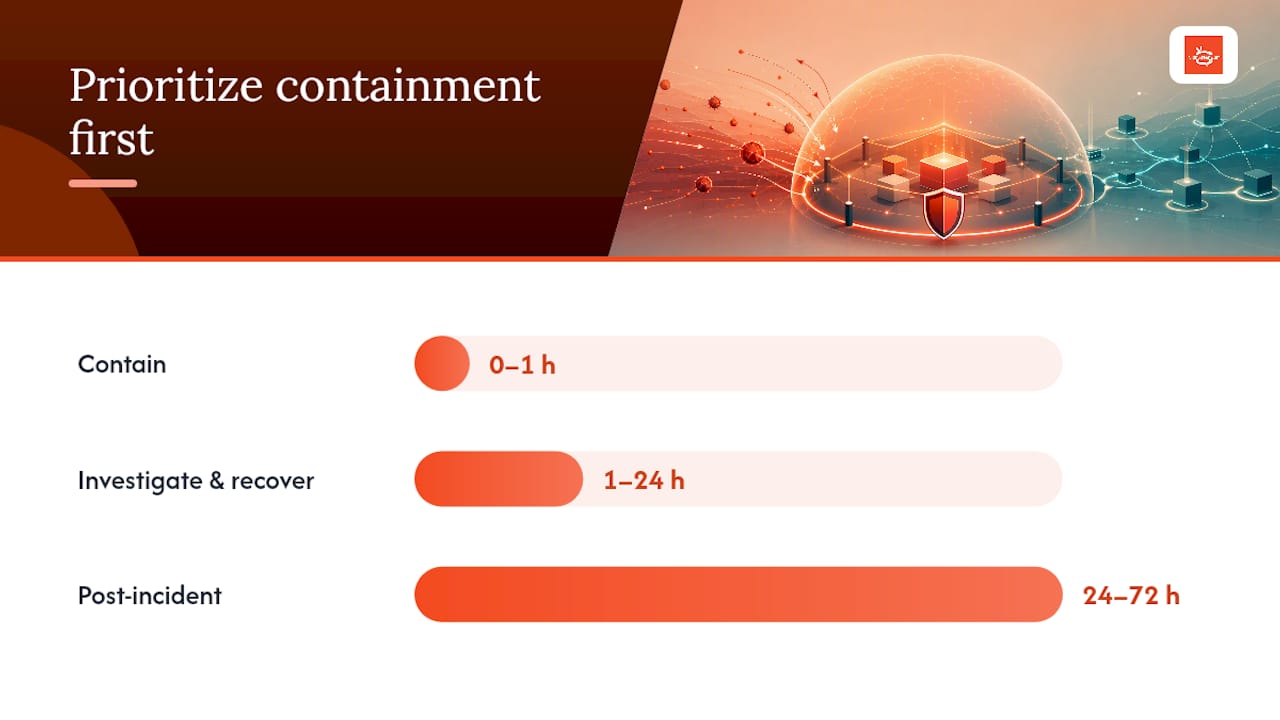
Speed and containment matter more than root-cause analysis in the first hour. Here is a practical incident playbook:
0–1 hour: Contain
Take affected players offline immediately — physically disconnect them from the network if remote isolation is not available.
Isolate the signage VLAN at the firewall to prevent lateral movement while you assess scope.
Rotate all CMS credentials and API keys, starting with admin accounts.
Push known-good content to unaffected players to maintain operational continuity.
Preserve logs — do not reboot affected players until you have captured system logs and a disk image if forensics are needed.
1–24 hours: Investigate and recover
Review CMS audit logs for unauthorized logins, unusual publishing events, or off-hours access.
Check firewall logs for unexpected outbound connections from the signage VLAN.
Restore affected players from a clean firmware image rather than attempting to clean a potentially compromised OS.
Verify content integrity on all players using checksums before bringing them back online.
Brief internal stakeholders (legal, PR, operations) on the scope and status.
24–72 hours: Post-incident
Document the full timeline, entry point, and scope in a written incident report.
Identify the control gap that allowed the incident and assign a remediation owner with a deadline.
Notify affected parties if personal data was exposed, per applicable state privacy law.
Schedule a lessons-learned review with IT, facilities, and content owners.
Update the incident playbook with findings before the next quarter.
For malware-specific triage, Ransomnews’s infostealer detection and response guide covers forensic steps for credential-harvesting incidents that often accompany signage compromises.
How Signstream implements these security controls
Signstream maps directly to the layered controls described throughout this guide, giving IT and facilities teams a platform where security features are built into the workflow rather than bolted on afterward.
Recommended control | Signstream feature |
MFA on CMS accounts | Admin login with multi-factor authentication |
RBAC / least privilege | Role-based user permissions per channel |
Encrypted content delivery | HTTPS/TLS for all content transfers |
Content approval workflow | Built-in review and publish workflow |
Audit logging | CMS activity logs for all user actions |
Scheduled off-peak updates | Publishing scheduler for off-hours content pushes |
Offline fallback / local cache | Local content caching on players |
Remote management | Browser and mobile control from any device |
Validation checklist for procurement:
Confirm MFA is available and enforced on all admin accounts.
Verify that content is delivered exclusively over HTTPS with no HTTP fallback.
Test the approval workflow by submitting content as an editor and confirming it requires reviewer sign-off.
Pull the network cable on a player and confirm it continues displaying cached content.
Review the audit log after a test publishing event to confirm it captures user, timestamp, and action.
Where should IT and facilities teams focus first?
Most teams have limited time and budget, so sequencing matters. Here is a ranked view of where to invest:
Network segmentation (highest priority, fastest risk reduction): A dedicated VLAN for signage stops lateral movement before it starts. This is a configuration change, not a purchase, and it delivers the largest risk reduction per hour of effort.
Credential hygiene and MFA: Default passwords and single-factor CMS accounts are the most commonly exploited vectors. Changing defaults and enabling MFA costs nothing and closes the gap immediately.
Physical port locks and tamper-resistant mounts: For any player accessible to the public, physical hardening is a one-time cost with permanent benefit.
Patch cadence and firmware management: Unpatched players accumulate known CVEs. A monthly patch window with a defined emergency process is the operational habit that keeps risk from compounding.
Content approval workflow: Unauthorized content is the most visible breach outcome. A two-person approval rule prevents the most common content-hijack scenario at the CMS layer.
Incident playbook: Teams that have never rehearsed a response take far longer to contain an incident. A one-page playbook with clear roles and a 0–1 hour checklist is worth more than any tool you have not configured.
The honest trade-off most teams face is between security and operational agility. A strict approval workflow slows content updates; a tight VLAN blocks some integrations that were convenient. Accept those frictions deliberately rather than bypassing controls for convenience — that is usually how gaps form. For small teams with limited IT resources, affordable signage security steps covers low-cost controls that deliver real protection without enterprise-level overhead.
Signstream gives you secure signage operations without the complexity
Managing secure digital displays across multiple locations does not have to mean juggling separate tools for access control, content approval, and monitoring. Signstream delivers MFA, role-based permissions, HTTPS content delivery, a built-in approval workflow, and a publishing scheduler in a single platform — so the controls described in this guide are already part of your daily workflow, not a separate security project.

You get unlimited screen deployment, remote updates from any device, and audit logs that give IT the visibility they need without slowing down content teams. The interactive ad and channel features extend that control to monetization, with the same secure delivery pipeline. Ready to see how it works end to end? Explore the platform and start a free trial today.
Sources
Recommended
Comments