

Year One $900–$1,800: Digital Signage Cost and Ongoing TCO for Businesses
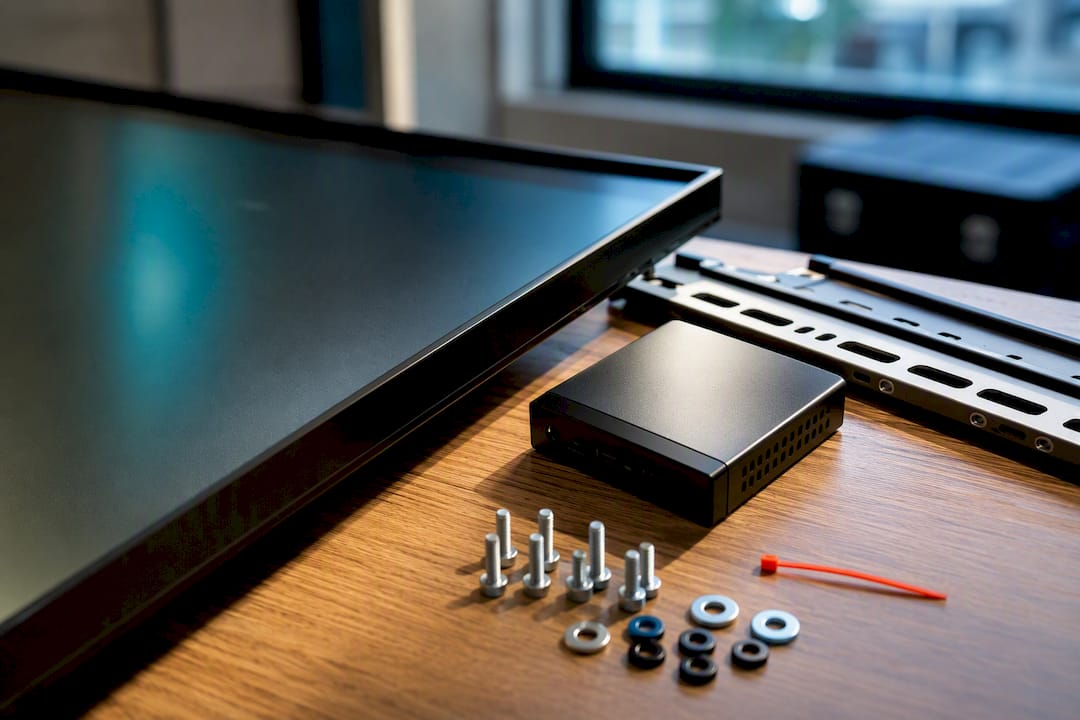
A single commercial display, fully installed with basic software, typically costs $900 to $1,800 in year one. Monthly recurring costs usually land between $30 and $60 per screen once you add software, electricity, and light support. Your digital signage cost depends mainly on three things: the hardware class you choose, your software licensing model, and how complicated your installation turns out to be.
TL;DR:
A single commercial display with basic software typically costs between $900 and $1,800 in the first year, with annual ongoing costs of $30 to $60 per screen.
Small multi-screen setups usually spend $400 to $600 per screen initially, with lower per-screen ongoing expenses due to shared installation costs.
Large deployments exceeding ten screens often cost $1,000 to $3,000 per screen because of complex logistics, higher specs, and multi-site installation needs.
Hardware costs are driven by display quality, with commercial panels costing $800 to $1,500 each and industrial media players from $200 to $500 or more.
Unlimited-screen CMS platforms and revenue-generating features can significantly reduce long-term costs and improve ROI.
Table of Contents
What Are Typical Digital Signage Cost Ranges by Deployment Size?
Your budget looks completely different depending on whether you’re outfitting one lobby screen or rolling out signage across ten locations. Scale changes the math in ways that catch a lot of first-time buyers off guard.
Here’s how three common scenarios break down, based on typical market pricing for hardware, software, and installation:
Single screen (one location): A single indoor commercial display, fully installed, typically totals $900 to $1,800 in year one. That covers a commercial-grade panel, a basic media player, a wall mount, and a straightforward install. Ongoing costs run roughly $15 to $30 per month for software plus $4 to $7 for electricity, so expect $250 to $450 annually after year one.
Small multi-screen deployment (3 to 5 screens): Organizations running a handful of screens across a gym, office, or storefront cluster tend to spend $400 to $600 per screen in year one, with ongoing costs closer to $120 per screen annually. The per-screen number drops because you’re spreading a single site visit and setup fee across multiple units.
Enterprise rollout (10+ screens across multiple sites): Larger deployments average $1,000 to $3,000 per screen installed, driven up by multi-site logistics, higher-spec displays, and more complex network requirements. Software often shifts to a flat enterprise rate rather than per-screen pricing at this volume.
The gap between the small and enterprise numbers isn’t really about the screens themselves. It’s electrical work, site surveys, and IT integration multiplying across locations. A DIY install with a consumer TV and a streaming stick can push the single-screen number down closer to $400, but you’re trading installation savings for a shorter hardware lifespan and more troubleshooting later. Duty cycle matters here too: a screen running 16 hours a day in a gym wears differently than one running during business hours in an office lobby, and that affects how soon you’re replacing hardware.
Displays, Media Players, and Mounts: What Actually Drives Hardware Cost
Hardware is where most first-time buyers underestimate their budget. The display itself is only part of the equation.
Displays. A consumer-grade 55 inch 4K TV runs about $300 to $500, while a commercial-grade 55 inch display typically starts near $800 to $1,500. That price gap buys you longer duty-cycle ratings (commercial panels are built to run 16 to 24 hours a day without burning out), better warranties, and often built-in media players that skip the need for a separate box.
Media players. Your options span a wide range:
Budget streaming sticks (Fire TV Stick and similar): $35 to $50
Raspberry Pi setups: $50 to $80
Mini-PCs: $150 to $400
Industrial-grade players like BrightSign: $200 to $500 or more
A cheap streaming stick works fine for a single low-traffic screen. For anything customer-facing and running all day, an industrial player or a display with a built-in system-on-chip (SoC) tends to pay for itself through fewer crashes and less hands-on troubleshooting.
Mounts and enclosures. A standard wall mount adds roughly $50 to $150. Outdoor enclosures, anti-glare housings, or tamper-resistant frames for public spaces can add several hundred dollars more.
The general rule: commercial-grade displays paired with SoC playback tend to lower total cost over a 3 to 5 year window for screens running daily, because you’re not replacing burned-out consumer panels or swapping failed players every year.
How Much Does Digital Signage Software Cost per Screen?
Software pricing follows three common shapes, and picking the wrong one for your scale wastes money fast.
Per-screen pricing. Most platforms charge between $8 and $30 per screen per month. This model scales predictably for small and mid-size deployments but gets expensive fast once you cross a dozen screens.
Flat-rate pricing. Some platforms charge one price regardless of screen count, which favors businesses planning to add locations or screens over time without renegotiating.
Enterprise licensing. Larger organizations often move into custom-quoted territory, $30 or more per screen with volume discounts built in for scale.
Features that justify a higher tier usually include:
Remote reboot and device health monitoring (cuts truck rolls for troubleshooting)
Kiosk mode and content lockdown for public-facing screens
Multi-location scheduling and content syndication
Built-in analytics on playback and audience engagement
Pro Tip: Before signing anything, ask about migration and exit clauses. Some contracts lock your content library into a proprietary format, which turns switching platforms later into a much bigger project than it should be.
What Raises Installation Costs the Most?
Installation is where budgets go sideways. A straightforward mount and an engineered video wall live in completely different cost universes.
Standard drywall mount with existing power and data: $150 to $450. This assumes an outlet and network drop are already nearby.
Recessed installs or video walls: Costs climb to $1,200 up to $24,000 depending on the number of panels, custom framing, and calibration work involved.
Outdoor or engineered installs: These often start around $5,800 once you factor in weatherproof enclosures, structural mounting, and often a lift rental.
Multi-site rollouts: Per-site labor costs rise faster than screen count alone would suggest, since union labor markets, permits, and conduit routing add complexity that a simple screen count doesn’t capture.
What actually drives these numbers up: running new electrical circuits, pulling permits for structural mounting, conduit work to hide cabling, and lift rentals for high or awkward placements. Metropolitan markets with union labor requirements routinely cost more per site than screen count alone would predict.
Always get a line-item quote and insist on a site walk before signing anything. A phone estimate rarely catches the conduit run behind a finished wall.
What Ongoing and Hidden Costs Should You Budget For?
The sticker price on hardware and software is never the whole story. Recurring costs are what separate a realistic budget from a rude surprise six months in.
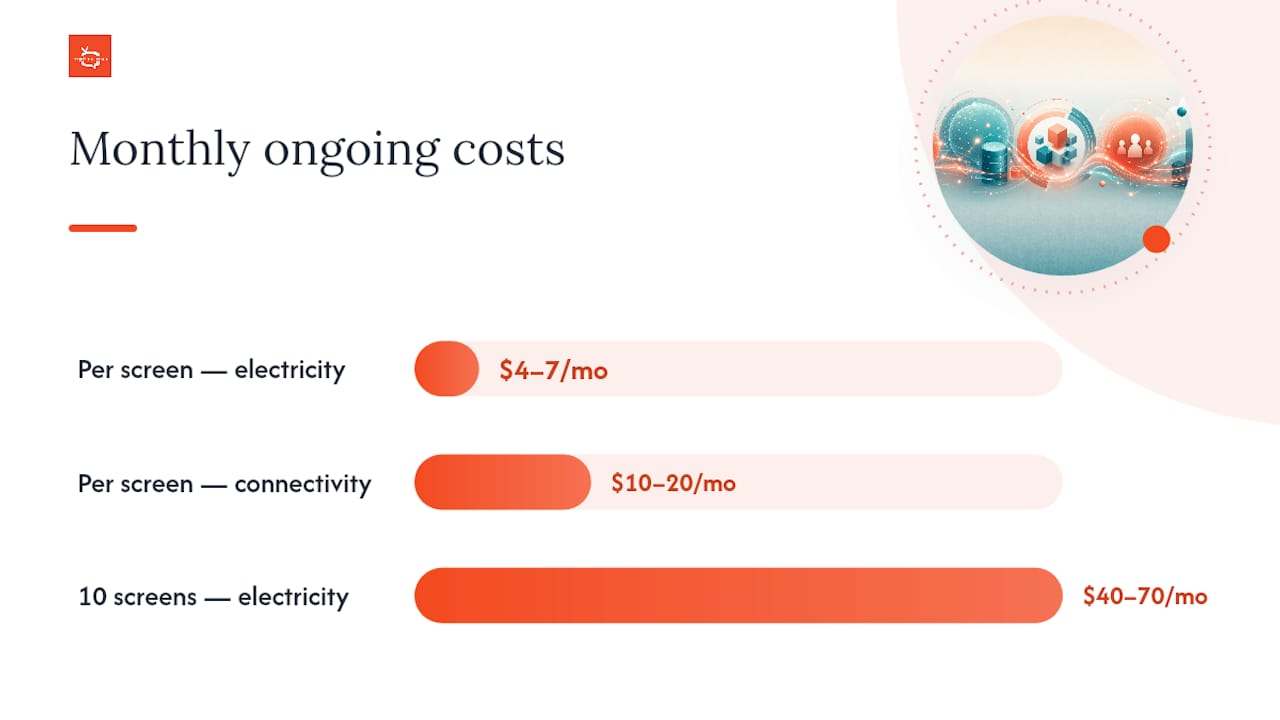
Electricity: A 55 inch display drawing 80 to 120 watts and running 12 hours a day costs roughly $4 to $7 per month per screen. That number climbs with screen count and longer duty cycles.
Connectivity: Most CMS platforms need a stable internet connection; budgeting $10 to $20 per screen monthly for network overhead is reasonable if you’re not already covered by existing business internet.
Content creation: Simple template-based content is often included in software subscriptions, but custom graphics, video production, or a dedicated content coordinator can add real monthly cost depending on how often you refresh messaging.
Maintenance and support: Budget for occasional hardware replacement, especially on consumer-grade panels, plus any premium support tier your CMS provider charges.
Statistic Callout: Electricity alone adds up faster than most people expect. Ten screens running 12 hours a day can quietly cost $40 to $70 a month in electricity before you’ve spent a dollar on content or software.
Watch for contract traps too: per-user fees stacked on top of per-screen pricing, storage caps that force an upgrade once your content library grows, premium support surcharges buried in the fine print, and annual price escalators that quietly raise your renewal cost year over year.
How Do You Build a Realistic Digital Signage Budget?
A defensible total cost of ownership estimate follows a repeatable process, not guesswork.
Define your use cases. A gym promoting class schedules needs different content cadence than a restaurant menu board or an office directory.
Choose your display and player class. Match duty cycle to hardware grade. Daily, all-hours screens justify commercial panels; occasional-use screens can often run on consumer hardware.
List site and install needs. Walk each location and note power access, network drops, mounting surface, and any permit requirements.
Pick your CMS pricing model. Per-screen for small deployments, flat-rate or enterprise for anything scaling past a dozen units.
Add content and operations costs. Include electricity, connectivity, and whoever is responsible for updating content.
Add contingency and an escalator. Budget 10 to 15% extra for surprises, and assume software renewal costs may rise annually.
A simple spreadsheet works better than intuition here. Useful row labels include: Hardware (per screen), Install labor (per site), CMS subscription (annual), Electricity (annual), Content production (annual), Contingency (%). Divide your full year-one total by screen count to get a true per-screen figure, then compare that against your projected digital signage ROI from things like reduced print costs or increased promotional visibility.
As a rule of thumb, volume discounts on hardware and installation typically kick in around the 10-screen mark. That’s when it’s worth renegotiating your CMS pricing model too, if you haven’t already.
How Platforms Like SignStream Change the Cost Equation
Traditional per-screen CMS pricing punishes growth. Add a screen, add a bill. Platforms built around unlimited-screen deployment flip that math, and it’s worth understanding how before you commit to a per-screen contract you’ll regret at screen number eleven.
Unlimited screens at no extra software charge removes the biggest scaling penalty in the whole budget: your CMS cost doesn’t multiply every time you add a location.
Remote content updates from any device cut the labor cost of managing content across multiple sites, since no one needs to physically visit a screen to change a promotion.
An ad exchange marketplace lets businesses cross-promote with other local advertisers and offset running costs by monetizing their own screens.
Built-in analytics show which content actually drives engagement, so you’re not guessing where the marketing budget is working.
One fitness club client using SignStream saw a 25% increase in class attendance after deploying screens for schedule promotion, a result that shortens payback considerably when it’s weighed against a flat unlimited-screen software cost instead of a per-screen bill.
DIY or Commercial: How Should You Decide?
The honest answer depends on uptime needs, not upfront price. A single low-traffic screen in a break room can survive on a consumer TV and a streaming stick. A customer-facing screen running twelve hours a day in a gym or storefront cannot, not without hidden labor costs creeping in through crashes, reboots, and early hardware failure.
Ask yourself three questions: How much daily uptime does this screen need? Who’s responsible when it freezes at 8 a.m. on a Monday? And do you have five screens or fifty, because DIY savings evaporate fast past a handful of locations.
The smartest approach for most businesses is a small pilot: one or two screens, real content, thirty to sixty days, before committing budget to a full rollout. DIY savings that look real on paper often get eaten by the labor cost of someone fixing a frozen screen every other week.
— DKS
Ready to See What SignStream Costs for Your Screens?
SignStream removes the biggest budgeting headache in this whole article: the per-screen software tax that punishes growth. Deploy content across unlimited screens without a rising software bill every time you add a location, and use built-in analytics to see exactly which promotions earn their keep.

The ad exchange marketplace adds a second lever most CMS platforms skip entirely: your screens can generate revenue by cross-promoting other local businesses, which offsets your ongoing digital signage system expenses instead of just adding to them. Combine that with remote updates from any device and you cut the labor cost that usually eats into DIY savings.
If you’re weighing your first-year numbers against a per-screen contract, see how the platform works and start a trial to compare your real budget against a flat-rate model built for growth.
Sources
Recommended
Comments