

Operators: Launch a Digital Signage Ad Exchange in 2 to 4 Weeks

A digital signage ad exchange is a marketplace that connects screen owners with advertisers, letting either side book campaigns directly or through programmatic auctions. You start monetizing by packaging your inventory into sellable units, dayparts, and location bundles, then either sell directly to nearby businesses or connect your CMS to a supply-side platform (SSP) for broader demand. The fastest path is a small pilot: pick a handful of screens, define your ad slots, and start with direct local deals while you build toward programmatic scale.
TL;DR:
Smaller networks can start monetizing quickly by launching a pilot with one or two screens, focusing on direct local deals before expanding to programmatic.
Proof-of-play logs and clean reporting are essential for attracting larger advertisers and command higher CPMs, especially in regulated environments.
Combining direct sales with private marketplace and open RTB bids allows for flexible pricing and better yield management across different demand channels.
Reliable connectivity, a single media player per screen, and a robust CMS support stable ad delivery and accurate verification, reducing fraud risks.
Pricing strategies typically include CPM models, flat rates for predictable revenue, or revenue sharing, with hybrid approaches best suited for scaling.
Table of Contents
What Is a Digital Signage Ad Exchange and Who Uses It?
Three roles drive every transaction. The publisher owns the screens and the audience walking past them. The SSP (supply-side platform) packages that inventory, applies pricing rules, and makes it available to buyers. The DSP (demand-side platform) is how advertisers and agencies place bids across many publishers at once. You, as the screen owner, are the publisher. Whether you connect to an SSP or sell direct, you’re the one deciding what gets shown, when, and for how much.
Ad exchanges exist because direct sales alone cap your growth. A gym selling ad space to three local businesses hits a ceiling fast. Plugging into a broader marketplace opens the door to national and regional advertisers who never would have found your lobby screen on their own.
Common use cases show up wherever foot traffic and dwell time overlap:
Retail screens near checkout, selling promotional slots to complementary brands
Hospitality lobbies and elevators, where dwell time makes ads more memorable
Transit hubs and waiting areas, high volume with captive audiences
Corporate offices and gyms, blending internal messaging with paid local ads
Exchanges scale inventory by aggregating many small networks into something advertisers can buy at scale, while giving individual publishers access to demand they’d never reach alone.
How Does Programmatic DOOH Actually Work From Booking to Delivery?
Programmatic digital-out-of-home (DOOH) sounds abstract until you break it into the steps that actually move money and content from an advertiser’s desk to your screen. The process is more mechanical than mysterious, and once you understand the sequence, you can decide where to plug in and where to stay hands-on.
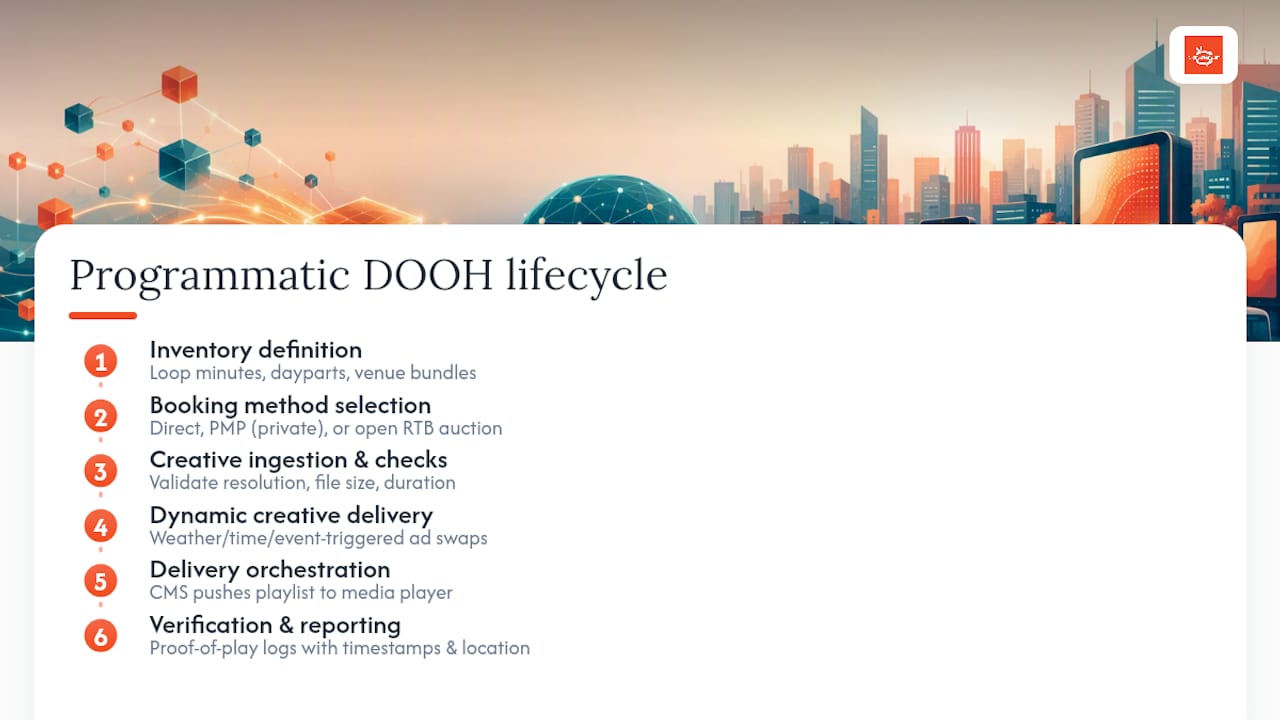
1. Inventory definition and packaging. Before anyone can buy anything, you define what you’re selling. That means breaking your screen time into loop minutes (say, a 10 second slot in a 2 minute loop), dayparts (morning rush vs. evening wind down), and, if you run multiple locations, bundles grouped by venue type or geography. A retail chain might package “checkout screens, weekday lunch hours” as one unit and “lobby screens, all hours” as another.
2. Booking method selection. You have three lanes. Direct sales mean a local business pays you and you upload their creative yourself, full control, no auction. Private marketplaces (PMPs) let a specific set of trusted advertisers bid on your inventory at negotiated floor prices. Open real-time bidding (RTB) throws your inventory into a wider auction where any connected buyer can bid, maximizing reach but sacrificing some control over who shows up.
3. Creative ingestion and format checks. Whatever the booking method, creative has to pass through format validation, correct resolution, file size, duration, before it hits a playlist. Platforms built for programmatic DOOH typically automate this step so a bad file doesn’t stall your loop.
4. Dynamic creative delivery. More advanced setups let ads change based on live data. Weather-triggered creative, time-of-day swaps, and event-based targeting are increasingly standard features on SSPs built for out-of-home, letting the same slot serve a coffee ad at 7 AM and a happy hour promo at 5 PM.
5. Delivery orchestration. Your CMS pushes the finalized playlist to the media player, which renders it on the screen. This is the plumbing layer, invisible to advertisers, but it’s where reliability actually lives or dies.
6. Verification and reporting. Buyers expect proof their ad ran. Proof-of-play logs, timestamped and often paired with location data, are the baseline. Anything short of that makes it hard to justify repeat business from serious advertisers.
Pro Tip: Start every pilot campaign with proof-of-play reporting turned on from day one, even for a direct local deal. Advertisers who see clean logs on a small campaign are far more likely to commit to a bigger one next quarter.
This lifecycle, defining inventory, booking, processing creative, delivering, and reporting, is the backbone that advertising network guides point to as the standard operational flow for any publisher trying to generate measurable revenue from screens. SSPs built specifically for out-of-home, like Place Exchange, are designed to plug into this exact sequence, connecting your inventory to dozens of demand-side platforms so you’re not limited to whoever happens to call your office.
What Technical Components Do You Need to Run an Exchange?
Before you can sell a single ad slot programmatically, your stack needs four things working together: a content management system (CMS), a media player, reliable connectivity, and a clear policy for the data you collect. Skip any one of these and you’ll hit a wall the moment a real advertiser asks for proof of delivery.
Your CMS is the control center. At minimum, it needs to handle scheduling across time zones and dayparts, support ad insertion into existing playlists without breaking your organic content, and connect via API to an SSP or marketplace if you plan to go programmatic. Reporting has to be built in, not bolted on, because every serious advertiser will ask what happened during their campaign window.
Media player choice matters more than most new publishers expect:
A smart TV app (built into a Fire TV, Samsung, or LG display) is the cheapest and fastest way to get a screen live, no separate hardware to buy or maintain.
A dedicated Android or Windows player offers more processing headroom for complex playlists, multiple video layers, or heavy dynamic creative.
Whichever you choose, stick to one player per screen. Trying to drive two displays from a single device invites sync issues and playback failures that make your proof-of-play logs unreliable.
Connectivity is the quiet failure point most operators underestimate. A screen that drops offline mid-loop doesn’t just skip an ad, it breaks the verification trail an advertiser is paying for. Wired ethernet beats WiFi for anything commercial. Cloud-based platforms that push updates via API rather than requiring someone to physically touch the player are worth the setup effort, especially once you’re managing more than a handful of screens (Signstream’s remote platform architecture is built around this exact model).
Data signals, time, location, local weather, are what make dynamic creative possible, but they come with privacy responsibilities. Keep audience data anonymized and aggregate; you’re measuring foot traffic patterns and dwell time, not tracking individuals. That distinction keeps you on the right side of most advertiser compliance requirements without needing a legal team on retainer.
How Should You Price and Package Your Screen Inventory?
Pricing inventory well is the difference between a screen network that pays for itself and one that just displays ads for free. Your first job is deciding what unit you’re actually selling.
Most publishers package inventory as loop minutes (a fixed slot within a repeating cycle), dayparts (morning, lunch, evening blocks priced differently based on traffic), or location bundles (grouping multiple screens by venue type so an advertiser buys reach across several sites in one deal).
Three pricing models dominate the market:
CPM/CPV (cost per thousand impressions or per view), the standard for programmatic and larger advertisers who think in reach
Flat-rate loops, a fixed monthly fee for a guaranteed slot, popular with local businesses who want predictable costs
Revenue share, where you and a marketplace partner split what a campaign generates, common when you’re leaning on an SSP for most of your demand
CPMs move based on factors you can partially control: foot traffic volume, dwell time, screen location relative to point of purchase, and whether you can prove delivery with clean reporting. A gym lobby with a captive audience during a 45 minute class commands a different price than a hallway screen people walk past in five seconds.
Deciding between direct sales, PMPs, and open RTB isn’t an either/or choice. A hybrid approach, often the smartest one, reserves your best dayparts for direct local deals and PMP relationships you’ve vetted, while routing your lower-demand hours into open programmatic auctions to avoid dead air. Vistar Media’s programmatic marketplace and similar platforms are built to handle exactly this kind of blended strategy, so you’re not forced to pick one lane permanently.
Yield controls protect your best relationships once you start mixing channels. Set price floors so open RTB never undercuts what you charge a direct advertiser. Use private deals to lock in premium local sponsors before their slots ever hit an open auction. And apply competitive separation rules, so a gym doesn’t accidentally run two competing supplement ads back to back, which is a fast way to lose trust with both advertisers.
How Do You Launch a Monetized Screen Network Step by Step?
Getting from zero to your first paid campaign doesn’t require a massive build. It requires a tight pilot and a willingness to start small before scaling.
Assemble your minimum viable pilot. You need a mounted display, a media player, a CMS connected to it, one working playlist, and proof-of-play logging turned on from day one.
Test with your own content first. Run promotional or informational content for a week to confirm reliability before you ever sell a slot.
Connect to a monetization path. Either set up direct billing for local advertisers or configure your CMS’s API connection to an SSP or marketplace for programmatic access.
Run a paid test campaign. Start with one advertiser, ideally a nearby business you already have a relationship with, and confirm delivery and reporting end to end.
Expand once proof-of-play is clean. Add screens, dayparts, or a second advertiser only after your first campaign’s reporting holds up without gaps.
A single screen can realistically go live in an afternoon, and for larger rollouts, professional AV installation typically runs $200 to $600 per screen, depending on mounting complexity and cabling. Most operators find they can move from pilot to their first paid campaign within two to four weeks if they start with direct local deals rather than waiting on programmatic approval processes. Selling to businesses you already know, the coffee shop next door, a neighboring retailer, is consistently the fastest way to validate that your inventory actually has value before you invest more time in marketplace integrations.
What Measurement Standards Should Buyers Expect You to Meet?
Advertisers spending real money on your screens want proof, not promises. The Media Rating Council’s combined out-of-home measurement standards define how OOH inventory should be measured and reported, and buyers increasingly treat MRC alignment as a baseline expectation rather than a nice-to-have.
Why this matters for your CPMs: publishers who adopt standardized proof-of-play reporting early tend to command higher advertiser confidence, and confidence translates directly into willingness to pay premium rates rather than negotiating down.
Verification in practice comes down to a few concrete habits:
Timestamped proof-of-play logs for every ad that runs, not just spot checks
Viewability proxies like foot traffic counts or dwell-time estimates where available
Campaign-level reporting that a non-technical advertiser can actually read
Policy controls round out the picture. Creative approval workflows catch problems before they air, not after a competitor complains. Competitive separation rules keep rival advertisers from appearing back to back. Brand-safety filters prevent inappropriate content from ever reaching your loop, especially important once you’re pulling from open programmatic demand rather than vetting every advertiser yourself.
Market context helps here too. OAAA reported significant growth in out-of-home advertising revenue in recent periods, a figure to cite when you’re making the case to advertisers that screen-based ads are a growing category worth their budget, not a shrinking niche.
How Does Signstream Support an Ad Exchange Pilot?
Signstream’s platform maps directly onto exchange needs: real-time content updates across unlimited screens, a built-in ad exchange marketplace for cross-promotion, and no per-screen fees that would otherwise punish you for scaling. Users have noted increases in related business metrics after implementation, a result tied to consistent, timely promotion rather than static, forgotten flyers.
To pilot your own exchange, start by reviewing how the platform works, then explore advertising directly with local businesses to invite your first advertisers.
How Do You Prevent Ad Fraud on a Digital Signage Network?
Fraud in DOOH looks different than in web advertising, but it’s just as real. The most common risks are inflated impression claims (reporting a screen played an ad when it didn’t), playlist tampering (unauthorized content slipping into a loop), and location misrepresentation (claiming a screen sits in a higher-traffic spot than it actually does).
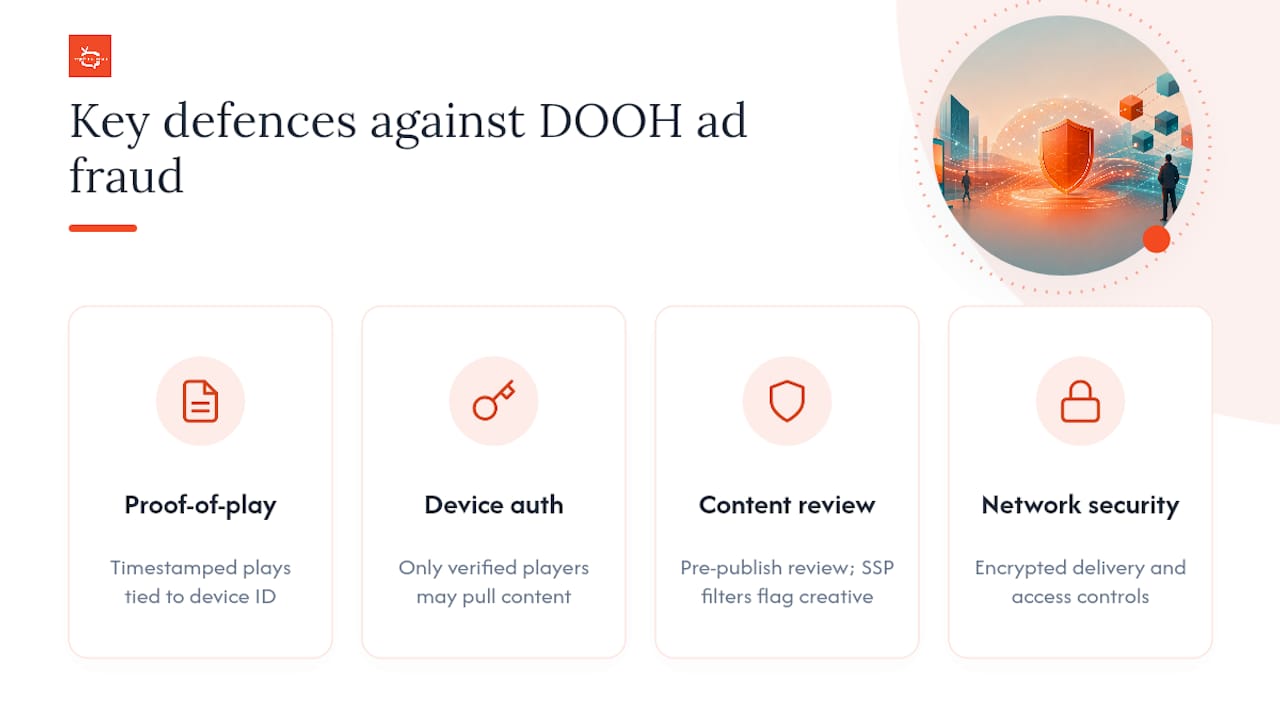
Proof-of-play logging is your first line of defense. A system that timestamps every ad play and ties it to a specific device ID makes it much harder to claim delivery that never happened. Pair that with device authentication, ensuring only verified players connected to your CMS can pull content, so a bad actor can’t spoof a screen ID and siphon ad spend meant for your network.
Content approval workflows matter just as much as delivery verification. If your exchange accepts programmatic demand, you need a review step before creative goes live, catching inappropriate, misleading, or malicious content before it ever reaches a screen. Platforms with brand-safety filters built into the SSP layer, like the controls Place Exchange offers, cut down on the manual review burden by flagging suspicious creative automatically.
Network security rounds out the picture. Encrypted connections between your CMS and media players prevent interception, and access controls that limit who can push content to your screens stop internal mistakes from becoming security incidents. None of this needs to be complicated. A cloud platform with device authentication, encrypted delivery, and automated proof-of-play covers the basics most small and mid-size networks need without a dedicated security team.
Who Are the Major Players in the Digital Signage Ad Exchange Space?
The ecosystem splits into a few functional layers, and understanding where each type of player sits helps you figure out what you actually need to buy or integrate.
SSPs (supply-side platforms) package publisher inventory and connect it to buyers. Place Exchange is a widely referenced example, offering brand safety tools, private deal support, and dynamic creative capabilities that respond to signals like weather or time of day.
Programmatic marketplaces sit adjacent to SSPs, focused on connecting DOOH supply to omnichannel demand-side platforms. Vistar Media’s marketplace is built around this exact function, giving publishers automated on-ramps into buying systems that agencies already use for other channels.
CMS and platform providers, the layer where Signstream operates, handle the day-to-day publisher side: scheduling, content management, and increasingly, the marketplace connectivity that lets a small business owner cross-promote with neighboring businesses without needing a separate ad-tech stack.
Industry standards bodies round out the ecosystem without selling anything directly. The MRC sets measurement expectations, while the OAAA tracks market-level revenue and trends that publishers use to benchmark pricing.
Most operators won’t touch every layer directly. A small network typically works with a CMS provider and, once ready to scale, connects that CMS to an SSP rather than building direct relationships with dozens of individual DSPs.
What Are the Biggest Challenges in Running an Ad Exchange?
Latency is the problem nobody mentions until it costs them a deal. A programmatic bid has to clear, creative has to ingest and validate, and content has to reach the player, all within a window measured in seconds for some open RTB transactions. Slow connectivity or an outdated player can cause a screen to miss its ad window entirely, which shows up as a reporting gap an advertiser will notice.
Ad quality control gets harder the more you open your inventory to programmatic demand. Direct sales let you personally vet every advertiser. Open RTB means creative arrives from sources you’ve never directly interacted with, which is exactly why brand-safety filters and pre-approval workflows aren’t optional once you scale past direct deals.
Fragmented standards remain a real friction point across the industry. Even with the MRC’s measurement guidance available, not every publisher or platform implements reporting the same way, which means comparing inventory across networks isn’t always apples to apples for advertisers trying to plan a multi-market campaign.
Inventory undervaluation trips up a lot of new publishers. Without clean proof-of-play data and dayparted pricing, it’s easy to sell your best hours, lunch rush at a busy gym, at the same flat rate as your dead 6 AM slot, leaving real revenue on the table.
And connectivity reliability is a physical-world problem that ad tech alone can’t solve. A screen on shaky WiFi in a back corner of a retail store is going to generate weaker delivery data than one on a hardwired connection, regardless of how good your CMS or SSP integration is.
Where Is Digital Signage Advertising Headed Next?
AI-driven content workflow and automated publishing is moving from novelty to expectation. Dynamic creative that shifts based on weather, time of day, or even anonymized crowd-density estimates is already available on platforms built for programmatic DOOH, and it’s becoming a baseline feature buyers ask about rather than a premium add-on.
Contextual triggering is expanding beyond simple time-of-day rules. Screens near a stadium can serve different creative on game days. Retail screens can shift messaging based on local weather patterns pulled from connected data feeds, a coffee ad on a cold morning, a cold-brew promo during a heat wave, without a human manually swapping playlists.
Consolidation between CMS platforms and programmatic marketplaces is likely to continue. Publishers increasingly want one connection point rather than juggling separate relationships with a scheduling tool and a separate SSP integration, which pushes platform providers toward building or partnering their way into direct marketplace access.
Smaller, local advertisers are gaining easier access to inventory that used to require an agency relationship to book. Self-serve marketplace features, letting a nearby restaurant buy a slot on a gym’s lobby screen without a phone call or a media buyer, are lowering the barrier for the kind of cross-promotion that used to be exclusive to national brands with programmatic budgets.
When Should You Actually Add an Ad Exchange to Your Screens?
Add an exchange once you have consistent foot traffic, a CMS that’s already reliable, and at least a little advertiser interest. The most common pitfall isn’t launching too early. It’s underpackaging inventory and skipping proof-of-play until a buyer demands it.
— DKS
Turn Your Screens Into a Real Revenue Line With Signstream
Most ad exchange platforms assume you already have a dedicated ad-ops team and a six-figure media budget. Signstream is built for the business owner running the gym, restaurant, or retail floor themselves, unlimited screens on one subscription with no per-screen fees, an ad exchange marketplace built in, and an interface that doesn’t require a technical background to operate.

If you’re ready to see the mechanics firsthand, check pricing for the Signstream Network and Custom Channel plans starting at $10 per month per channel, or browse how the platform handles setup, content, and ongoing management if you’d rather have help getting screens live. Businesses ready to start selling ad space to neighboring shops and restaurants can go straight to the local advertiser marketplace page to see how cross-promotion works in practice. Multi-location operators or agencies managing signage for other businesses should look at the white label software option. Whichever path fits, the next move is simple: pick your screens, request a walkthrough, and get your first paid campaign running.
Sources
FAQ
What Does Digital Signage Typically Cost to Set Up?
A single screen can go live in an afternoon with just a display, a media player, and a CMS subscription. For larger rollouts, professional AV installation generally runs $200 to $600 per screen, depending on mounting and cabling complexity. Signstream’s Signstream Network plan starts at $10 per month per channel, with a Custom Channel option at $105 per month per channel.
Can You Give an Example of an Ad Exchange in Practice?
A gym running Signstream might sell ad slots on its lobby screens to a nearby smoothie shop and a local physical therapist directly, while also connecting to its built-in ad exchange marketplace to attract advertisers it wouldn’t reach on its own. That combination of direct local deals and marketplace connectivity is the core model behind most working digital signage ad exchanges.
What Should You Look for in a Digital Signage Provider?
Look for real-time content control across unlimited screens, no punishing per-screen fees, and a genuinely simple interface that doesn’t require a technical background to operate. Built-in monetization features, like an ad exchange marketplace, matter if generating ad revenue is part of your goal, not just an afterthought.
What Are the Current Trends Shaping Digital Signage?
AI-driven dynamic creative that adjusts based on weather, time of day, or local context is moving from a premium feature to a baseline expectation among advertisers. Self-serve marketplace access is also expanding, letting smaller local businesses buy ad slots directly without going through an agency or media buyer.
How Long Does It Take to Start Earning Revenue From Screens?
Most operators can move from a pilot to their first paid campaign within two to four weeks by starting with direct local advertiser deals rather than waiting on programmatic marketplace approval. Clean proof-of-play reporting from day one is what makes advertisers comfortable renewing after that first campaign.
Recommended
Comments